Introduction
A Chrome extension for ADHD readers, using Bionic Reading and semantic highlighting to improve focus and comprehension.
What is adhdreading?
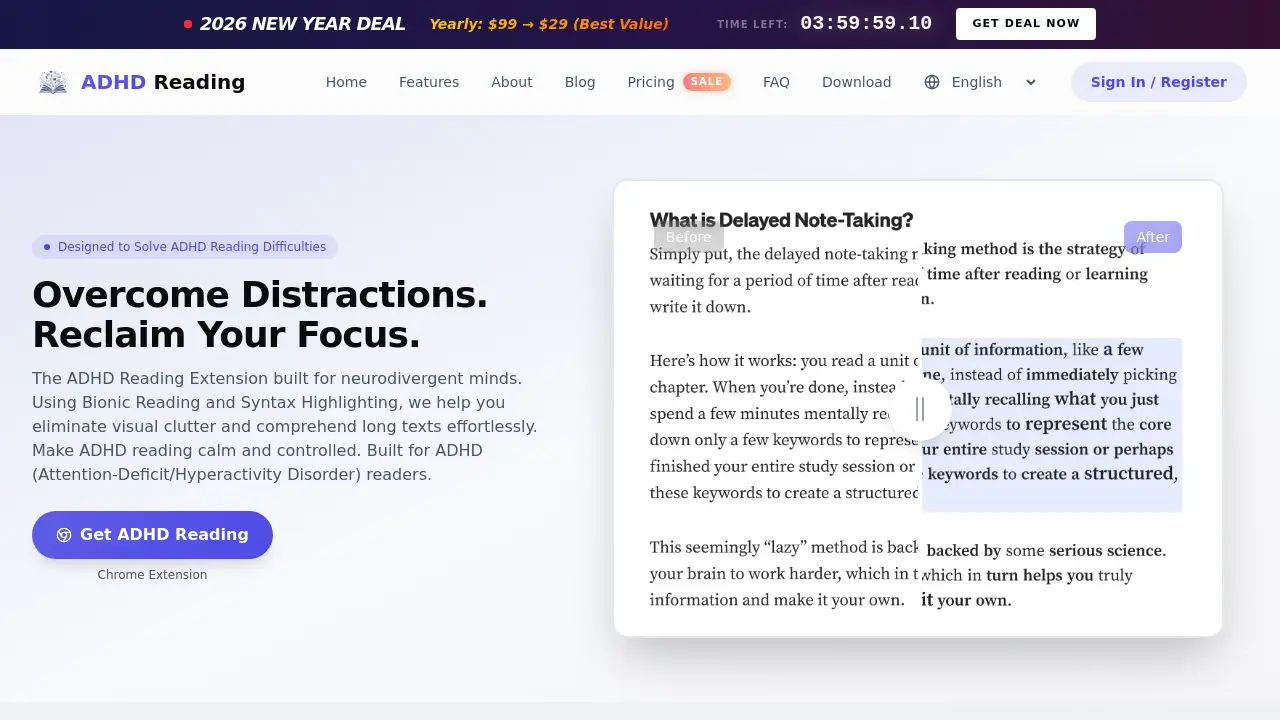
adhdreading is a specialized Chrome extension designed to assist individuals with Attention-Deficit/Hyperactivity Disorder (ADHD) in reading digital content. The product directly tackles common challenges like visual clutter, attention drift, and cognitive overload that can make reading online articles, documents, or emails exhausting. By employing techniques like Bionic Reading and semantic highlighting, this ADHD reader extension transforms dense "walls of text" into manageable, focus-friendly content. It is suitable for students, professionals, and any neurodivergent individual who wants to reclaim control over their web reading experience, making it calmer and more efficient.
Key Features of adhdreading
Bionic Reading Emphasis
This mode guides eye movement by bolding the initial parts of words, helping ADHD users process content faster by reducing attention drift and improving reading fluency on long texts.
Semantic Bold & Highlight
The extension intelligently bolds the most meaningful words or softly highlights key phrases within sentences, making crucial information pop without adding visual noise for the ADHD reader.
Fully Customizable Typography
Users can fine-tune font size, line height, letter spacing, and paragraph width to create a personalized and comfortable reading environment on any website, functioning as a powerful ADHD reading font extension.
Focus Mode
This feature dynamically highlights the current line or paragraph being read, effectively blocking out sidebar ads and other distractions to help users enter and maintain a flow state while reading.
Pre-Calibrated Presets
For instant optimization, the extension offers Light, Medium, and Heavy presets, providing scientifically calibrated levels of assistance that users can apply with a single click.
Multi-Language & Site-Specific Support
It comprehensively supports languages like Chinese, English, Japanese, and more, with intelligent mixed-language recognition. Settings can be saved per website, automatically applying preferences next time you visit.
Use Cases for adhdreading
Academic Research and Essay Writing
Students and researchers can use this reading extension for ADHD to tackle dense academic papers, medical journals, or literature reviews without feeling overwhelmed, improving comprehension and stamina.
Professional Document Review
Lawyers, editors, and managers can process long contracts, technical documentation, or competitor analysis reports more efficiently, reducing the time lost to zoning out or re-reading paragraphs.
Daily Web Browsing and Email
For everyday tasks like reading news articles, long-form blog posts, or email threads, the extension helps users maintain focus, making ADHD reading a more controlled and less draining activity.
Creative and Technical Work
Writers, developers, and UI designers can use the typography controls and focus mode to proofread drafts, read code documentation, or analyze design content with reduced visual fatigue.
How to Use adhdreading
- Install the Extension: Visit the Chrome Web Store from the official adhdreading website and add the "ADHD Reading" extension to your Chromium-based browser (Chrome, Edge, Brave).
- Activate on Any Webpage: Navigate to any article or webpage you want to read. Click the adhdreading extension icon in your browser's toolbar.
- Choose Your Mode: Select from the available emphasis modes—Bionic Reading, Semantic Bold, or Semantic Highlight—based on your preference.
- Customize Your Experience: Adjust typography settings (font, spacing) or enable Focus Mode from the extension pop-up panel to block distractions.
- Save Preferences (Optional): Enable "Site Memory" for frequently visited sites to have your custom settings automatically applied on future visits.
Target Audience for adhdreading
- Students and academics with ADHD who need to read lengthy papers and textbooks.
- Professionals (editors, lawyers, developers, managers) who regularly review dense documents.
- Neurodivergent individuals who experience fatigue or distraction from standard web formatting.
- Anyone seeking a tool to improve reading speed, focus, and comprehension online.
Is adhdreading Free?
adhdreading operates on a freemium model. Core features are available for free, while a Pro upgrade unlocks full customization and advanced functionality.
| Plan | Price | Key Features |
|---|---|---|
| Free | $0 | Access to 3 emphasis modes (Bionic, Bold, Highlight), Light/Medium/Heavy presets, and basic typography adjustments. |
| Pro (Lifetime) | One-time payment* | Full typography customization, auto-apply settings per website (Site Memory), advanced color schemes, and all future feature updates. |
*Payments are processed securely via Stripe. The Pro license unlocks local features permanently. Any potential future cloud-based services would be billed separately.
adhdreading's Pros and Cons
| Aspect | Pros | Cons |
|---|---|---|
| Effectiveness | Scientifically-backed methods like Bionic Reading significantly reduce cognitive load for ADHD users. | Effectiveness can vary slightly depending on individual preference and website complexity. |
| Usability | Simple three-step flow with instant presets; requires no account, ensuring privacy. | Currently only available as a desktop Chrome extension; no dedicated mobile app yet. |
| Customization | Highly customizable reading experience with site-specific memory for personalized settings. | The full range of typography controls requires the Pro version. |
| Pricing & Value | Robust free tier provides substantial value; Pro license is a one-time purchase. | No subscription middle-ground; it's either free core features or a lifetime Pro payment. |
Frequently Asked Questions about adhdreading
What browsers support the adhdreading extension?
As a Chrome extension for ADHD reading, it is compatible with all Chromium-based browsers, including Google Chrome, Microsoft Edge, Brave, and Opera.
Does the adhdreading extension collect my data or reading history?
No. The developer emphasizes a privacy-first approach. All text processing happens locally on your device. Your reading history, settings, and any personal data are never sent to external servers.
Can I use adhdreading on PDF files?
The ADHD reading extension primarily optimizes standard web content. For online PDFs that are rendered in HTML format by your browser, the extension's features will generally work effectively.
How does the Bionic Reading mode actually help?
Bionic Reading is a technique that bolds the first few letters of words. For the ADHD brain, this creates artificial fixation points that guide eye movement, helping to prevent lines from blending together and improving word recognition speed, which leads to better fluency and focus.
Are there text-to-speech (TTS) features?
Yes. The extension includes a built-in, high-quality text-to-speech function that supports multiple languages. This allows users to listen to content, providing an alternative way to consume information and rest their eyes.
What happens if the extension breaks a website's layout?
On rare occasions with complex web layouts, formatting may appear unusual. Users can quickly click the extension icon to temporarily disable optimization for that specific page or use the built-in feedback feature to report the issue.
adhdreading Tags
adhd reading, chrome extension for adhd, adhd reader, bionic reading, reading extension for adhd, adhd browser extension, focus tool for reading, neurodivergent reading aid, semantic highlighting, adhd reading font, adhd chrome extension, improve reading comprehension