Introduction
AI Ease Expand is an AI-powered tool designed to intelligently expand photos to any size in seconds, solving a major pain point for digital professionals.
What is AI Ease Expand?
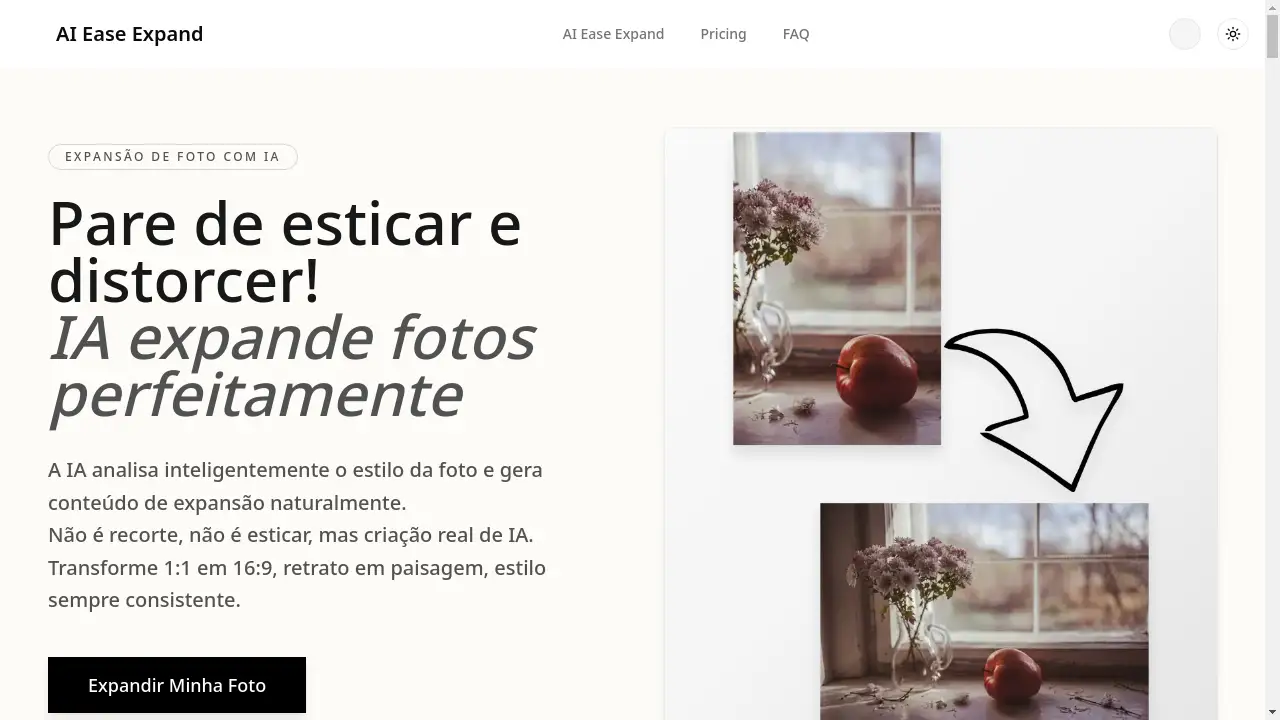
AI Ease Expand is an advanced online tool that leverages generative artificial intelligence to extend the canvas of an image. It solves the common, time-consuming problem of adapting a single photo for multiple platforms and formats, such as converting a portrait image into a landscape one or changing a 1:1 square into a 16:9 rectangle. Unlike traditional methods like stretching, cropping, or manual editing in Photoshop, this tool generates new, photorealistic content that seamlessly blends with the original scene. It’s suitable for e-commerce sellers, digital marketers, graphic designers, content creators, and social media managers who need to produce high-quality, professionally formatted images quickly and cost-effectively. The significance of AI Ease Expand lies in its ability to turn a task that was once nearly impossible or prohibitively expensive into a simple, automated process, drastically improving workflow productivity.
Key Features of AI Ease Expand
Intelligent Context-Aware Expansion
The AI analyzes the style, lighting, and content of the original photo to generate natural-looking extensions, rather than simply copying or stretching pixels.
Support for Any Format or Ratio
Users can easily adapt a single image for various social media formats, including Instagram posts (1:1, 4:5), Stories (9:16), YouTube thumbnails (16:9), Facebook ads, and website banners.
High-Resolution, Professional Quality
The tool creates high-resolution outputs that maintain sharpness and detail, making the expanded images suitable for both digital use and professional print materials.
Fast and Automated Processing
An image expansion that could take 60-90 minutes manually is completed in about 30 seconds, offering a productivity gain of over 95%.
Secure and Private Processing
All uploaded images are processed securely with SSL/TLS encryption, are kept 100% private, and are automatically deleted from servers after processing in compliance with data protection laws.
Cost-Effective Solution
It provides a highly affordable alternative to hiring a designer, with plans starting from a low cost per expansion, including a free trial to test the service.
Use Cases for AI Ease Expand
Multi-Platform E-commerce Listings
Online store owners can instantly adapt a single product photo to meet the specific dimension requirements of Amazon, Mercado Livre, Instagram Shop, and other marketplaces without losing composition.
Social Media Content Creation
Content creators and influencers can reformat their photos for different social media channels—like turning a vertical portrait into a horizontal cover photo—ensuring optimal presentation everywhere.
Advertising Campaign Adaptation
Marketing agencies can quickly generate multiple ad sizes (e.g., Facebook Feed, Instagram Stories) from one master campaign image, saving significant production time and budget.
Graphic Design and Composition Adjustment
Graphic designers can correct "tight" compositions, add breathing room around a subject, or change the orientation of an image long after the photo shoot is over.
How to Use AI Ease Expand
- Create an Account: Sign up on the AI Ease Expand website to receive free trial credits.
- Upload Your Image: Select and upload the photo you wish to expand from your computer.
- Select Desired Format: Choose the target aspect ratio or dimensions (e.g., 16:9 for YouTube, 9:16 for Stories).
- Generate the Expansion: Click the process button. The AI will analyze and expand your image in approximately 30 seconds.
- Download the Result: Preview the perfectly expanded photo and download the high-resolution final version to your device.
Target Audience for AI Ease Expand
- E-commerce sellers and online store owners
- Social media managers and digital marketers
- Graphic designers and design agencies
- Content creators, bloggers, and influencers
- Freelancers and small business owners
- Photographers looking to adjust image composition
Is AI Ease Expand Free?
AI Ease Expand offers a risk-free way to start with a free trial. New users receive 2 free credits upon creating an account, allowing them to test the tool's capabilities with their own images without providing credit card details. For ongoing needs, affordable premium options are available. These include one-time credit packs and subscription plans (Pro and Studio) that offer a higher monthly quota of expansions, providing excellent value for frequent users.
Frequently Asked Questions about AI Ease Expand
How does the free trial work?
Every new user receives 2 free credits upon account creation. This allows for testing the photo expansion tool with personal images to see the results firsthand, with no commitment or credit card required.
Is the output quality good enough for professional printing?
Yes. The AI generates high-resolution images that preserve sharpness and detail, making them suitable for both digital use and professional print applications.
Are my photos kept private?
Absolutely. All images are 100% private and processed securely. They are not used to train public AI models and are automatically deleted from servers after processing, in full compliance with privacy regulations like the LGPD.
Can I cancel my subscription?
Yes, users can cancel their subscription plan at any time. For those who prefer not to subscribe, one-time credit packs are also available for occasional use.
Does it work on mobile phones?
Yes, the AI Ease Expand platform is optimized to work perfectly in web browsers on both desktop and mobile devices, allowing users to expand photos from anywhere.
What makes this better than Photoshop's Content-Aware Fill?
Unlike Content-Aware Fill, which often creates smudged, repetitive, and artificial-looking results, AI Ease Expand uses generative AI to understand the scene's context and create new, photorealistic content that matches the lighting, texture, and perspective of the original image.
AI Ease Expand Tags
AI photo expander, expand image with AI, image aspect ratio changer, social media format tool, e-commerce photo editor, generative AI for designers, content-aware fill alternative, batch image processing, online photo editor, professional image expansion, AI for marketing, resize photo without cropping