Introduction
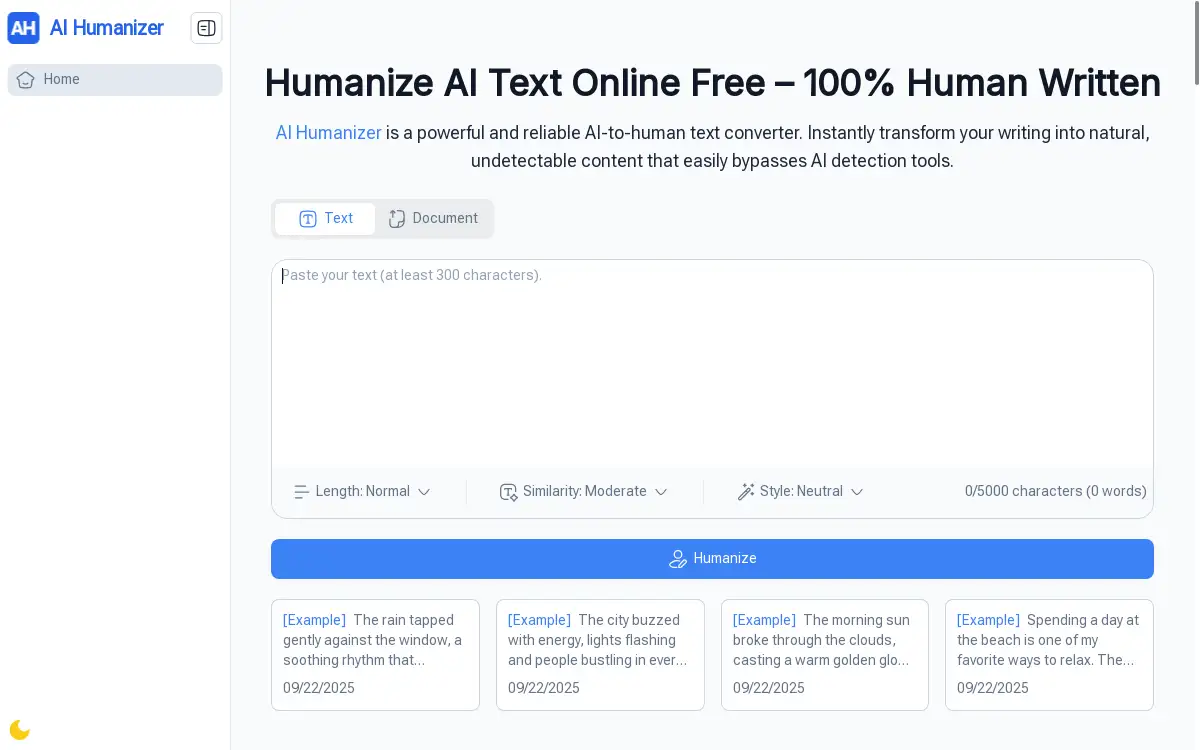
AI Humanizer is a free online tool that transforms AI-generated text into natural, human-like content instantly without requiring sign-up or payment.
What is AI Humanizer?
AI Humanizer is a powerful AI text converter designed to solve the growing challenge of making artificial intelligence-generated content sound more natural and authentic. This free online tool addresses the common problem where AI-written text often appears robotic, repetitive, or easily detectable by AI detection software. The platform serves students, content creators, freelancers, business professionals, and anyone who needs to humanize AI text for better readability and authenticity.
The tool matters because as AI writing becomes more prevalent, the need for content that feels genuinely human has increased dramatically. AI Humanizer bridges this gap by transforming stiff, mechanical AI output into flowing, natural prose that connects with readers while bypassing detection tools. Whether you're working on academic papers, blog posts, marketing copy, or business communications, this AI text humanizer ensures your content maintains a human touch.
Key Features of AI Humanizer
Unlimited Free Usage
AI Humanizer offers completely free access with no hidden limits, caps, or restrictions, allowing users to humanize AI text as much as needed without cost concerns.
No Registration Required
Users can start transforming their AI-generated content immediately without creating accounts, providing passwords, or going through lengthy sign-up processes.
Long Text Processing
The platform handles extensive documents and lengthy drafts with ease, making it suitable for processing everything from short paragraphs to comprehensive reports and research papers.
Built-in AI Detection Check
AI Humanizer includes integrated detection features that help ensure the transformed text appears authentic to both readers and AI detection tools.
Customizable Humanization Levels
Users can adjust the intensity of text transformation, choosing between lighter edits for subtle improvements or deeper rewrites for complete style overhauls.
Multiple Language and Style Support
The tool adapts content to different tones and writing styles, whether academic, casual, creative, or professional, ensuring the output matches the intended audience.
Multiple Download Formats
Processed content can be copied directly or downloaded in various formats including TXT, PDF, and DOCX for convenient sharing and integration into workflows.
Use Cases for AI Humanizer
Academic Writing Enhancement
Students and researchers use AI Humanizer to refine AI-generated drafts into clear, natural academic prose for essays, thesis papers, and research documentation.
Content Creation Optimization
Bloggers, YouTubers, and social media creators transform robotic AI scripts into engaging, authentic content that resonates with their audiences and maintains personal voice.
Professional Communication Improvement
Business professionals enhance AI-generated reports, emails, and presentations to ensure they sound natural, professional, and appropriately human for workplace communication.
Marketing Copy Refinement
Digital marketers and SEO specialists use the tool to humanize AI-generated marketing content while preserving keyword optimization and improving audience connection.
Freelance Writing Enhancement
Independent writers and contractors polish AI-assisted drafts to deliver high-quality, authentic content that meets client expectations and professional standards.
Personal Document Creation
Everyday users improve AI-generated resumes, cover letters, personal statements, and social media posts to ensure they sound genuine and personally authored.
How to Use AI Humanizer
Using AI Humanizer is straightforward and requires just three simple steps:
-
Input Your Content: Paste your AI-generated text directly into the platform's text box or upload document files. The tool accepts content of various lengths, from short paragraphs to extensive documents.
-
Select Humanization Style: Choose your preferred transformation level and tone. Options include academic, casual, creative, or professional styles, allowing you to match the output to your specific needs and target audience.
-
Process and Download: Click the humanize button to transform your text. Once processing is complete, copy the improved content directly or download it in your preferred format (TXT, PDF, or DOCX) for immediate use.
The entire process typically takes just seconds, regardless of text length, making it efficient for users with tight deadlines or high-volume content needs.
Target Audience for AI Humanizer
- Students and academic researchers needing natural-sounding papers and assignments
- Content creators including bloggers, YouTubers, and social media influencers
- Freelance writers and copywriters working with AI-assisted content
- Business professionals creating reports, emails, and presentations
- Digital marketers and SEO specialists optimizing AI-generated copy
- Small business owners developing marketing materials and communications
- Everyday users improving personal documents and correspondence
Is AI Humanizer Free?
AI Humanizer operates on a completely free model with unlimited usage. Users can access all core features without payment, subscription, or registration requirements. The platform provides unlimited text processing, supports long documents, includes AI detection checking, offers multiple style options, and allows downloads in various formats—all at no cost.
This generous free approach makes the tool accessible to students, freelancers, small businesses, and individual users who need reliable AI text humanization without budget constraints. Unlike many similar tools that impose usage limits or require premium subscriptions for full functionality, AI Humanizer maintains its commitment to providing unrestricted access to all users.
Frequently Asked Questions about AI Humanizer
Does AI Humanizer require registration or sign-up?
No, AI Humanizer works without any registration requirements. Users can immediately start transforming their AI-generated text by simply visiting the website and pasting their content.
How long can the text be that I submit to AI Humanizer?
AI Humanizer handles both short and long texts effectively. The platform can process everything from brief paragraphs to extensive documents, making it suitable for various content types including academic papers, blog posts, and business reports.
Will the humanized text bypass AI detection tools?
AI Humanizer includes built-in detection features designed to help transformed content appear more natural to both readers and AI detection software. However, detection tool effectiveness can vary, so users should test their specific requirements.
Can I use AI Humanizer for commercial purposes?
Yes, AI Humanizer can be used for both personal and commercial applications. Freelancers, marketers, business professionals, and content creators regularly use the tool for client work and commercial content creation.
What file formats does AI Humanizer support for download?
The platform allows users to download their humanized content in multiple formats including TXT, PDF, and DOCX, providing flexibility for different workflow requirements and sharing needs.
Does AI Humanizer change the meaning of my original text?
AI Humanizer focuses on improving readability and naturalness while preserving the original meaning and key information. The tool transforms style and flow rather than altering core content or factual information.
AI Humanizer Tags
AI humanizer, humanize AI text, AI text converter, free AI humanizer, AI detection bypass, AI text humanizer online, humanize AI writing, AI content humanizer, free text humanizer, AI to human text, natural AI writing, AI writing enhancement