Introduction
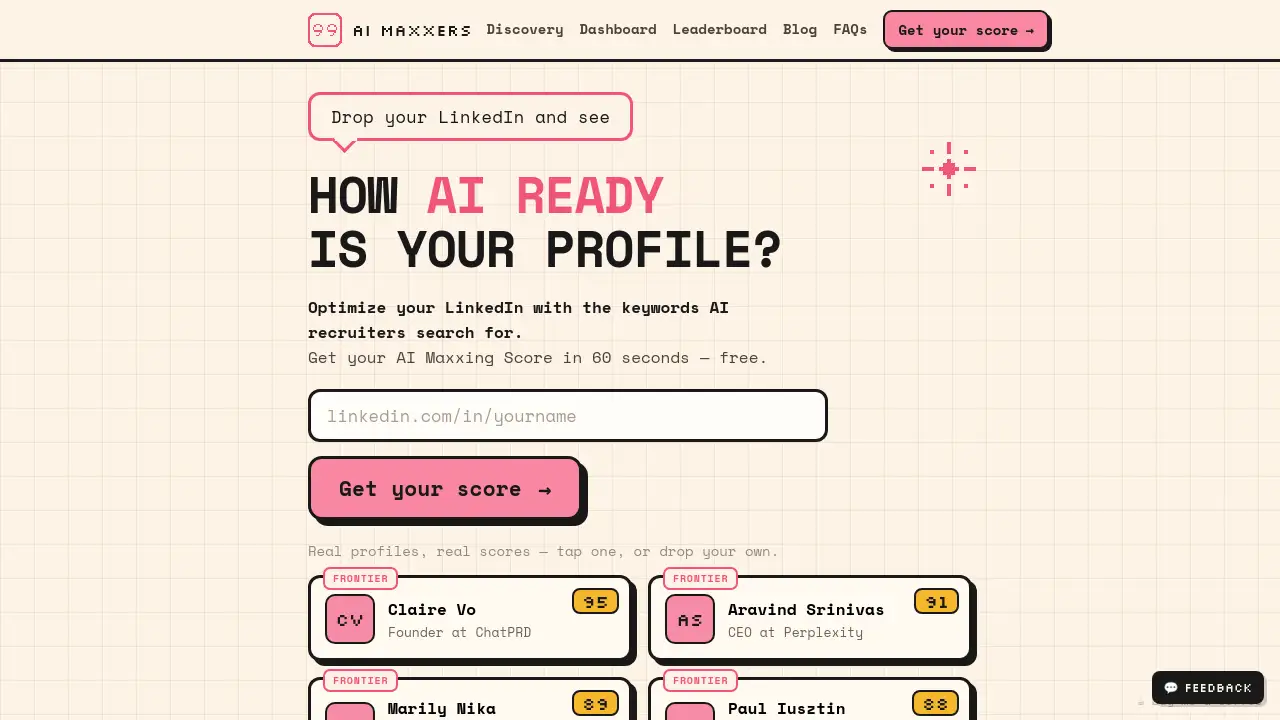
In today’s competitive tech market, checking your LinkedIn profile AI readiness is essential if you want to be found by recruiters hiring for artificial intelligence roles. AI MAXXERS offers a fast, free tool that scans your profile and gives you an AI Maxxing Score in under 60 seconds — no signup required.
What is AI MAXXERS?
AI MAXXERS is a free online tool that evaluates how well your LinkedIn profile is optimized for AI job recruiters. Many professionals miss out on opportunities because their profiles lack the specific keywords that recruiters search for when filling positions like AI engineer, machine learning specialist, or prompt engineer. AI MAXXERS solves this by analysing your profile against nine AI-related skill categories and returning a score from 0 to 10 for each. It also tells you exactly which keywords you are missing and which proof points to add. Designed for anyone from experienced data scientists to recent graduates entering the AI field, this tool helps you optimize your LinkedIn profile quickly and without any hassle.
Key Features of AI MAXXERS
Instant LinkedIn Profile Scan
Drop your LinkedIn URL and get a full analysis in about 60 seconds. No forms, no logins, no email required.
Nine AI Skill Rungs
The tool scores your profile across nine distinct AI categories — from AI-native productivity to advanced AI research. Each rung shows a score out of 10 with a short explanation.
Missing Keyword Detection
AI MAXXERS identifies the specific terms recruiters use — such as RAG, agents, evals, LLM APIs, and prompt engineering — and highlights which ones are absent from your profile.
Actionable Recommendations
After the scan, you receive a clear list of keywords and proof points to add. You can then update your profile and re-run the test to see your AI Maxxing Score improve.
Free and No Signup
The entire service is free to use. You do not need to create an account or provide any personal information beyond your LinkedIn URL.
Real Profile Examples
The homepage shows anonymised examples of real profiles with their scores, giving you a benchmark to compare against.
Use Cases for AI MAXXERS
Job Seeker in AI
If you are actively applying for AI roles, use AI MAXXERS to ensure your profile ranks well in recruiter searches. Knowing your LinkedIn profile AI readiness helps you stand out.
Career Changer Moving Into AI
Professionals transitioning from other fields can use the tool to identify the key AI keywords they need to feature, making their profiles more attractive to hiring teams.
Freelancer or Consultant
Independent AI consultants and freelancers can check their profile regularly to stay aligned with current recruiting trends and the latest technical terms.
University Student or Recent Graduate
Students aiming for their first AI job can optimise their entry-level LinkedIn profile by filling gaps in AI-related terms that recruiters expect.
Recruiter or Talent Sourcer
Recruiters themselves can use AI MAXXERS to understand what keywords are trending for AI positions and advise candidates accordingly.
How to Use AI MAXXERS
- Go to the AI MAXXERS website – no download or registration required.
- Paste your LinkedIn profile URL into the input field on the homepage.
- Click the "Check my score" button (or similar call-to-action). The tool processes your profile in about a minute.
- Review your AI Maxxing Score – you will see scores for nine rungs and a list of missing keywords.
- Update your LinkedIn profile with the recommended terms and proof points, then re-run the scan to watch your LinkedIn profile AI readiness increase.
Target Audience for AI MAXXERS
- Data scientists and machine learning engineers looking for new opportunities
- Applied AI specialists (e.g., NLP, computer vision, robotics)
- Software developers with AI/ML experience
- Recent graduates or bootcamp completers entering the AI job market
- Career changers pivoting into artificial intelligence
- Freelancers and consultants offering AI services
- Recruiters and HR professionals sourcing AI talent
- LinkedIn profile coaches or resume writers
Is AI MAXXERS Free?
AI MAXXERS is completely free to use. There is no paid plan or subscription mentioned in the available information. Users can check their AI Maxxing Score as many times as they want without any cost.
| Plan | Price | Features |
|---|---|---|
| Free | $0 | Full profile scan, 9 rung scores, missing keyword list, recommendations, re-run unlimited |
Check the official AI MAXXERS website for any future pricing updates.
AI MAXXERS's Pros and Cons
| Aspect | Pros | Cons |
|---|---|---|
| Pricing | Fully free, no signup or hidden fees | No premium tier for advanced analytics |
| Ease of Use | Simple one-field input, 60-second results | Cannot analyse profiles of connections without URL |
| Features | Identifies exact missing keywords used by AI job recruiters | Does not provide a full LinkedIn rewrite |
| Accuracy | Scores are based on real recruiter search behaviour | Limited to nine AI rungs; may miss niche roles |
| Privacy | No account creation, no data storage | Requires public LinkedIn URL – some users prefer more anonymity |
| Support | No support mentioned – tool is self-service | No community or integration with other platforms |
Frequently Asked Questions about AI MAXXERS
How does AI MAXXERS calculate my AI Maxxing Score?
AI MAXXERS scans your public LinkedIn profile for over 100 AI-related keywords across nine categories. Each category receives a score from 0 to 10 based on how many relevant terms appear in your headline, summary, experience, and skills sections.
Do I need to sign up to use the tool?
No, AI MAXXERS does not require any registration. You simply paste your LinkedIn URL and get your results immediately. Your personal information is not stored.
What are the nine AI rungs the tool checks?
The rungs cover areas such as AI-native productivity, machine learning fundamentals, deep learning, natural language processing, computer vision, LLM APIs, prompt engineering, AI agents, and advanced AI research. Each rung gives a separate score.
Can I use AI MAXXERS for someone else's profile?
Yes, you can test any public LinkedIn profile by pasting its URL. This is useful for recruiters or career coaches who want to assess candidates' LinkedIn profile AI readiness.
How often should I re-check my profile?
It is a good idea to re-run the scan after every major update to your profile or every few months. Recruiting keywords evolve quickly in the AI field, so regular checks help you stay visible.
Is my LinkedIn data safe with AI MAXXERS?
The tool accesses only the publicly visible parts of your LinkedIn profile. The website claims no signup and no data storage, meaning your information is not retained after the scan completes.
AI MAXXERS Tags
LinkedIn profile AI readiness, AI Maxxing Score, AI job recruiters, optimize LinkedIn for AI, AI keywords recruiter, free LinkedIn scanner, AI job search, prompt engineering keywords, LinkedIn profile optimization, AI recruitment tool, AI career tips, LinkedIn for AI jobs