Introduction
AI Paralegal automates routine legal tasks for law firms.
What is AI Paralegal?
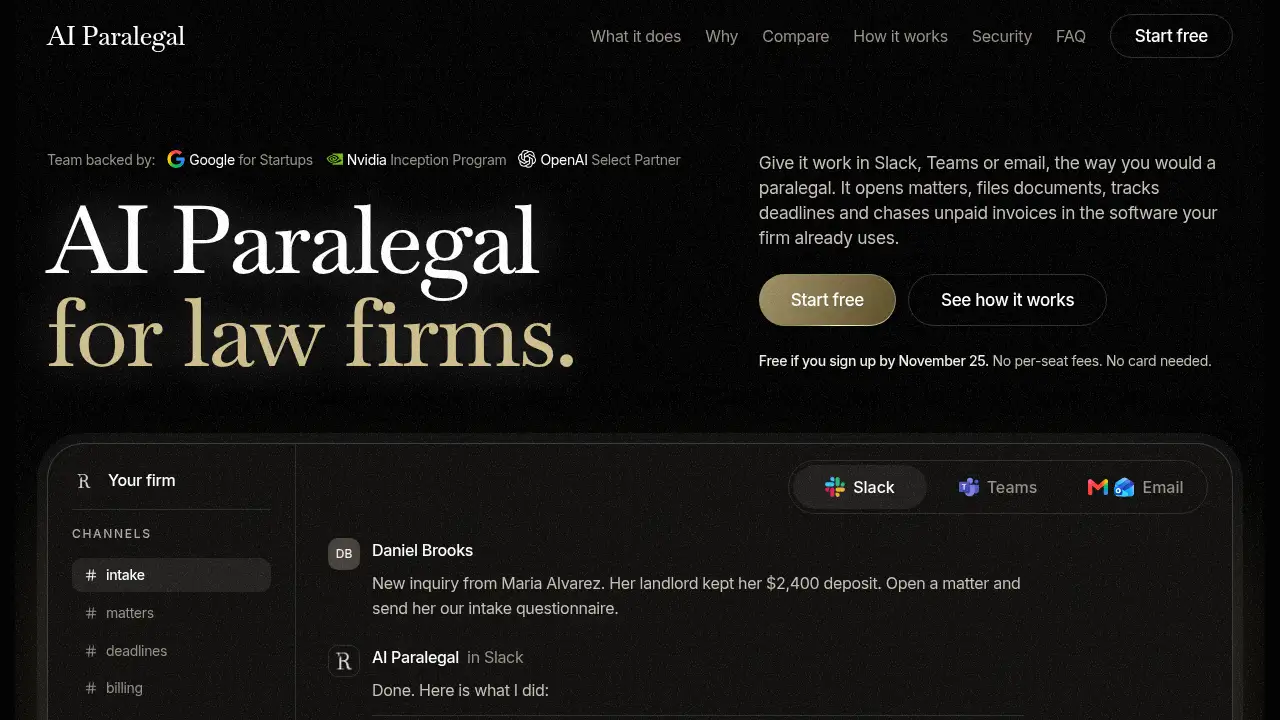
AI Paralegal is a legal AI assistant built for law firms. It works through Slack, Microsoft Teams, or email. Lawyers and legal teams can give it tasks in plain English, just as they would to a paralegal. The software then completes those tasks inside the tools the firm already uses, such as Clio, MyCase, Outlook, Gmail, and Google Drive. It handles intake, documents, deadlines, billing, and follow-ups. This helps reduce the time lawyers spend on repetitive administrative work. It is not a chatbot that only drafts answers. It acts as a law firm automation tool that opens matters, files documents, tracks deadlines, and chases unpaid invoices. The product is suitable for small and boutique firms, managing partners, paralegals, and legal assistants. AI Paralegal matters because many lawyers spend hours each day on routine tasks that do not require legal judgment. By taking over these tasks, it allows legal teams to focus on client work and strategy. The product also includes approval controls, so client emails, filings, and payments wait for a lawyer’s review before anything is sent. This makes it a practical legal workflow automation option for firms that want efficiency without replacing their existing practice management software.
Key Features of AI Paralegal
Intake and Conflict Checks
AI Paralegal logs new inquiries, runs conflict checks against contacts in your practice software, and opens matters. It can also prepare intake questionnaires from your templates.
Document Filing and Drafting
This legal AI assistant files client documents to the right matter folder and drafts routine letters from your firm’s templates. It works inside Google Drive and connected document systems.
Deadline Tracking and Calendar Management
AI Paralegal adds deadlines to the firm calendar, links them to the correct matter, and assigns a responsible person. It can also check for scheduling conflicts.
Client Follow-Ups with Approval
The software drafts reminders and status updates for clients but does not send them without approval. A named lawyer must review each message before it goes out.
Time Tracking and Billing Support
AI Paralegal logs time to the right matter and follows up on unpaid invoices. This supports law firm automation for routine billing tasks.
Daily and Weekly Reports
It sends scheduled reports on matter status, upcoming deadlines, and unpaid invoices. Managing partners can see what came in, what is due, and who has not paid.
Use Cases for AI Paralegal
Boutique Law Firms
A small firm with a lean team can use AI Paralegal to handle the queue of small routine jobs. This lets lawyers spend more hours on client work and less on filing, reminders, and intake.
Managing Partners
Managing partners can receive daily or weekly reports without asking staff to prepare them. This improves visibility into new inquiries, deadlines, and unpaid invoices.
Paralegals and Legal Assistants
Paralegals can hand off repetitive tasks such as calendar entries, document filing, and time entries. They still review the results and keep client contact and judgment calls.
Firms Using Clio or MyCase
Firms that already use Clio, MyCase, Outlook, Gmail, or Google Drive can connect these tools once. AI Paralegal then works inside the existing legal workflow automation setup without moving matters to a new system.
How to Use AI Paralegal
- Fill in the short sign-up form. The reference states it takes less than a minute.
- Connect your tools. Add AI Paralegal to Slack, Teams, or email, and sign in to the practice software you use.
- Give it a real task from this week. For example, ask it to open a matter, file a document, or set a deadline.
- Review what it did. AI Paralegal reports each action, and client emails, filings, and payments wait for approval from a named lawyer.
- Check the activity log. Every action is recorded, including who asked, what it did, and what was sent.
Target Audience for AI Paralegal
- Boutique law firms with lean teams
- Managing partners who need daily oversight
- Paralegals and legal assistants handling routine tasks
- Small legal teams that already use Clio, MyCase, Outlook, Gmail, or Google Drive
- Firms looking for legal AI assistant tools without replacing their current software
Is AI Paralegal Free?
AI Paralegal is free if you sign up by November 25, according to the reference information. The offer includes the first $90 of work with no card required. After that, plans start at $90 a month for the whole firm. There are no per-seat fees. Pricing details are limited in the reference content, so users should check the official page for current terms.
| Plan | Price | Features |
|---|---|---|
| Free Offer | $0 first $90 of work | Sign up by November 25; no card needed; no per-seat fees |
| Standard Plan | From $90/month per firm | Routine legal task automation; works in Slack, Teams, or email; connects to existing software |
AI Paralegal's Pros and Cons
| Aspect | Pros | Cons |
|---|---|---|
| Pricing | Flat firm pricing from $90/month; no per-seat fees | Limited public pricing details beyond the starting price |
| Features | Handles intake, documents, deadlines, billing, and reports | Does not give legal advice, decide strategy, or appear for a client |
| Integration | Works with Clio, MyCase, Outlook, Gmail, Google Drive, and thousands more | Requires initial connection to each tool |
| Control | Lawyer approval required for client emails, filings, and payments | Not a replacement for paralegals or practice software |
| Security | Zero data retention on every plan; CASA Tier 2 certified | SOC 2 Type 1 and ISO 27001 are still in progress |
Frequently Asked Questions about AI Paralegal
What is AI Paralegal?
AI Paralegal is software that performs routine paralegal or legal assistant tasks on a lawyer’s instruction. It logs inquiries, runs conflict checks, opens matters, files documents, drafts routine letters, calendars deadlines, reminds clients, logs time, and follows up on unpaid invoices.
Does AI Paralegal replace paralegals?
No. AI Paralegal takes repetitive tasks such as data entry, filing, reminders, and follow-ups. Client contact, investigation, and judgment calls remain with people. It is a legal AI assistant, not a replacement for trained staff.
What software does AI Paralegal work with?
AI Paralegal works inside Clio, MyCase, Outlook, Gmail, Google Drive, and thousands of other tools. Users connect each tool once, and matters stay in the existing system. It also works through Slack, Microsoft Teams, or email.
Is client data safe with AI Paralegal?
The product runs under zero data retention. According to the reference, no AI company stores prompts or answers after the reply, and no one trains on client information. Access is limited to connected tools, and every action is logged. CASA Tier 2 certification is listed, with SOC 2 Type 1 and ISO 27001 in progress.
How much does AI Paralegal cost?
Sign up by November 25 to get the first $90 of work free with no card. After that, plans start at $90 a month for the whole firm. There are no per-seat fees.
Does AI Paralegal send emails without approval?
No. Client emails, filings, and payments wait for approval from a lawyer you name. Each action is written to a log, so the firm can see who asked, what it did, and what was sent.
AI Paralegal Tags
AI Paralegal, legal AI assistant, law firm automation, legal workflow automation, AI for law firms, paralegal software, legal intake automation, AI legal assistant, law practice management, Clio integration, Slack legal assistant, legal billing automation