Introduction
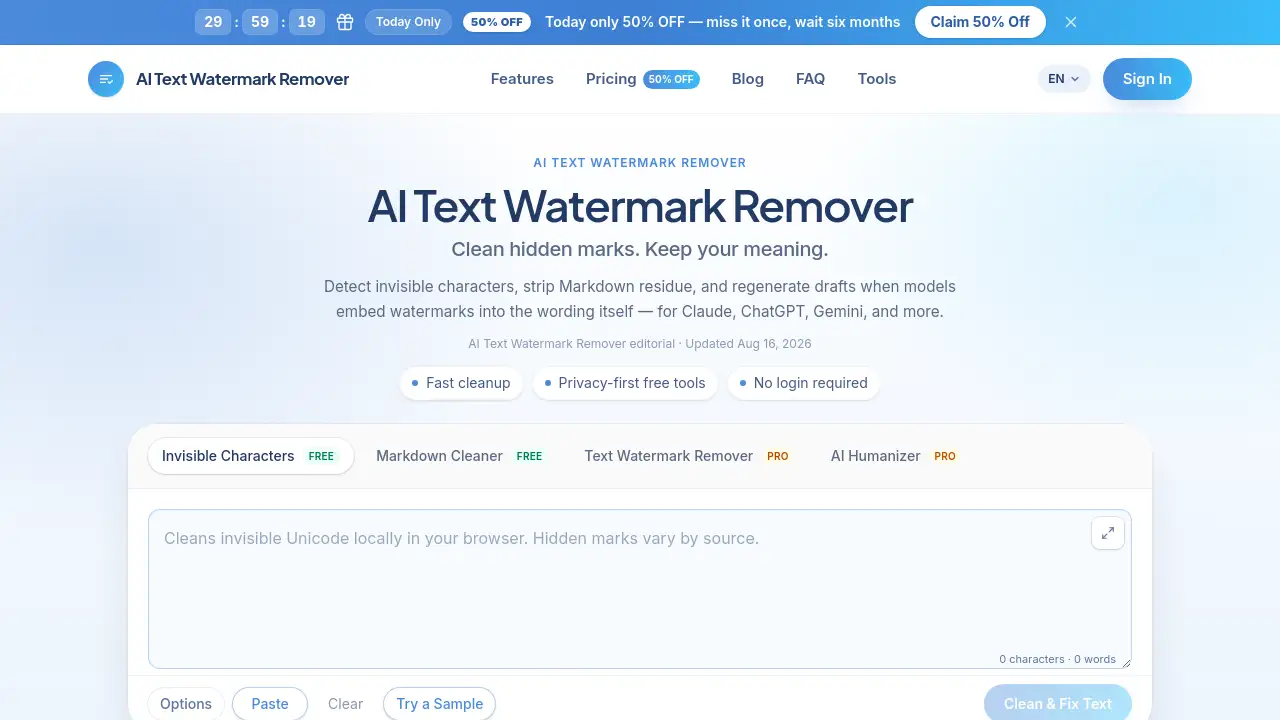
AI Text Watermark Remover is a browser-based cleanup utility for AI-generated drafts. It finds hidden marks that most editors cannot see, including hidden Unicode code points, zero-width spaces, and Markdown residue. The tool works with output from Claude, ChatGPT, Gemini, and other AI assistants. Writers and editors can paste text directly into the workspace, inspect what is hidden, and then clean it for free. If the watermark is inside the wording itself, the Pro rewrite option regenerates the draft. This makes the tool useful for anyone who publishes AI-assisted content.
What is AI Text Watermark Remover?
This product solves a problem that many content teams face: AI-generated text often looks clean in an editor but carries extra code that can break publishing workflows. Hidden Unicode code points, such as zero-width spaces, non-breaking spaces, and directional marks, can interfere with CMS fields, search snippets, and syndication. These hidden Unicode code points are not visible in a normal paste.
The product also removes Markdown residue. AI assistants frequently return text with headings, lists, quotes, fences, and emphasis markers. The Markdown cleaner turns that content into plain text, which is easier to review and publish.
The final layer is rewrite-based cleaning. Some AI providers, including the maker of Claude, use a statistical watermark that is built into word choice rather than hidden characters. This product does not claim to remove that watermark with a single click. Instead, the Pro Text Watermark Remover regenerates wording while keeping the meaning. The official homepage describes the service as an independent third-party tool, not an official tool from Anthropic, OpenAI, or Google.
A useful detail for buyers is that free cleaning does not require an account. The browser handles the scan, so confidential drafts do not need to be uploaded. For Pro rewrite, server-side processing is required, and credits are used. This separation is important for workflows that handle unpublished or client-owned content.
Key Features of AI Text Watermark Remover
Invisible Character Detection
The free scanner checks for 60+ hidden Unicode code points, including zero-width space, NNBSP, BOM, and directional marks. It shows a before/after view so users can see exactly what will be removed. This feature does not rewrite words, which means the visible meaning is preserved.
Markdown Cleaner
The free cleaner strips headings, lists, quotes, fences, and emphasis markers into plain text. This is useful when AI output is pasted into WordPress, Webflow, or a headless CMS. Markdown residue can break formatting if it reaches a live editor or metadata field.
Text Watermark Remover
The Pro rewrite tool regenerates meaning-preserving text when a watermark is embedded in the wording. This is separate from character cleanup and is designed for drafts where deletion alone is not enough. The official page notes that statistical watermarking is evolving and removal is not guaranteed.
AI Humanizer
The AI Humanizer rewrites text with a more natural cadence. It uses the same Pro credits as the watermark remover, and the product page notes that results vary. A humanizer is not an alternative to editing; it is an optional cleanup layer.
Privacy-First Free Tools
Invisible-character detection and Markdown cleaning run locally in the browser. No login is needed, and free-tool text is not stored. This is a practical option for confidential drafts because it avoids file uploads and third-party storage.
Use Cases for AI Text Watermark Remover
SEO & Content Ops
SEO teams can sanitize AI-generated drafts before publishing to WordPress, Webflow, or a headless CMS. This prevents hidden Unicode characters from entering meta fields or search snippets. Clean metadata helps maintain consistent search presentation.
Editorial Teams
Editors can strip Markdown residue before style review. The before/after list makes it easy to confirm that no visible meaning was changed. This reduces the back-and-forth between writers, fact-checkers, and CMS staff.
Agencies & Freelancers
Freelancers can clean client drafts locally without uploading them to a server. When a client wants a less robotic tone, the AI Humanizer can be used selectively. This workflow is useful for agencies that handle sensitive brand content.
Technical Writers
Technical writers can normalize assistant output for docs, changelogs, and knowledge bases. The tool keeps visible wording intact while cleaning hidden code points and Markdown noise. It also helps when text needs to pass through parsers or static site generators.
How to Use AI Text Watermark Remover
Using the tool is a simple five-step process:
- Paste AI-generated text into the workspace. The tool accepts text from Claude, ChatGPT, Gemini, Docs, CMS, and email.
- Inspect the detection panel. Users can see which hidden code points were found and preview the cleaned result.
- Click Clean to remove invisible characters or Markdown residue for free.
- If the watermark is in the wording, choose Text Watermark Remover or AI Humanizer.
- Copy the cleaned text to the destination platform.
No signup is required for free tools, while Pro rewrite uses an account with credits. The product interface is designed for a paste-first workflow, so there is no lengthy configuration process.
Target Audience for AI Text Watermark Remover
The tool is suitable for:
- SEO specialists and content operations teams
- Editors and publishing teams
- Freelance writers and agencies
- Technical writers and documentation teams
- Anyone who pastes AI-assisted copy into a CMS, email, or knowledge base
Content operations teams often need a quick way to remove invisible characters without changing meaning. The target audience benefits from a tool that separates local cleanup from optional rewriting.
Is AI Text Watermark Remover Free?
Yes, the core cleanup tools are free. Invisible character detection and Markdown cleaning run in the browser, require no login, and do not store free-tool text. Pro rewrite tools use credits, and new accounts start with 10 free credits.
The plan structure is simple: 10 credits equal 1,000 Pro words. Paid plans are billed once per year, and credits arrive each month. The free plan is not a trial; it is a usable layer for hidden character and Markdown cleanup.
| Plan | Price | Features |
|---|---|---|
| Free | $0 | Invisible character detection, Markdown cleaner, local processing, no login |
| Starter | $3.00/month billed yearly | 200 credits/month, ~20,000 Pro words/month |
| Professional | $5.00/month billed yearly | 420 credits/month, ~42,000 Pro words/month |
| Advanced | $10.00/month billed yearly | 1,000 credits/month, ~100,000 Pro words/month |
Paid plans include Text Watermark Remover and AI Humanizer. All paid plans also include the free tools. The product page states that failed Pro jobs are refunded. Payment is handled through Stripe.
AI Text Watermark Remover's Pros and Cons
| Aspect | Pros | Cons |
|---|---|---|
| Pricing | Free tools for hidden Unicode and Markdown cleaning | Paid plans are billed yearly |
| Privacy | Free processing runs locally, no login required | Pro rewrite requires server-side processing |
| Ease of Use | Simple paste-inspect-clean workflow | Rewrite effectiveness varies |
| Transparency | Shows detected code points and before/after view | Does not claim guaranteed statistical watermark removal |
Frequently Asked Questions about AI Text Watermark Remover
What does the tool do?
It is a text cleanup tool. It removes hidden Unicode characters, strips Markdown residue, and offers Pro rewrite for watermarks embedded in wording. It does not claim to bypass AI detectors.
Is my text uploaded to a server?
Invisible-character detection and Markdown cleaning run entirely in the browser. Only Text Watermark Remover and AI Humanizer need server-side processing. Free-tool text is not stored.
Will cleaning change my words?
Invisible-character cleaning keeps visible words intact. Text watermark removal and AI Humanizer intentionally rewrite the wording to remove model-specific patterns. Users can review a before/after view before copying.
Can the product remove a Claude or ChatGPT text watermark?
Hidden characters can be removed locally. Wording-level watermarks use Pro rewrite to regenerate meaning-preserving text. Effectiveness varies, and removal is not guaranteed.
Do new accounts get free credits?
New accounts get 10 free credits. These credits can be used for Pro rewrite tools. Invisible-character detection and Markdown cleaning remain free.
Does the product bypass AI detectors?
No. The tool helps clean paste artifacts and optionally rewrite text. It does not claim guaranteed detector bypass or removal of any statistical watermark.
AI Text Watermark Remover Tags
AI text watermark remover, remove AI text watermark, text watermark removal, hidden Unicode remover, invisible character remover, Claude watermark remover, ChatGPT watermark remover, Markdown cleaner, AI text cleaner, AI humanizer, AI content cleanup, clean AI generated text