Introduction
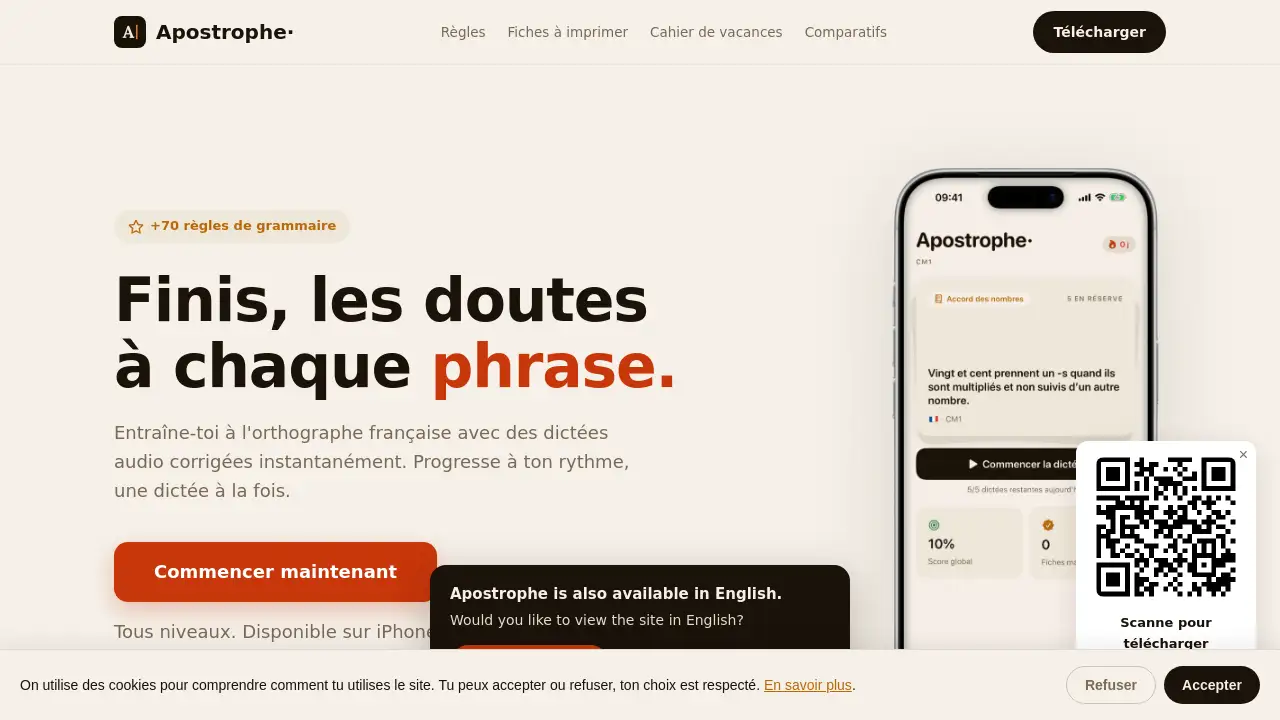
Apostrophe is a French dictation app that uses AI correction to help users improve spelling and grammar. It offers audio dictations, 70 grammar rules, and spaced repetition. Suitable from CE2 to adult, this orthographe française app is free to start and available on iOS and Android for learners at any level.
What is Apostrophe?
Apostrophe is a mobile application dedicated to French dictation and spelling practice. It solves the common problem of making repeated grammar mistakes by providing instant, AI-powered corrections on audio dictations. The app covers over 70 rules of French grammar—including participe passé, homophones, agreement, conjugation, accents, and plurals—making it a comprehensive tool for mastering orthographe française. Users can train at their own pace, one dictation at a time, and track progress per rule. What sets it apart is the use of spaced repetition (SRS): wrong answers reappear more frequently, while mastered items space out, optimizing long-term retention. Apostrophe is built for everyone from primary school students (CE2) to adults preparing for the brevet, bac, civil service exams, or the TCF. Because data stays on the device and no account is needed, it also respects privacy. For anyone seeking a reliable French dictation app to build writing confidence, Apostrophe offers a focused, research-backed approach.
Key Features of Apostrophe
Spaced Repetition (SRS)
This scientifically proven method makes sure difficult grammar points return often. Users no longer waste time on what they already know, as the app adjusts review frequency based on performance.
AI-Corrected Audio Dictations
Dictations are spoken by high-quality synthetic voices (France, Belgium, Switzerland, Quebec) at adjustable speed. After writing, the AI instantly compares the response against the correct text and provides detailed feedback on each error.
Grammar Rule Statistics
The app visualizes progress across all 70 grammar rules. Users can identify weak areas at a glance, such as participe passé or homophones, and focus practice where it matters most.
Comprehensive French Grammar Coverage
Apostrophe includes more than 70 rules covering all major grammar topics from CE2 to advanced adult level. This includes accord, conjugaison, ponctuation, majuscules, and more.
Family Sharing
One subscription supports up to six family members, each with their own separate progress. Ideal for households where multiple people want to improve their orthographe française.
Privacy and Offline Mode
No account creation is required; all data stays on the device. Dictations can be cached for offline playback, and progress syncs privately across a user’s devices via iCloud.
Use Cases for Apostrophe
Preparing for the Brevet or Bac
Students can train with dictations tailored to exam difficulty. The French dictation app helps reinforce common grammar pitfalls that appear in official tests.
Civil Service Exam Preparation
Job seekers facing spelling tests in French civil service exams can use Apostrophe to drill the most frequent errors and build speed and accuracy.
TCF, DELF, DALF, and French Nationality
For those needing to prove written French proficiency, regular practice with AI-corrected dictations improves spelling and grammar quickly, meeting official language requirements.
Everyday Writing Confidence
Anyone wanting to write error‑free emails, social media posts, or letters can use the app for five minutes daily to steadily eliminate mistakes.
How to Use Apostrophe
- Download the app from the iOS App Store or Google Play Store (no account needed).
- Select your level (CE2 to adult) and start the free trial of 5 dictations.
- Listen to the audio dictation, type what you hear, and submit.
- Review the AI correction: see which words were wrong and why, with explanations tied to specific grammar rules.
- Continue daily: the spaced repetition system automatically schedules reviews of your weak points. For unlimited access, choose a subscription after the trial.
Target Audience for Apostrophe
- Parents of primary and middle school children who want to help with dictation at home
- Middle school and high school students preparing for the brevet or bac
- Adults studying for civil service exams that include a spelling test
- Learners taking TCF, DELF, or DALF exams, or applying for French nationality
- Any individual who wishes to write without spelling mistakes in daily life
Is Apostrophe Free?
Apostrophe offers a free trial of 5 dictations with all levels unlocked. No credit card is required. After the trial, a subscription is needed to continue. The exact pricing is not displayed on the homepage but can be found in the app. Family sharing is included with the premium subscription.
| Plan | Price | Features |
|---|---|---|
| Free Trial | $0 | 5 dictations, all levels, no card required |
| Premium | Subscription (price in app) | Unlimited dictations, full grammar coverage, family sharing, offline mode, progress sync |
Apostrophe's Pros and Cons
| Aspect | Pros | Cons |
|---|---|---|
| Pricing | Free trial available, no commitment | Full features require ongoing subscription; price not stated upfront |
| Features | AI‑corrected audio dictations with SRS, 70+ grammar rules, family sharing | Only French language; no web version, mobile only |
| Usability | No account needed, offline playback, intuitive interface | Limited free trial (5 dictations) may feel short for evaluation |
| Privacy | No tracking, data stays on device | Sync requires iCloud; no cross‑platform sync outside Apple ecosystem |
Frequently Asked Questions about Apostrophe
How does the AI correction work in this French dictation app?
After you type the dictation, the AI compares your text to the correct version. It highlights each error and links it to the relevant grammar rule, showing you exactly where and why you made a mistake. This instant feedback helps you learn and remember.
Can I use Apostrophe offline?
Yes, dictations that have been downloaded (cached) can be played and written offline. However, the correction step requires an internet connection because the AI processes your response in real time.
Is Apostrophe suitable for complete beginners in French?
The app is designed for native speakers or advanced learners, not absolute beginners. It starts at CE2 level (age 8) and assumes a basic command of the language. For TCF preparation or grammar improvement, it works well, but it is not a beginner’s French course.
How does the family sharing option work?
One premium subscription allows up to six family members, each with their own separate progress and level. This is ideal for households where multiple people want to improve their orthographe française without paying separately.
Do I need to create an account to use Apostrophe?
No account is required. The app respects privacy: all data stays on your device and in your private iCloud. Only the text of your dictation is sent to the server for correction via a secure connection.
What happens after the 5 free dictations?
After the trial, you can choose to subscribe to a premium plan. The subscription unlocks unlimited dictations, full access to all grammar rules, and family sharing. You can subscribe directly in the app.
Apostrophe Tags
French dictation app, orthographe française, AI correction, dictées audio, grammaire française, répétition espacée, brevet preparation, bac spelling test, TCF French exam, civil service exam spelling, family sharing, offline dictation practice