Introduction
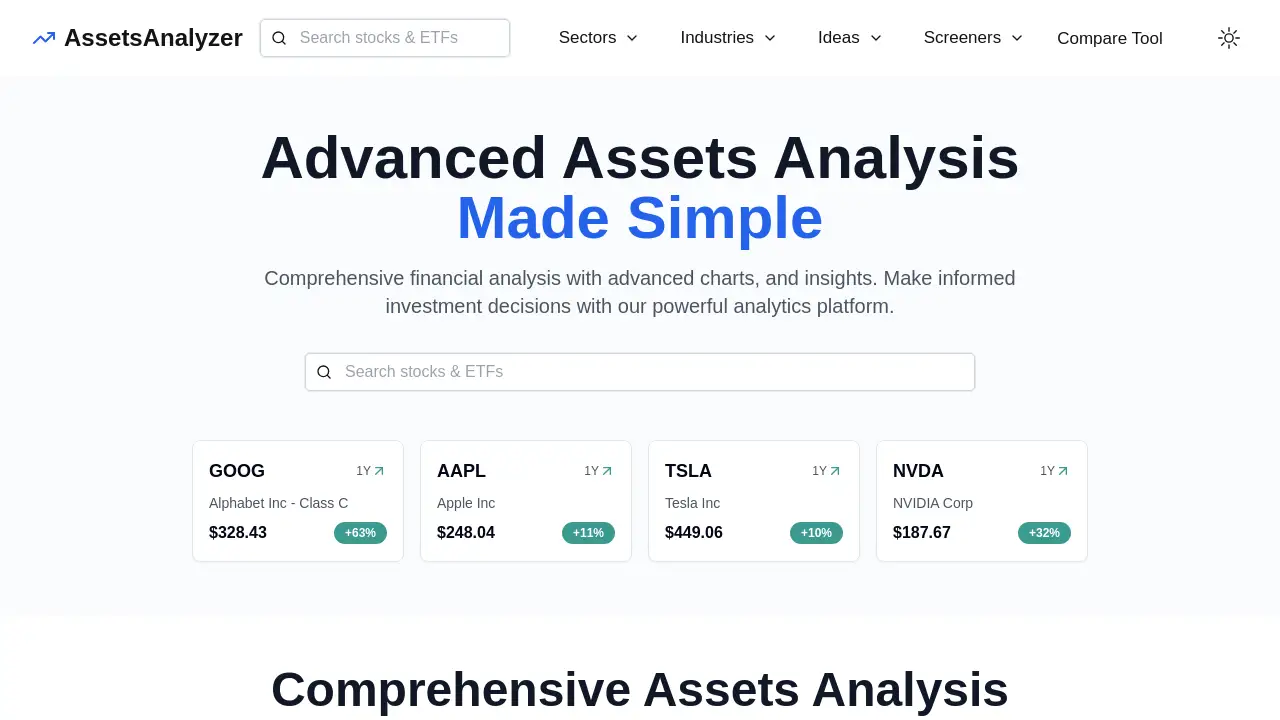
A platform for advanced stock and ETF analysis with real-time data and insightful financial tools.
What is AssetsAnalyzer?
AssetsAnalyzer is a web-based financial analytics platform designed to simplify investment research. It provides users with a suite of tools for performing advanced stock analysis and ETF evaluation, aiming to turn complex financial data into actionable insights. The platform aggregates real-time data, offers detailed P/E charts, consolidates analyst ratings, and provides deep dividend analysis and ETF insights. By helping investors analyze correlations between assets and compare key financial ratios, AssetsAnalyzer supports more informed investment decisions. It is suitable for a range of users, from individual retail investors to more experienced analysts looking for a centralized hub for fundamental research.
Key Features of AssetsAnalyzer
Comprehensive Stock Analysis
The platform offers deep-dive analysis on individual stocks, featuring over 20 years of historical data, detailed financial reports, and key ratios like PEG, P/E, P/B, and P/S to assess value and growth potential.
In-Depth ETF Insights
Users can explore ETF compositions with sector and holdings allocation breakdowns, view average financial ratios for the fund's constituents, and discover similar ETFs for comparative research.
Advanced Performance & Correlation Tools
The service includes sophisticated tools for performance analysis against benchmarks like the S&P 500, detailed drawdown analysis, and a correlation analysis feature to identify highly or lowly correlated assets for portfolio diversification.
Powerful Screening and Comparison
AssetsAnalyzer provides both a stock screener and an ETF screener to filter assets based on custom criteria, alongside a dedicated compare tool to evaluate multiple stocks or ETFs side-by-side across various metrics.
Pre-Built Investment Ideas
The platform curates thematic investment screens, such as "Growth at a Reasonable PEG," "Dividend Aristocrat-Style," and "Analyst Favorites," offering users a starting point for discovering potential opportunities.
Use Cases for AssetsAnalyzer
Evaluating Individual Stock Investments
An investor can use the platform to research a specific company, examining its P/E charts, dividend history, analyst consensus, and financial health before making a purchase decision.
Building a Diversified ETF Portfolio
A user looking to invest in ETFs can utilize the ETF screener and insights to compare funds based on sector exposure, expense ratios (implied), and the fundamental metrics of their underlying holdings.
Conducting Sector and Industry Research
By navigating the dedicated sector and industry pages, an analyst can quickly assess the performance and average valuations of all companies within a specific market segment, like Technology or Semiconductors.
Performing Portfolio Risk Analysis
Using the correlation analysis and drawdown analysis tools, a portfolio manager can identify assets that move in tandem and understand historical risk patterns to better manage overall portfolio volatility.
How to Use AssetsAnalyzer
- Navigate to the Website: Visit the AssetsAnalyzer homepage at
https://assetsanalyzer.com. - Explore or Search: Use the main navigation to browse stocks by sector, industry, or pre-built ideas. Alternatively, use the search function to find a specific ticker symbol (e.g., AAPL, GOOG).
- Analyze an Asset: On a stock or ETF page, review the comprehensive data tabs covering fundamentals, performance, dividends, and analyst ratings.
- Utilize Advanced Tools: Access the screeners to filter for stocks or ETFs matching specific criteria, or use the comparison tool to evaluate multiple assets simultaneously.
- Apply Insights: Use the gathered information on analyst ratings, dividend analysis, and correlation data to inform your broader investment strategy and decision-making.
Target Audience for AssetsAnalyzer
- Individual retail investors seeking deeper fundamental analysis.
- DIY investors and financial enthusiasts who manage their own portfolios.
- Students and learners of finance and investment analysis.
- Analysts and advisors looking for a quick, centralized data source for client research.
Is AssetsAnalyzer Free?
Based on the available reference information, the pricing model for AssetsAnalyzer is not explicitly detailed on the provided homepage content. The site appears to offer full access to its data and tools without an immediately visible paywall or subscription prompt. Users should visit the official website directly to check for any updated information on premium features, subscription plans, or terms of use.
AssetsAnalyzer's Pros and Cons
| Aspect | Pros | Cons |
|---|---|---|
| Data & Features | Offers a wide array of advanced analysis tools (correlation, drawdown, screening) in one platform. Comprehensive fundamental data and ETF insights. | The abundance of data may have a learning curve for complete beginners. |
| Usability | Clean interface with organized navigation by sectors, industries, and ideas. Makes complex data more accessible. | Lack of immediately clear pricing information on the homepage. |
| Functionality | Provides unique pre-built investment screens ("Ideas") that can spark research. Powerful compare tool for direct asset evaluation. | Real-time data latency and specific data sources are not disclosed, which is common but worth noting. |
Frequently Asked Questions about AssetsAnalyzer
What kind of data does AssetsAnalyzer provide?
AssetsAnalyzer provides extensive financial data for stocks and ETFs, including real-time and historical prices, fundamental ratios (P/E, PEG, P/B), analyst ratings and price targets, dividend history and yield analysis, and detailed ETF composition data.
Is AssetsAnalyzer suitable for beginner investors?
While the platform is designed to simplify advanced stock analysis, beginners may find the depth of information initially overwhelming. However, its structured layout and pre-built "Ideas" can serve as useful educational starting points for learning about fundamental analysis.
Can I compare multiple stocks on AssetsAnalyzer?
Yes, AssetsAnalyzer features a dedicated compare tool that allows users to select multiple stocks or ETFs and evaluate them side-by-side across key metrics like valuation ratios, performance, and analyst sentiment.
Does AssetsAnalyzer offer portfolio tracking or management?
The provided reference information highlights analysis and screening tools but does not mention a dedicated portfolio tracking or management feature where users can input holdings and track total return. Its focus appears to be on pre-investment research and ETF analysis.
How current is the data on AssetsAnalyzer?
The platform advertises real-time data for stock prices. Financial reports, analyst ratings, and other fundamental data are updated according to their respective reporting schedules, but the exact refresh frequency is not specified in the available content.
Are the investment ideas on AssetsAnalyzer financial advice?
No. The platform's disclaimer clearly states that all information is for educational purposes only and is not investment advice. The pre-built "Ideas" are thematic screens, not recommendations, and users must conduct their own research before making any informed investment decisions.
AssetsAnalyzer Tags
advanced stock analysis, real-time data, P/E charts, analyst ratings, dividend analysis, ETF insights, stock screener, ETF screener, investment research, financial analysis, portfolio diversification, correlation analysis, fundamental ratios, investment platform