Introduction
BloxCanvas: AI Roblox thumbnail maker for 16:9 game art.
What is BloxCanvas?
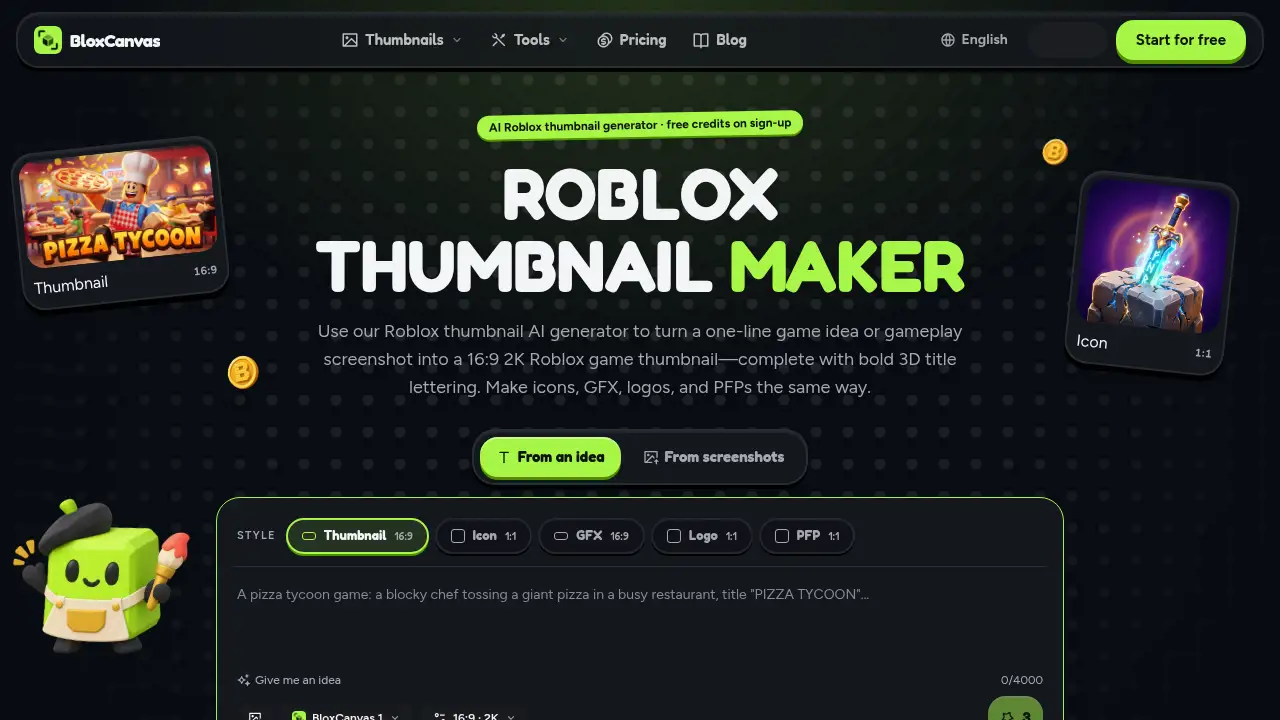
BloxCanvas is an AI Roblox thumbnail maker and generator that turns a one-line prompt or gameplay screenshot into a 16:9 Roblox game thumbnail. It also creates square icons, cinematic GFX renders, 3D title logos, and avatar PFPs. The tool is designed for Roblox creators who need polished storefront art without opening Blender or Photoshop. A Roblox thumbnail maker matters because the home page and experience page rely on strong visuals to earn clicks. BloxCanvas wraps each request in Roblox-style art direction and supports up to 14 reference screenshots, so creators can guide the result with existing gameplay or avatar images. It offers 9 free credits on sign-up and is an independent tool, not affiliated with Roblox Corporation. For anyone comparing a Roblox thumbnail generator, BloxCanvas focuses on fast browser-based output and simple credit pricing.
Key Features of BloxCanvas
Five Roblox Art Styles
Generate a 16:9 Roblox thumbnail, 1:1 icon, GFX render, 3D title logo, or avatar PFP from the same prompt. Each style sets the shape, size, and Roblox look for a consistent Roblox game thumbnail.
Prompt or Screenshot Workflow
Start with a short game idea or upload gameplay screenshots, JPG, PNG, or WebP up to 10 MB each. Add up to 14 reference images and use @ mentions to guide the Roblox thumbnail AI.
3D Title Lettering
Put the game name in quotes and the Roblox thumbnail maker draws it into the art as bold cartoon lettering. Nano Banana Pro and GPT Image 2 are noted for reliable title spelling.
Four Image Models
Choose BloxCanvas 1 for low-cost drafts, Nano Banana Pro for readable titles, GPT Image 2 for detailed scenes, or Seedream 5.5 for a different look. Switch models without rewriting the prompt.
Roblox-Ready Sizes
Create thumbnails at 16:9 and 2K, plus icons at 1:1 and 1K. The Roblox thumbnail generator produces files that can be scaled to 1920×1080 before upload in Creator Hub.
Private by Default
Uploads and results are visible only to the creator. Reference images are used to make the image and deleted after 30 days.
Use Cases for BloxCanvas
Game Launch Thumbnails
Create a clear Roblox game thumbnail for a new experience page or ad test. Use a one-line concept to test several visual directions before launch.
Icon and Logo Sets
Make matching Roblox icons and Roblox logos for a game page, Discord server, or social profile. A Roblox thumbnail maker helps keep the same character, colors, and title style across assets.
GFX and Avatar Art
Produce cinematic Roblox GFX for trailers, banners, or community posts. The same workflow can create Roblox PFPs for developers, streamers, and fan accounts.
Screenshot-Based Edits
Upload existing gameplay captures and turn them into a polished Roblox thumbnail with better lighting, contrast, and title lettering. This is useful when the game already has strong scenes but weak promotional art.
How to Use BloxCanvas
- Open the Roblox thumbnail maker, BloxCanvas, and sign in to claim the 9 free credits.
- Describe the game in one line, or upload screenshots and reference images.
- Pick a style: thumbnail, icon, GFX, logo, or PFP. Add the game title in quotes for 3D lettering.
- Select an image model and review the credit cost on the Generate button.
- Generate, download, and upload the Roblox thumbnail in Creator Hub under Thumbnails or Icon.
Target Audience for BloxCanvas
- Roblox game developers who need quick thumbnails, icons, and GFX.
- Small studios testing multiple Roblox game thumbnail concepts.
- Content creators and streamers who want Roblox PFPs or channel art.
- Beginner creators without Blender or Photoshop experience.
- Community managers building consistent Roblox logos and icons.
Is BloxCanvas Free?
BloxCanvas offers 9 free credits on sign-up. Paid credits are one-time purchases, not subscriptions. Pricing is listed on the official pricing page, and each generation shows its credit cost before the user presses Generate.
| Plan | Price | Features |
|---|---|---|
| Free | $0 | 9 free credits on sign-up; try the Roblox thumbnail maker and other styles. |
| Starter | $9.99 one-time | 300 credits; about 60 Nano Banana Pro images at 1K. |
| Creator | $29.99 one-time | 1,000 credits; save 10%; about 200 Nano Banana Pro images at 1K. |
| Studio | $69.99 one-time | 2,500 credits; save 16%; about 500 Nano Banana Pro images at 1K. |
BloxCanvas's Pros and Cons
| Aspect | Pros | Cons |
|---|---|---|
| Pricing | Free credits and one-time packs; low-cost BloxCanvas 1 drafts. | Credit costs vary by model and resolution, so heavy use needs planning. |
| Features | Five Roblox styles, up to 14 reference images, and four image models. | Not a full 3D or Photoshop replacement for manual editing. |
| Speed | Browser-based Roblox thumbnail generator with a simple prompt-to-image flow. | Output quality still depends on prompt clarity and reference images. |
| Accessibility | No Blender or Photoshop required; suitable for beginners. | Users need to scale thumbnails to 1920×1080 before upload. |
Frequently Asked Questions about BloxCanvas
What is BloxCanvas used for?
BloxCanvas is an AI Roblox thumbnail maker for creating 16:9 game thumbnails, icons, GFX, logos, and PFPs from prompts or screenshots. It is built for Roblox creators who want fast promotional art.
Does BloxCanvas offer free credits?
Yes. New users get 9 free credits on sign-up. Paid credit packs start at $9.99 for 300 credits, and the button shows the credit cost before generation.
Can I make a Roblox thumbnail from a screenshot?
Yes. The Roblox thumbnail generator accepts JPG, PNG, or WebP screenshots up to 10 MB each. Creators can add up to 14 reference images and mention them in the prompt.
Which model should I use for a Roblox game thumbnail?
Start with BloxCanvas 1 for cheaper drafts. Use Nano Banana Pro for readable 3D titles, GPT Image 2 for detailed scenes, or Seedream 5.5 for a different visual style.
Is BloxCanvas affiliated with Roblox?
No. BloxCanvas is an independent tool and is not affiliated with, endorsed by, or sponsored by Roblox Corporation.
Does the Roblox thumbnail maker work in a browser?
Yes. BloxCanvas runs in the browser and produces images for download. Thumbnails are generated at 16:9 and 2K, then can be scaled to 1920×1080 before upload.
BloxCanvas Tags
Roblox thumbnail maker, AI Roblox thumbnail generator, Roblox thumbnail AI, Roblox game thumbnail, Roblox icons, Roblox GFX, Roblox logos, Roblox PFPs, AI thumbnail maker, BloxCanvas, Roblox thumbnail from screenshot, Roblox game art