Introduction
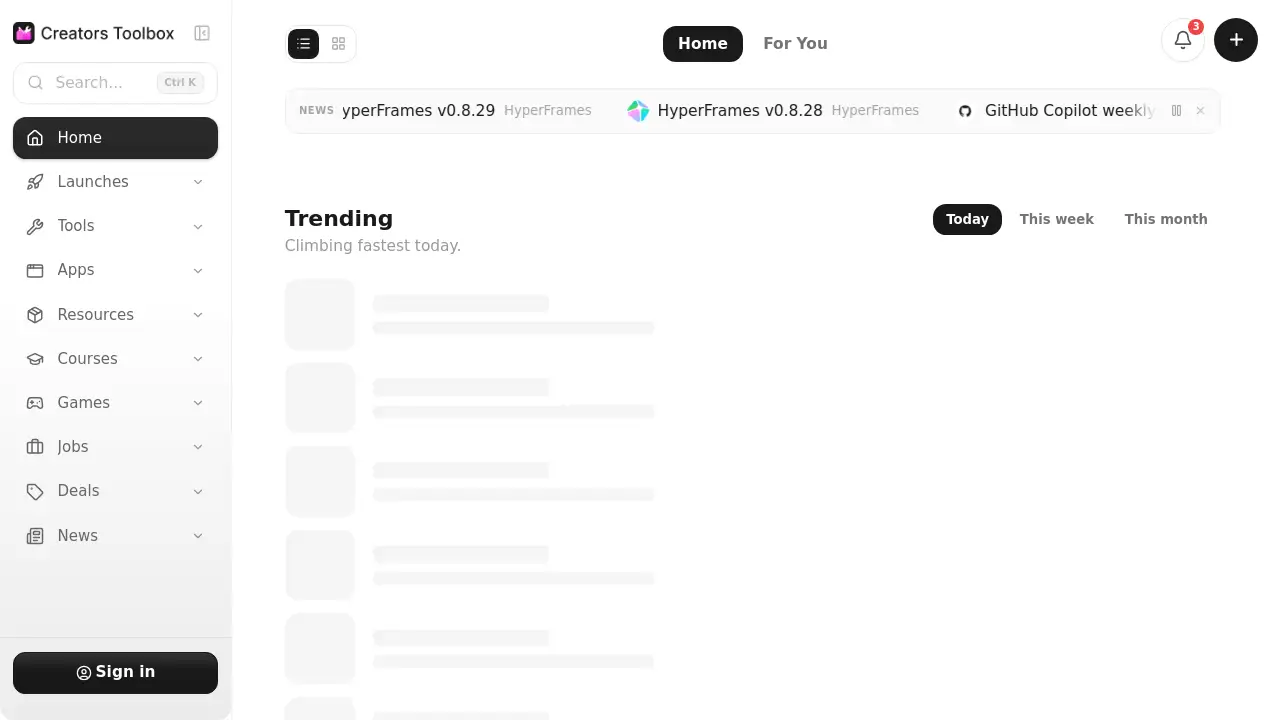
Creators Toolbox is a free discovery hub for digital creators. Instead of checking many websites, visitors can open Creators Toolbox to find rising apps, trending games, and useful resources. The homepage shows what is climbing fastest today, which tools the community follows most, and which products have the highest views. Each item includes a short description, a category, and a pricing label like Free or Freemium. The platform describes itself as a collection of free tools, news, and resources for creative work. This makes Creators Toolbox an efficient starting point for any content creator researching software, templates, games, or general inspiration.
What is Creators Toolbox?
Creators Toolbox is a directory-style website that gathers digital creator tools and resources in one place. It solves the problem of scattered research: a creator may need an AI animation assistant, a no-code website builder, or a music game for inspiration, but finding these options usually requires visits to many separate sites. Creators Toolbox groups the products, explains each one briefly, and shows popularity signals such as view counts and follower counts. This structure helps people compare options quickly.
The site fits video editors, social media managers, graphic designers, marketers, and hobbyists who like to explore new creative products. It mixes well-known names like Framer and Suno with smaller projects such as Toon Tone and Magnitudle, so newer tools can gain visibility too. Following trending lists helps users discover fresh ideas from the creator community before they become mainstream. The platform focuses on free tools for creators and also lists freemium tools whose basic plans start at $0.
Key Features of Creators Toolbox
The homepage of Creators Toolbox has clear sections that make quick browsing easy.
Trending Discovery
The first list shows products climbing fastest today. This allows users to spot rising tools early.
Most Followed Community Picks
A second section shows tools with strong community support. Follower counts make stable favorites easy to identify.
Most Viewed Items
Another list ranks products by total views. This adds social proof to the decision-making process.
Transparent Product Cards
Each listing contains a one-line description, category tags like Game or Tool, and a pricing label such as Free or Freemium. This format keeps expectations clear.
Wide Range of Creative Categories
The directory includes AI generators, QR code makers, movie databases, music games, photography apps, and website builders. For that reason, Creators Toolbox works as a browsable library of creator tools.
Use Cases for Creators Toolbox
Creators Toolbox supports several regular workflows, from research to creative breaks.
Sourcing New Video Hooks
Motion designers and social media managers can study AI motion tools like AutoAE or Swishy. These examples show whether a free or freemium tool fits a planned campaign.
Planning Interactive Media Projects
Designers and game lovers can inspect resources such as Nothing to Watch or ICQR Magic Tree. The format ideas can inspire web experiments or promotional content.
Keeping a Weekly Pulse
Checking the trending and most followed lists on Creators Toolbox once a week helps users catch new products and free tools for creators without spending late nights scrolling social feeds.
How to Use Creators Toolbox
A research session does not require sign-up. The workflow can follow five simple steps.
- Open the homepage and scan the trending section for items rising fast today.
- Check "Most followed" and "Most viewed" to see community signals.
- Read the description, category tags, and Free or Freemium label.
- Select a promising resource and visit the product's official page.
- Return weekly or daily to catch new tools.
This routine works well as a quick research desk before a creative project. The directory is not where the creative work happens; it is where users decide which tools deserve a closer look.
Target Audience for Creators Toolbox
- Content creators looking for new video, audio, and design tools
- Social media managers who track free tools for creators
- Motion designers and video editors
- Indie game developers and interactive media designers
- Marketers who monitor creator tools and new formats
- Students and hobbyists exploring creative resources
Is Creators Toolbox Free?
Creators Toolbox appears to be free to browse. The homepage does not mention a paid subscription for directory access. Many listed tools are free to start, and freemium products are clearly marked.
| Plan | Price | Features |
|---|---|---|
| Directory access | $0 | Browse trending, followed, and viewed lists; read descriptions, categories, and pricing labels |
| Individual tools | Free or Freemium | Depends on each product and shown under the listing |
For exact paid plans, visitors should check the official page of the selected tool.
Creators Toolbox's Pros and Cons
| Aspect | Pros | Cons |
|---|---|---|
| Discovery | Saves research time with curated lists | Does not include in-depth tutorials |
| Pricing details | Free and Freemium labels help filter tools | Does not list exact paid prices |
| Content range | Covers AI, video, music, design, and games | Some entries are games rather than production tools |
| Popularity data | Views and followers add useful context | Popularity does not guarantee quality for every user |
| Ease of use | Simple layout for quick scanning | New items appear often, so frequent visits help |
Frequently Asked Questions about Creators Toolbox
Is Creators Toolbox free to use?
Yes, the directory appears free to browse. Many products are labeled Free, while others use a Freemium model with optional paid upgrades.
What kind of products does the directory list?
It lists AI tools, animation generators, QR code makers, movie databases, music games, website builders, photography apps, and design games. Categories help users separate production tools from fun resources.
Does the platform build or host these tools?
No, the platform mainly organizes and describes third-party products. Creators Toolbox helps visitors compare options before they open the official website of a tool.
How often do the rankings change?
Different sections use different time frames. The trending list presents items climbing fastest today, while the most followed list shows community picks from this week. Regular visits give the best snapshot.
Creators Toolbox Tags
Creators Toolbox review, free tools for creators, creator tools directory, digital creator resources, content creator tools, AI tools for creators, trending creative apps, resource discovery platform, freemium product list, tools for creators