Introduction
EveryGen AI video generator: idea to video in one studio.
What is Everygen AI?
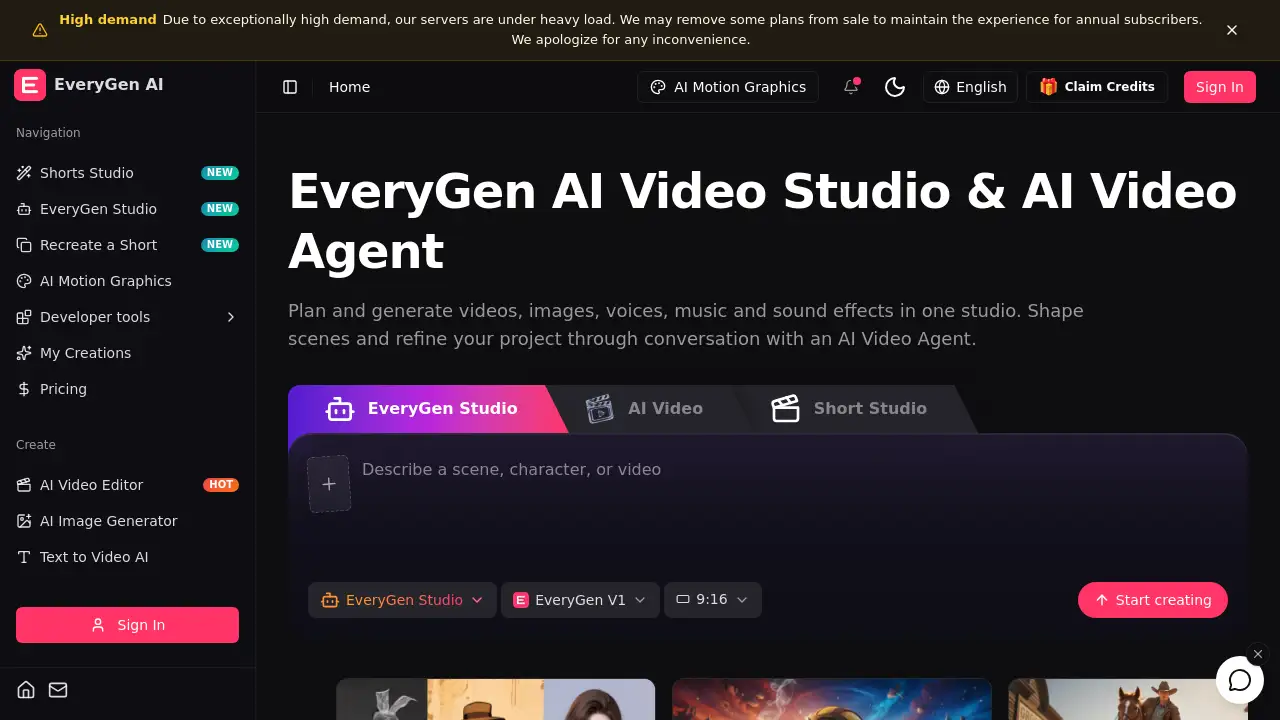
EveryGen AI is a creative workspace for video, images, and sound. It is built around an EveryGen AI video generator, but it goes beyond single-clip creation. The platform combines an AI video studio, an AI Video Agent, and a set of image, audio, and editing tools in one place. Instead of moving between separate apps for clips, voiceovers, music, and motion graphics, users can plan a project, generate media, and refine the result in a shared environment.
The EveryGen AI video generator supports text-to-video, image-to-video, reference footage, motion control, and video editing. The AI video studio keeps scenes, references, voices, and generated assets together. The AI Video Agent works like a conversational planning partner: users describe the goal, audience, and style, then review a scene plan before creating media. This approach can help marketers, creators, and small teams move from a rough idea to a finished video with fewer handoffs.
EveryGen AI is also designed for image and audio work. Users can create characters, product visuals, and scene references with the AI image generator. They can generate narration, dialogue, sound effects, and AI music. The product description mentions MCP and developer tools, which may appeal to more technical users who want to connect workflows. The homepage notes high demand, so some plans may be removed from sale to protect the experience for annual subscribers.
Key Features of Everygen AI
EveryGen AI Video Generator
Generate video clips from text prompts or still images using multiple AI models. The EveryGen AI video generator also supports reference footage, motion control, and video-to-video workflows.
EveryGen AI Video Studio
Plan scenes, store reusable media, and manage a project in one workspace. The AI video studio connects clips, images, voices, music, and sound effects so assets do not get lost between tools.
AI Video Agent
Share a brief and reference media, then review a scene plan created through conversation. The AI Video Agent helps users shape timing, characters, and creative choices before spending credits.
Text to Video AI and Image to Video AI
Turn written ideas into moving scenes or animate saved images. These text to video AI and image to video AI tools are useful for quick concept tests and polished social clips.
AI Image Generator
Create characters, product shots, and scene references with models such as Nano Banana, GPT Image 2, and Seedream. The AI image generator feeds visuals directly into the EveryGen AI video studio.
AI Video Editor and Motion Graphics
Refine existing footage, edit scenes, and create animated graphics. The AI video editor and AI motion graphics tools support revisions without a full manual editing suite.
Shorts Studio, Templates, and Viral Remix
Start from a template, recreate a short, or remix a viral format. Shorts Studio and related tools help social media creators produce vertical videos faster.
Voices, Music, and Sound Effects
Generate narration, character dialogue, scene effects, and AI music. These audio tools give the EveryGen AI video generator a complete soundtrack workflow.
Use Cases for Everygen AI
Social Media Shorts
Create vertical videos for TikTok, YouTube Shorts, and Instagram Reels. Shorts Studio and templates can speed up recurring content production.
Product Demos and Ads
Generate product visuals, animate them, and add narration or music. The AI video studio keeps brand references and scene assets organized across revisions.
Tutorials and Explainers
Use text to video AI, image to video AI, and voice generation to build clear step-by-step content. Motion graphics can highlight key points without complex animation software.
Storytelling and Short Films
Plan scenes with the AI Video Agent, then create characters, dialogue, and cinematic clips. Reusable references help maintain consistency across shots.
Marketing Teams and Agencies
Manage multiple projects, compare AI models, and review creative choices in one place. The EveryGen AI video generator and AI video editor can support fast client iterations.
How to Use Everygen AI
- Describe the project. Open EveryGen AI, explain the purpose, audience, and style, then add images, video, audio, or documents as references.
- Shape the plan. Work with the AI Video Agent to develop scenes, timing, and characters. Users can adjust the plan or create one scene first.
- Create media. Use the EveryGen AI video generator for clips, then generate images, dialogue, narration, music, and sound effects.
- Review and edit. Revise the plan or edit saved media through conversation. Check the assembled result and make changes before download.
- Download the video. Export the finished project for social media, ads, tutorials, or storytelling.
Target Audience for Everygen AI
- Social media creators and influencers
- Marketing teams and creative agencies
- Small business owners making product videos
- Educators and online course creators
- Filmmakers, animators, and storyboard artists
- Podcasters and audio-first creators adding video
- Developers exploring AI video and MCP workflows
Is Everygen AI Free?
EveryGen AI shows a Claim Credits option and a Pricing page. Exact prices and credit amounts are not listed in the reference information, so users should visit the official pricing page for current plans. The homepage warns that high demand may cause some plans to be removed from sale to maintain the experience for annual subscribers. A free credit claim may allow limited testing, while ongoing use likely depends on credits or paid plans.
| Plan | Price | Features |
|---|---|---|
| Free Credits | Claim credits | Limited testing of selected tools |
| Paid Plans | See official pricing page | More credits, model access, studio workflow |
| Annual Plans | See official pricing page | Priority experience during high demand |
Everygen AI's Pros and Cons
| Aspect | Pros | Cons |
|---|---|---|
| Features | All-in-one video, image, audio, and editing tools | Many tools and models may feel overwhelming |
| Workflow | AI Video Agent supports conversational planning | Requires learning how to write briefs and review plans |
| Models | Multiple video and image models in one studio | Model availability and credits may change |
| Output | Text, image, reference, and video inputs | Final quality still depends on prompts and source media |
| Pricing | Free credits may be available | Exact pricing is not clear in the reference, and high demand may limit plans |
| Access | Browser-based creative workspace | Requires internet and likely a paid credit balance for heavy use |
Frequently Asked Questions about Everygen AI
What is EveryGen AI?
EveryGen AI is a browser-based creative workspace for generating and editing videos, images, voices, music, and sound effects. It combines an EveryGen AI video generator with an AI video studio and an AI Video Agent.
Can EveryGen AI make videos from text?
Yes. The platform offers text to video AI tools that turn written prompts into video clips. Users can also start from images, reference footage, or templates.
Does EveryGen AI include an AI video editor?
Yes. The AI video editor supports revising footage, editing scenes, and refining generated media. The AI video studio also keeps project assets together for later changes.
Is EveryGen AI free to use?
The site displays a Claim Credits option and a Pricing page. Exact free limits and paid plan prices are not provided in the reference information, so checking the official pricing page is the best way to confirm current options.
What models does EveryGen AI support?
The EveryGen AI video generator lists models such as Veo 3.1 Fast, Veo 3.1 Quality, Kling Motion Control, Wan 3.0 Video, Kling 2.6, and MiniMax H3. Image models include Nano Banana, GPT Image 2, Seedream 5.0, and Wan 2.7 Image Pro.
Who should use EveryGen AI?
It suits social media creators, marketers, small businesses, educators, filmmakers, and agencies. Anyone who wants an AI video studio for planning, generating, and editing video content can explore the platform.
Everygen AI Tags
EveryGen AI, EveryGen AI video generator, AI video studio, AI Video Agent, text to video AI, image to video AI, AI image generator, AI video editor, AI motion graphics, Shorts Studio, AI music generator, sound effects AI