Introduction
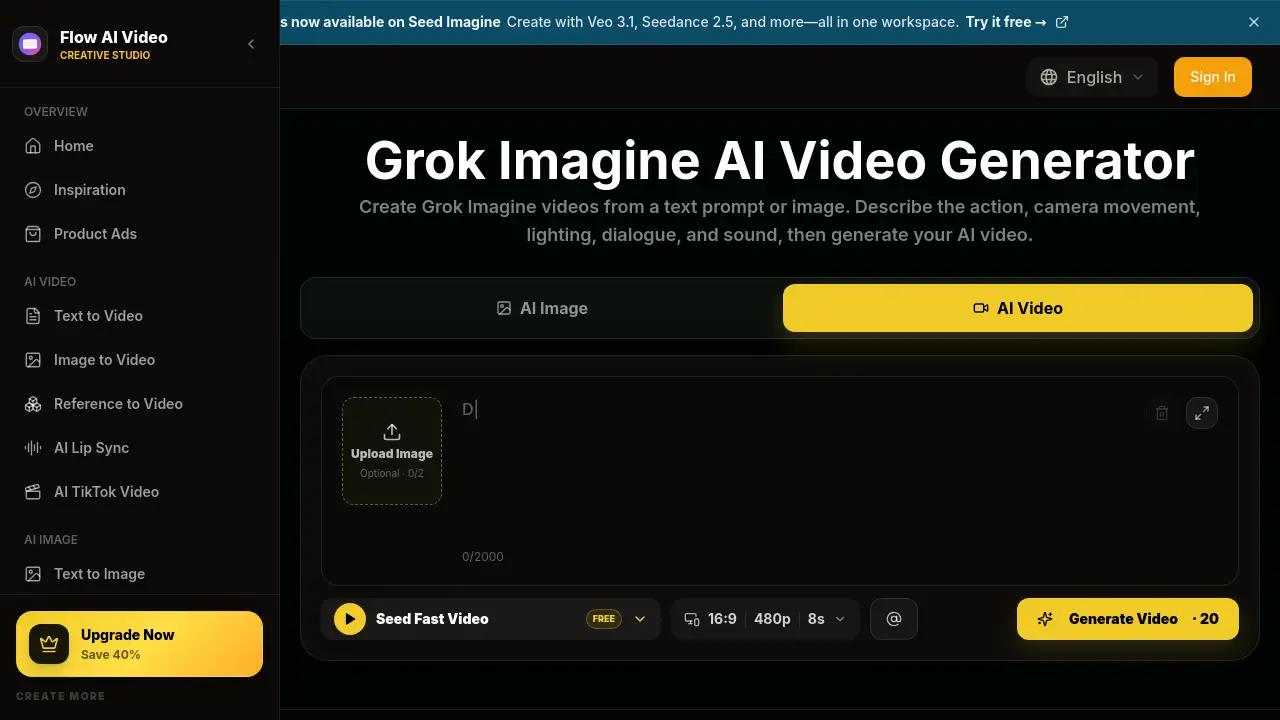
Grok Imagine AI Video Generator is an online AI video generator that helps users turn a text prompt or an uploaded image into short AI videos with motion, camera movement, dialogue, and sound. The tool is designed for creators who need quick video ideas without complex editing software. It provides a simple workflow to plan, generate, and preview clips.
What is Grok Imagine AI Video Generator?
The Grok Imagine AI Video Generator is a browser-based video creation tool offered through Flow AI Video. It converts plain-language prompts or uploaded images into short AI-generated clips. The tool supports camera direction, lighting, audio, and video settings, so users can create cinematic portraits, character performances, product reveals, and social video hooks. It matters because it simplifies AI video creation for people who want quick visuals for social media, ads, or creative projects.
Key Features of Grok Imagine AI Video Generator
Text and Image Input
Start with a written prompt to create a new scene, or upload an image to animate a portrait, product, illustration, or photo. The tool keeps the original image as the visual anchor for the video.
Motion and Camera Control
Describe how the subject should move, where the camera should go, and how the scene should feel. Users can plan camera push-ins, reveals, and subtle movements in the text prompt.
Audio and Dialogue Generation
The Grok Imagine video generator can create spoken lines, ambient sound, and key sound effects at the same time as the action. This makes it useful for talking character clips and short narrative scenes.
Video Settings and Formats
Choose the aspect ratio, duration, resolution, and audio options before generating. These settings help users match the final video to social platforms, ad layouts, or presentation needs.
Flexible Iteration
Reuse a prompt and try a different action, camera move, pace, or visual style without starting the whole project again. This helps creators test multiple versions quickly.
Multi-Device Access
Generate and review videos from a phone, tablet, or computer. The responsive workflow lets users manage prompts and previews in one place.
Use Cases for Grok Imagine AI Video Generator
Short Cinematic Scenes
Describe the subject, action, setting, camera movement, lighting, and final shot to turn a written idea into a focused cinematic clip.
Animated Photos and Artwork
Bring a still portrait, product image, illustration, or keyframe to life while keeping the original visual style intact. This is useful for transforming still images into animated video content.
Dialogue-Driven Character Clips
Create a character performance with a clear expression, spoken line, natural movement, and matching sound. This works well for story concepts and character-focused videos.
Social Media Hooks and Ads
Generate quick reveals, transformations, reactions, or visual surprises for short-form social feeds. Marketers can also test product reveals, lifestyle scenes, and different camera directions before producing longer content.
How to Use Grok Imagine AI Video Generator
- Enter a prompt or upload an image. Describe the subject, action, camera movement, lighting, timing, dialogue, and sound. Alternatively, upload an image to animate.
- Choose video settings. Select the aspect ratio, duration, resolution, and audio options that fit the project.
- Generate the video. Review the prompt and settings, then click Generate. The tool creates a short video with motion and audio.
- Preview and download. Check the movement and sound, then download the clip. If needed, update the prompt to create another version.
Target Audience for Grok Imagine AI Video Generator
- Social media managers creating daily content for Instagram Reels, TikTok, and content calendars
- Marketers and brands testing product ads, campaign concepts, and lifestyle scenes
- TikTok creators looking for scroll-stopping hooks and trend-inspired clips
- YouTube creators making intros, B-roll, story scenes, and YouTube Shorts
- Hobbyists and beginners who want a simple AI video generator without editing experience
Is Grok Imagine AI Video Generator Free?
Grok Imagine AI Video Generator offers free credits to start. Paid plans provide more credits and additional features such as commercial use, priority generation, and higher monthly video limits.
| Plan | Price | Features |
|---|---|---|
| Basic | $19.9/month | 800 credits/month, up to 40 videos/month, no watermark, priority queue |
| Pro | $39.9/month | 2,000 credits/month, up to 200 videos/month, everything in Basic plus commercial use |
| Enterprise | $99.9/month | 6,000 credits/month, up to 600 videos/month, everything in Basic plus priority support |
Grok Imagine AI Video Generator's Pros and Cons
| Aspect | Pros | Cons |
|---|---|---|
| Pricing | Free credits available; monthly and one-time options | Paid plans may feel expensive for occasional users |
| Ease of Use | No editing experience required; simple prompt workflow | Exact control over motion and dialogue may take practice |
| Features | Supports text to video and image to video with audio | Credit-based usage may limit long creative sessions |
| Output Control | Users can set size, length, resolution, and audio options | Some desired camera or sound details may require refined prompts |
Frequently Asked Questions about Grok Imagine AI Video Generator
Can I use Grok Imagine AI Video Generator for free?
The tool offers free credits to start, so new users can test the video generation workflow. For continued use, paid plans are available with more credits and additional features.
What can I create with Grok Imagine AI Video Generator?
Users can create short cinematic scenes, animated portraits, talking character clips, product reveals, social media hooks, and stylized visual stories. The tool supports both text prompts and image uploads.
Does Grok Imagine AI Video Generator support audio?
Yes. Users can describe dialogue, ambient sound, and sound effects in the prompt. The tool can generate audio alongside the video to match the action.
What video settings are available?
Users can choose the aspect ratio, duration, resolution, and audio options before generating. This helps match the video to social media, ads, or creative projects.
Do I need video editing skills?
No. The Grok Imagine AI Video Generator is designed for people who want to describe an idea in everyday language and generate a video without using complex editing software.
Grok Imagine AI Video Generator Tags
Grok Imagine AI Video Generator, Grok Imagine video, AI video generator, text to video, image to video, AI video creation, Grok Imagine prompts, short AI videos, AI video tool, cinematic AI video, video with audio, social media AI video