Introduction
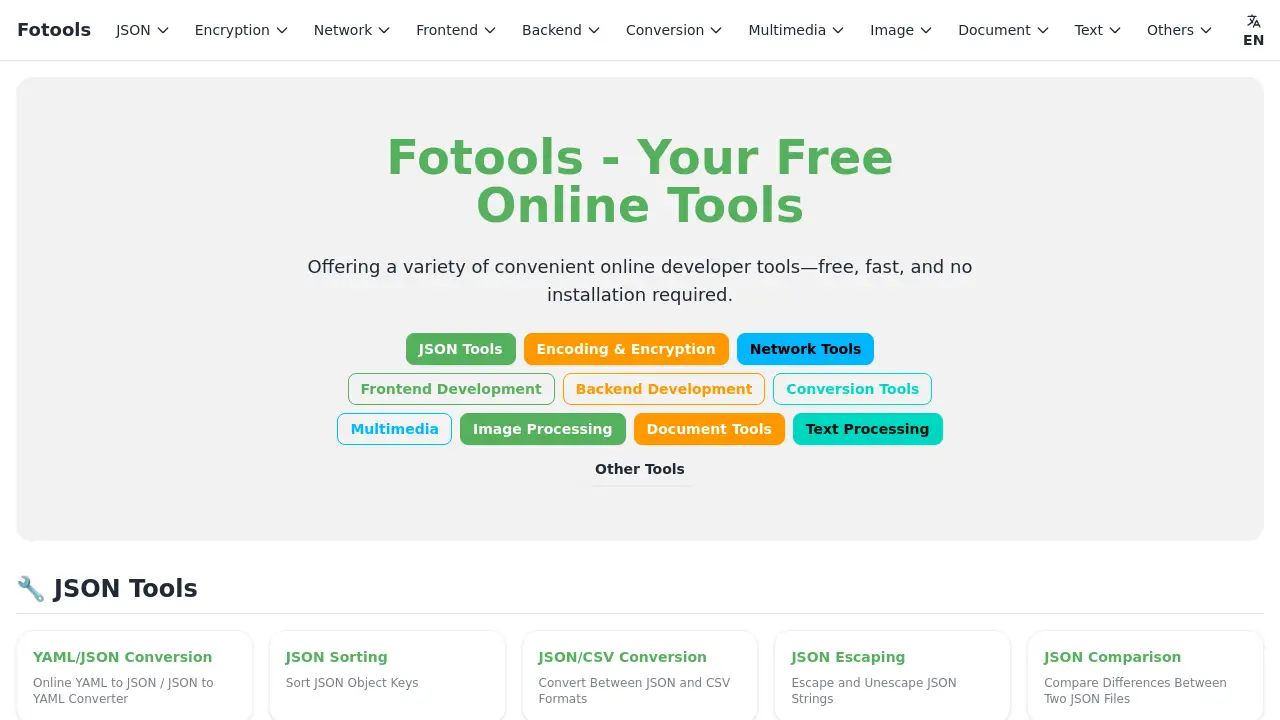
Fotools Online Tools offers over 200 free online utilities for developers and everyday users, covering tasks from JSON formatting to data encryption.
What is Fotools Online Tools?
Fotools Online Tools is a comprehensive web-based platform that provides a vast collection of over 200 specialized utilities, all accessible directly through a web browser. The platform solves the common problem of needing quick, simple tools for tasks like encoding data, converting file formats, hashing passwords, or formatting code without installing any software. It is suitable for a wide range of users, from professional developers and IT administrators to students and casual users who need to perform quick technical tasks. Its significance lies in its convenience, reliability, and the time it saves by centralizing many essential functions in one free, no-download-required service.
Key Features of Fotools Online Tools
Extensive Tool Collection
Fotools hosts over 200 free online tools, categorized for easy navigation into areas like JSON processing, encryption, network diagnostics, and data conversion.
Browser-Based Accessibility
Every tool runs directly in the web browser, requiring no installation, software download, or account registration to get started.
Developer-Focused Utilities
The suite includes essential developer tools for tasks like code formatting, JSON comparison, SQL beautification, and online code execution in multiple programming languages.
Data Security and Encryption
A robust set of encryption and hashing tools is available, featuring algorithms like MD5, SHA256, bcrypt, and RSA for securing sensitive data and passwords.
File and Format Conversion
Users can easily convert between various data formats, including JSON, YAML, XML, CSV, and image or audio files, streamlining data interoperability.
Network Analysis Tools
The platform offers network utilities such as DNS lookup, WHOIS lookup, port scanning, and SSL certificate checking for troubleshooting and analysis.
Real-Time Data Visualization
Fotools provides tools for generating charts and graphs, including bar charts, pie charts, and heatmaps, directly from user-input data.
User-Friendly Interface
Each tool is designed with a simple, intuitive interface that makes complex operations like Base64 encoding or cron job generation straightforward for any user.
Use Cases for Fotools Online Tools
Quick Data Formatting for Developers
A developer can instantly format a minified JSON string, compare two JSON documents for differences, or convert JSON to CSV directly within their browser while debugging an application.
Secure Password Hashing and Verification
A system administrator can use the bcrypt or scrypt hashing tools to generate secure password hashes for a new user database or verify existing login credentials.
Network Troubleshooting and Analysis
An IT support technician can perform a DNS lookup to check domain records, use a subnet calculator for network planning, or verify an SSL certificate's validity for a website.
Educational and Learning Aid
A computer science student can experiment with different encryption algorithms, practice code formatting in various languages, or understand data conversion processes using the interactive tools.
Everyday Utility Tasks
A regular user might calculate a file's MD5 checksum to verify its integrity, convert an image file to a different format, or use the world clock and date calculator for personal planning.
How to Use Fotools Online Tools
- Navigate to the Website: Open a web browser and go to the Fotools website at
https://www.fotools.com. - Browse or Search for a Tool: Use the categorized menu on the homepage to find the desired tool, such as "JSON Formatter" or "Base64 Encoder."
- Input Your Data: Enter the text, upload the file, or provide the necessary data into the tool's input field or area.
- Execute the Tool: Click the relevant action button (e.g., "Format," "Convert," "Encrypt," "Calculate").
- Copy or Download the Result: The processed output will be displayed. You can then copy it to your clipboard or download it as a file for further use.
Target Audience for Fotools Online Tools
- Software Developers and Engineers
- Web Developers and Frontend/Backend Programmers
- System Administrators and IT Professionals
- Data Analysts and Scientists
- Computer Science Students and Educators
- Technical Writers and Bloggers
- General Users needing quick digital utilities
Is Fotools Online Tools Free?
Based on available information, Fotools Online Tools appears to be completely free to use. The product description explicitly states "Over 200 Free Online Tools," and no subscription plans or pricing tiers are mentioned on the referenced homepage content. Users can access all listed tools without cost or registration.
Fotools Online Tools's Pros and Cons
| Aspect | Pros | Cons |
|---|---|---|
| Cost & Accessibility | Completely free; no account or installation required. | Reliant on an internet connection and browser. |
| Features & Scope | Vast collection of over 200 specialized tools in one place. | The sheer number of tools might be overwhelming for new users. |
| Usability | Intuitive, straightforward interface for each individual tool. | Lacks advanced customization or batch processing features found in dedicated desktop software. |
| Performance | Tools are fast and perform tasks instantly in the browser. | Processing speed for very large files may depend on the user's local system and network. |
Frequently Asked Questions about Fotools Online Tools
Is Fotools really free to use?
Yes, Fotools Online Tools is completely free. There are no hidden fees, subscriptions, or usage limits for accessing its over 200 online utilities.
Do I need to create an account to use the tools?
No account creation or registration is required. All tools on the Fotools website are accessible immediately upon visiting the page.
Is my data safe when using Fotools' encryption tools?
The encryption and hashing tools run locally within your web browser. For most tools, the data processing happens client-side, meaning your sensitive input (like text to encrypt) is not typically sent to and stored on Fotools' servers. However, for absolute security with highly sensitive data, using offline, dedicated software is recommended.
Can I use Fotools on my mobile phone?
Yes, the Fotools website is responsive and should work on modern mobile browsers. The interface adapts to smaller screens, allowing you to use many tools on-the-go.
What kinds of file conversions does Fotools support?
Fotools supports a range of data format conversions, including JSON, YAML, XML, CSV, Base64, and various image formats. Specific audio and video processing tools are also mentioned in the product description.
Are the code execution tools safe to run any code?
The online code runners are designed for execution in isolated, sandboxed environments. They are suitable for learning, testing snippets, and quick prototyping but are not intended for running production code or accessing sensitive system resources.
Fotools Online Tools Tags
free online tools, developer tools, web utilities, JSON formatter, Base64 encode decode, encryption tools, hashing calculator, file converter, code formatter, network tools, data conversion, online calculator