Introduction
GoodAI is an AI tools directory for fast discovery.
What is GoodAI?
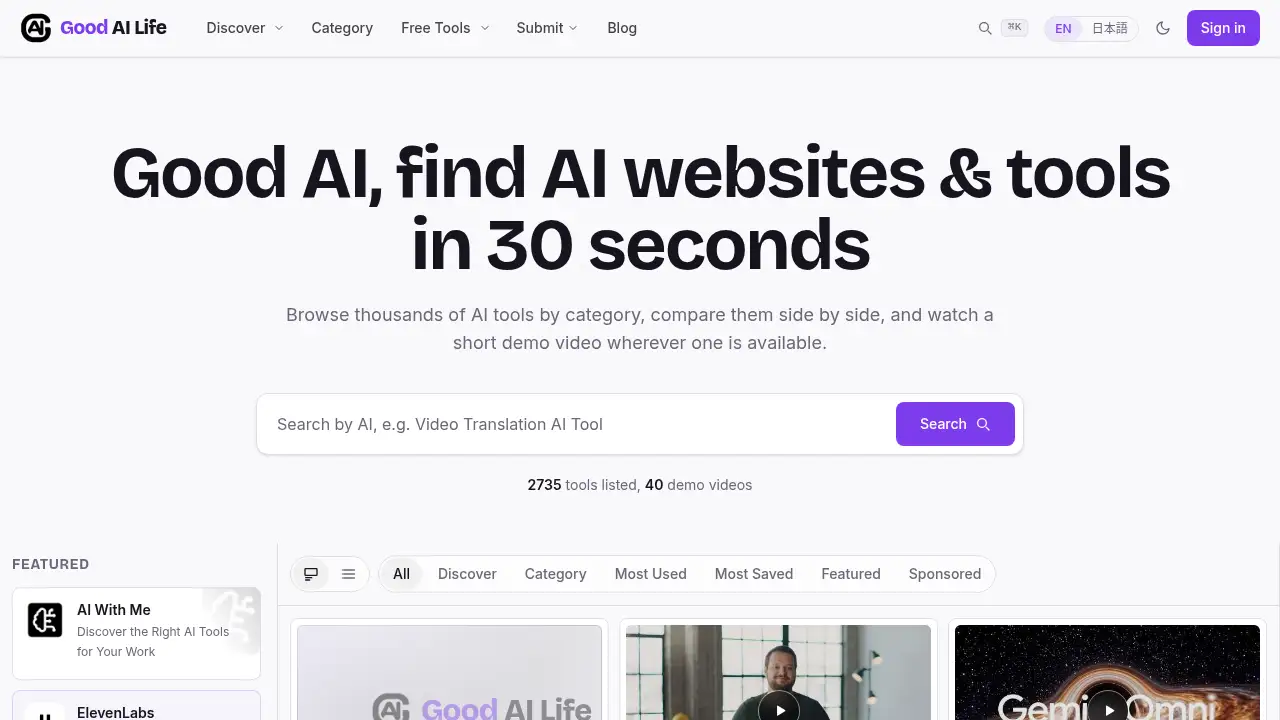
GoodAI is an AI tools directory designed to make AI discovery faster and less overwhelming. Instead of opening many tabs or relying on random lists, users can browse thousands of AI tools, sort them by category, and watch a short demo video where one is available. The platform currently lists 2,735 tools and 40 demo videos, according to its homepage, and it covers areas such as chatbots, writing, coding, image and design, video, audio and music, 3D, productivity, research and data, marketing, and sales.
The problem GoodAI solves is choice overload. The AI market changes quickly, and it can be hard to know which tool is worth trying. GoodAI acts as an AI tools directory that supports quick scanning, side-by-side comparison, and category-based discovery. It is suitable for individuals, creators, developers, marketers, researchers, and small teams who want to find AI tools with demo videos or simply compare AI tools before signing up. Because it is built around fast browsing and practical evaluation, GoodAI matters most for users who want a clear starting point rather than another long list of links.
Key Features of GoodAI
Large AI Tools Directory
Browse a large AI tools directory with 2,735 listed tools, based on the homepage. The size helps users explore many options across common and niche AI use cases.
Demo Videos for Quick Evaluation
Watch short demo videos before trying a tool when a video is available. This feature supports users who prefer to see a product in action rather than judge from a description alone.
Category-Based Discovery
Explore AI tools by category, including chatbots, writing, coding, image and design, video, audio and music, 3D, productivity, research and data, and marketing. Category pages make it easier to find AI tools for a specific task.
Search and Side-by-Side Comparison
Search the directory and compare AI tools side by side to review options in one place. This is useful when several tools appear to solve the same problem.
Sorting and Curation Options
Sort listings by most used, most saved, featured, or sponsored, according to the site. These views help users scan popular choices and curated placements without leaving the AI tools directory.
Free Tools Section
Use the Free Tools section to look for no-cost options before committing to a paid product. It is a practical entry point for users who want to test ideas with a limited budget.
Account Saving and Multilingual Access
Sign in to save tools for later review, and switch between English and Japanese where needed. These features make the AI tools directory easier to use for repeat research.
Use Cases for GoodAI
Finding the Right AI Tool for Work
Use GoodAI to find AI tools for writing, coding, presentations, meetings, research, or marketing tasks. The AI tools directory format helps narrow choices by task.
Comparing AI Tools Before Signing Up
Compare AI tools side by side before creating accounts or paying for plans. Demo videos and category listings can reduce the risk of choosing a tool that does not fit the task.
Exploring Free AI Tools
Start with the Free Tools section to test simple workflows or personal projects. This use case suits students, freelancers, and small teams that need low-cost options first.
Researching AI by Category
Browse AI tool categories to understand what types of products exist in a field. This is useful for market research, content planning, and competitive scanning.
Discovering New AI Websites
Discover AI websites beyond the most familiar names. The directory includes a broad mix of tools, which can help users find alternatives for specific needs.
How to Use GoodAI
- Open the GoodAI homepage and use the search bar to look for a task, tool name, or category.
- Browse AI tool categories if you do not have a specific product in mind; for example, choose writing, coding, video, or productivity.
- Apply sorting or view options such as most used, most saved, featured, or sponsored to scan the AI tools directory.
- Open a tool page and watch a demo video if one is available, then compare it with other options side by side.
- Sign in to save tools for later, or visit the Free Tools section to test lower-cost choices first.
Target Audience for GoodAI
- Individuals exploring AI tools for personal productivity and learning
- Content creators looking for writing, image, video, audio, or music tools
- Developers and technical teams searching for coding and app-building tools
- Marketers and sales teams comparing AI tools for campaigns and outreach
- Researchers and analysts looking for search, data, and research assistants
- Small teams that need a fast AI tools directory for shared exploration
Is GoodAI Free?
The reference content does not list paid plans, subscription prices, or trial terms. The site is accessible for browsing, includes a Free Tools section, and offers account sign-in to save tools. Users should check the official GoodAI website for current access rules and any future paid features. Based on the available information, GoodAI functions as a free-to-browse AI tools directory, but pricing details are not confirmed.
GoodAI's Pros and Cons
| Aspect | Pros | Cons |
|---|---|---|
| Size | Lists 2,735 AI tools in one directory | A large directory can still require careful filtering |
| Evaluation | Demo videos help users watch before trying | The homepage notes 40 demo videos, so video coverage is limited |
| Discovery | Categories, search, sorting, and side-by-side comparison support fast browsing | Comparison details depend on the information provided for each listing |
| Access | Free browsing, a Free Tools section, and account saving are available | Paid plans and pricing terms are not detailed in the reference content |
| Language | English and Japanese interfaces are available | Other languages are not shown in the reference content |
Frequently Asked Questions about GoodAI
What is GoodAI?
GoodAI is an AI tools directory that helps users find AI websites and tools in about 30 seconds. It combines search, categories, comparison, and short demo videos where available.
Is GoodAI an AI tools directory?
Yes. GoodAI is built as an AI tools directory with thousands of listings, category pages, and sorting options. It is designed for quick discovery rather than deep software reviews.
Does GoodAI include demo videos?
Some listings include short demo videos. The homepage states that the site has 2,735 tools and 40 demo videos, so users can watch before trying only when a video is available.
Can I compare AI tools on GoodAI?
GoodAI supports side-by-side comparison of AI tools, according to its product description. This helps users compare AI tools by features and fit before signing up.
Are there free AI tools on GoodAI?
The site includes a Free Tools section for users who want to explore no-cost options. Availability and terms depend on each listed tool, so check the individual tool page.
Do I need an account to use GoodAI?
Users can browse the AI tools directory without an account, based on the site structure. Signing in is presented as a way to save tools for later review.
GoodAI Tags
AI tools directory, GoodAI, AI tools with demo videos, find AI tools, compare AI tools, AI tool categories, free AI tools, discover AI websites, AI tool search, AI tools for productivity, AI tools for creators, side-by-side AI tool comparison