Introduction
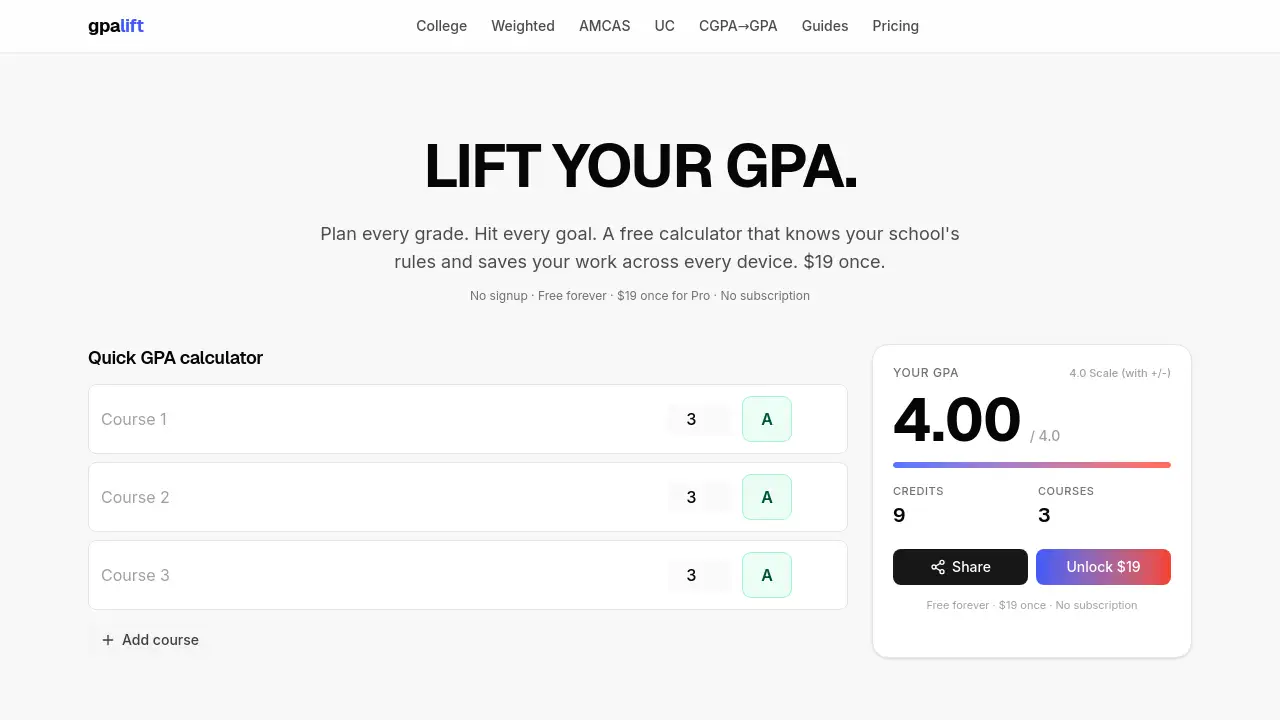
GPA Lift is a free GPA calculator with plus-minus support.
Unlike generic tools, it applies each school’s actual grading rules.
What is GPA Lift?
GPA Lift is a no‑signup, free GPA calculator with plus‑minus grading that respects the specific policies of colleges, medical school applications (AMCAS, AACOMAS, TMDSAS), law school applications (LSAC), and the University of California system. It solves the problem of vague online calculators that ignore plus/minus values, school‑specific caps, or repeated course treatment. Students can enter their courses, select their school’s scale, and see an accurate GPA instantly.
The tool is suitable for undergraduates, pre‑med and pre‑law applicants, and international students converting CGPA. It matters because a wrong GPA estimate can affect scholarship eligibility, graduate admissions, and academic planning. With a free core that never expires and a one‑time $19 Pro upgrade, GPA Lift offers an honest alternative to subscription‑based grade calculators.
Key Features of GPA Lift
School‑Specific Grading Rules
The calculator uses the actual policies from each institution. For example, the UC calculator caps honors bonuses at eight semesters and drops freshman year, exactly as UC admissions does. No more guessing whether a generic 4.0 scale applies.
AMCAS and LSAC Calculators
The AMCAS calculator counts every attempt at a repeated course and truncates (does not round) the GPA, matching what AAMC reports to medical schools. The LSAC calculator follows the same rigorous logic, making it a reliable tool for pre‑law applicants.
CGPA Converter with Multiple Formulas
International students can convert a 10‑point CGPA to US scales using five different formulas side by side. Because different graduate programs use different conversions, seeing all options helps applicants choose the most favorable or accurate one.
Cross‑Device Sync (Pro)
Save your transcript in the cloud. Start on a phone, continue on a laptop, and the data remains consistent. Pro also includes unwatermarked PDF exports and a BCPM auto‑classifier that maps your course names to AAMC’s four science categories.
What‑If Scenarios (Pro)
Plan future semesters by creating snapshots of grade combinations. See how a B+ in Organic Chemistry or a withdrawal affects your cumulative and major GPA before you take the class.
Open Source Methodology
The BCPM classifier is on GitHub. Every grading rule links to its official AAMC, LSAC, AACOMAS, TMDSAS, or UC document. If a number is wrong, the public receipts allow a fix within a week.
Use Cases for GPA Lift
Pre‑Med GPA Planning
A student entering a B- in a repeated chemistry course needs to know how AMCAS counts both attempts. The free GPA calculator with plus‑minus shows the impact instantly, helping the student decide whether to retake or focus on other subjects.
UC Transfer Application
A California community college student needs to calculate capped GPA with the honors bonus limit. Using the UC calculator built into GPA Lift ensures the result matches UC’s official formula.
International CGPA Conversion
An applicant from India with a 9.2 CGPA wants to apply to US graduate programs. The CGPA converter displays five conversion methods, so the student can present the most advantageous converted GPA that still aligns with the target school’s preferred formula.
How to Use GPA Lift
- Go to gpalift.com – no signup required.
- Select your school or the relevant system (AMCAS, LSAC, UC, etc.) from the dropdown.
- Add your courses: enter course name, credits, and the grade you received (with plus/minus, e.g., B+).
- The free GPA calculator with plus‑minus instantly displays your term and cumulative GPA.
- To save work or access Pro features, click the Pro upgrade – pay $19 once and sync across devices.
Target Audience for GPA Lift
- College and university students in the US (especially those at schools with non‑standard grading)
- Pre‑med students preparing AMCAS applications
- Pre‑law students using LSAC
- California community college students transferring to UC
- International students converting CGPA to US 4.0 scale
- Academic advisors who need a consistent, verifiable GPA calculator
Is GPA Lift Free?
| Plan | Price | Features |
|---|---|---|
| Free | $0 | Core GPA calculator with plus‑minus and per‑school rules, no signup, unlimited calculations |
| Pro | $19 once (no subscription) | Cross‑device sync, AMCAS BCPM auto‑classifier, unwatermarked PDF exports, what‑if scenarios, 30‑day refund |
GPA Lift's Pros and Cons
| Aspect | Pros | Cons |
|---|---|---|
| Pricing | Core is free forever; Pro is $19 one‑time, no monthly fee | Pro features require payment for advanced needs |
| Accuracy | Uses official school/application rules; open‑source methodology | Not every school is covered; relies on user selecting correct policy |
| Ease of Use | No signup needed; simple course entry | Interface may feel basic for users wanting detailed analytics |
| Compatibility | Works on phone and laptop via sync (Pro) | Some international scales may not be available |
Frequently Asked Questions about GPA Lift
Does GPA Lift include plus/minus grades?
Yes, the free GPA calculator with plus‑minus handles A+, A, A-, B+, B, B-, C+, C, C-, D+, D, D-, and F. The grade points adjust according to the selected school’s scale.
How does GPA Lift know my school’s rules?
GPA Lift maintains a database of grading policies from official sources. Each rule links to the original AAMC, LSAC, AACOMAS, TMDSAS, or UC document. Users can also select a generic 4.0 scale if their school is not listed.
Is there a subscription or hidden fee?
No. The free version never expires and has no ads. The Pro upgrade is a one‑time payment of $19 with a 30‑day money‑back guarantee. There is no monthly or annual subscription.
Can I use GPA Lift for law school applications?
Yes. The LSAC calculator is built into the tool. It follows LSAC’s rules for repeated courses and plus/minus treatment, giving a GPA that matches what law schools receive.
Does the CGPA converter work for any country?
The converter supports common international scales (e.g., 10‑point, 4.0, percentage) and shows five different formulas side by side. While it covers many systems, users should verify the method used by their target institution.
How do I save my courses across devices?
Saving across devices requires the Pro upgrade. After paying $19 once, you can log in (via email or social sign‑in) and your transcript syncs automatically between phone, tablet, and laptop.
GPA Lift Tags
free GPA calculator with plus-minus, AMCAS GPA calculator, UC GPA calculator, LSAC GPA calculator, CGPA converter, no subscription GPA calculator, per-school grading rules, college GPA planning, pre-med GPA tool, academic planner, grade simulator, open source GPA calculator