Introduction
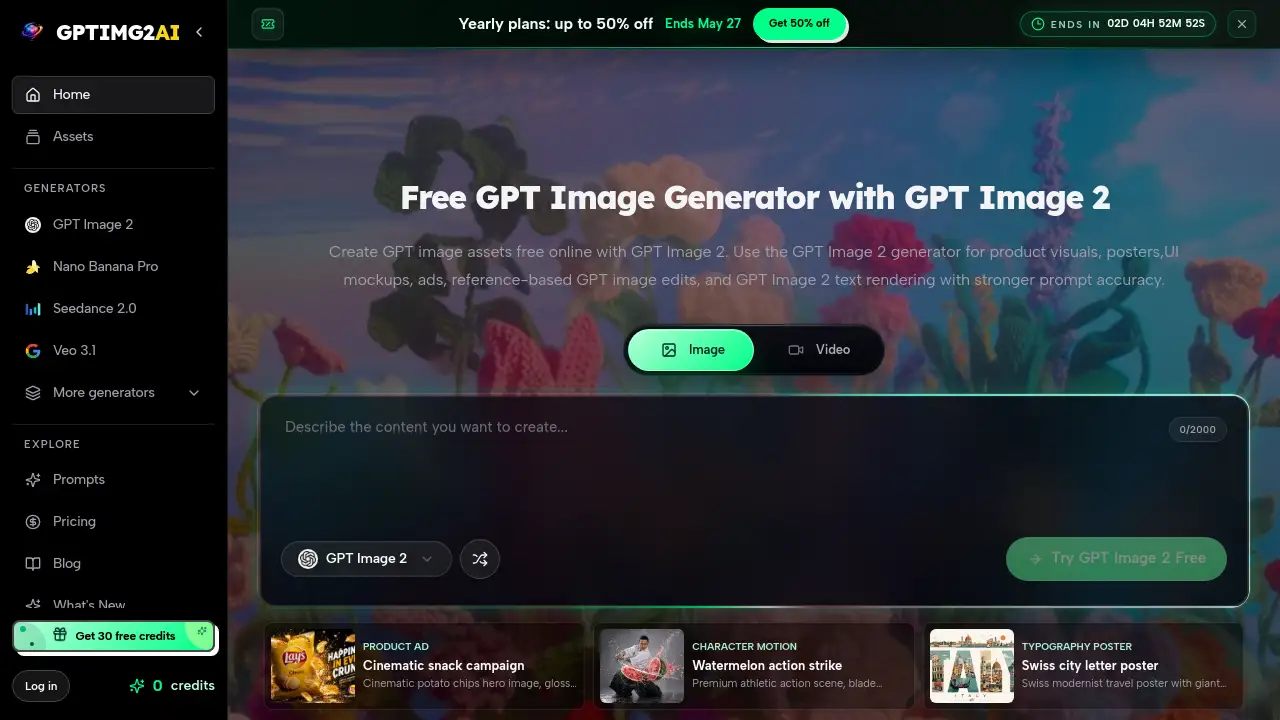
A free online AI image generator optimized for creating production-ready GPT image assets for marketing and design.
What is GPTIMG2 AI?
GPTIMG2 AI is a specialized AI image generation tool designed for creating professional-grade visual assets. It addresses the common problem in AI image generation where outputs often fail to meet specific production requirements, such as accurate text rendering or faithful adherence to reference images. The platform is built for image-first production, prioritizing prompt accuracy, stronger text rendering, and tighter, more controlled edits. This makes it particularly suitable for marketers, designers, and content creators who need product visuals, posters, UI mockups, and ad creatives that are review-ready and can be directly integrated into campaigns. Its focus on brief fidelity and reference-based edits distinguishes it from more general AI art tools, positioning it as a practical solution for commercial and design workflows.
Key Features of GPTIMG2 AI
Stronger Text Rendering
GPT Image 2 excels at generating clear, legible text within images, making it highly effective for creating assets like posters, menus, UI mockups, and ads where readable in-image copy is critical for approval.
Reference-Based Editing
The tool offers superior reference fidelity, allowing users to upload a source image and execute controlled edits that preserve key details like product cues, character features, and specific layouts.
Review-Ready Output
It is optimized to produce high-quality 2K and 4K still images with clean detail and composition, providing a smoother path into client or team review cycles compared to draft-focused generators.
Production Strength for Commerce
The generator is built for commercial applications, showing particular production strength in creating assets like product shots, packaging visuals, e-commerce banners, and typography-heavy posters.
Controlled Iteration
Feedback loops are more precise; users can make specific revisions—such as changing background or text—while reliably maintaining the core subject and approved composition of the asset.
Use Cases for GPTIMG2 AI
Product Ad Campaigns
Create cinematic and glossy product visuals, like hero images for snack campaigns or tech products, with e-commerce-ready layouts and dramatic lighting.
UI and App Mockups
Generate clean, professional UI thumbnail mockups and interface panels with bold, readable typography for tutorials, presentations, and marketing materials.
Stylized Portrait Edits
Transform reference photos into artistic styles, such as colored-pencil illustrations, while accurately preserving the subject's identity, expression, and hairstyle.
Infographic Design
Produce cartoon-style explainer boards and infographics with simplified concept blocks, hand-drawn icons, and a clear visual hierarchy for educational or presentation content.
Dynamic Action Scenes
Generate premium athletic or action scenes, such as a blade slicing a watermelon, with frozen splash particles and high-contrast studio lighting for dynamic visuals.
Typography-Focused Posters
Design Swiss modernist-inspired posters or other typography-heavy visuals where giant, readable letters integrate landmark illustrations within a precise grid layout.
How to Use GPTIMG2 AI
- Describe the Image: Start by writing a detailed prompt. State the subject, composition, materials, lighting, brand elements, and any specific text that must appear legible within the GPT image asset.
- Generate the First Pass: Use the GPT Image 2 generator with your prompt. For better accuracy, you can also upload a reference image to guide the initial output closer to your vision.
- Refine the Details: Use the tool's editing features to make targeted adjustments. Tighten the layout, correct text, or modify styling without having to rewrite the entire prompt from scratch.
- Send the Asset Downstream: Once approved, download the high-resolution image for immediate use in campaigns, storefronts, presentations, or as a keyframe to guide further video production.
Target Audience for GPTIMG2 AI
- Marketing Professionals and Ad Creatives needing campaign-ready visuals.
- UI/UX and Graphic Designers creating mockups and commercial compositions.
- E-commerce Managers and Product Marketers requiring high-quality product visuals.
- Content Creators and Educators producing infographics and explainer materials.
- Social Media Managers designing engaging, typography-heavy posts and ads.
Is GPTIMG2 AI Free?
The reference information indicates that GPTIMG2 AI offers a free online tier. For specific details on credit limits, premium features, or paid plans, users should visit the official GPTIMG2 AI website to check the latest pricing page.
GPTIMG2 AI's Pros and Cons
| Aspect | Pros | Cons |
|---|---|---|
| Output Quality | Excellent text clarity and review-ready output for professional use. | May be over-specialized for users seeking only abstract or highly artistic imagery. |
| Workflow Integration | Strong production strength and controlled iteration for commercial design workflows. | The focus on precision might have a slightly steeper learning curve than simpler, idea-generation tools. |
| Pricing & Accessibility | Offers a valuable free online tier for testing and light use. | Full commercial production may require understanding of credit systems or paid plans. |
| Feature Set | Unmatched reference fidelity for precise, brand-consistent edits. | Compared to some competitors, it may offer fewer styles geared purely toward fine art or cinematic exploration. |
Frequently Asked Questions about GPTIMG2 AI
What makes GPT Image 2 different from other AI image generators?
GPT Image 2 is specifically engineered for image-first production, with core advantages in prompt accuracy and stronger text rendering. It is optimized to create assets that survive review and revision, making it more suitable for direct commercial use than tools focused on exploration or artistic style.
Can I edit an existing image with GPTIMG2 AI?
Yes, a key feature is reference-based GPT image edits. You can upload a reference image and provide instructions to edit it while preserving crucial details like product design, character identity, or specific layout elements.
Is the text generated inside images actually readable?
The platform highlights stronger text rendering as a core advantage. It performs well for assets like posters, labels, and UI mockups where legible in-image text is necessary, though results should always be checked as perfection can vary by prompt.
What are some common use cases for GPT Image 2?
Common GPT Image 2 use cases include creating product ads, UI mockups, stylized portrait edits, commerce mockups, infographics, and typography-heavy posters. It is built for marketing, design, and e-commerce visual production.
How does the free online access work?
The product description states you can create GPT image assets free online. This typically involves a certain number of free generations or credits per period. For sustained professional use, checking the official site for credit packages or subscription plans is recommended.
Who is the GPT Image 2 generator best suited for?
It is ideally suited for marketing teams, graphic designers, e-commerce managers, and content creators who need reliable, high-fidelity product visuals and marketing assets that require minimal cleanup and are ready for client presentation.
GPTIMG2 AI Tags
GPTIMG2 AI, GPT Image 2, AI image generator, free online AI image tool, create GPT image assets, product visuals, AI for marketing, text rendering AI, reference-based image edit, UI mockup generator, ad creative tool, commercial AI images, prompt accuracy, brief fidelity, production-ready AI, image-first production