Introduction
Grayscale Image is a free online tool for converting color photos to black and white with professional controls.
What is Grayscale Image?
Grayscale Image is a web-based application designed to transform color photographs into high-quality grayscale images. This tool addresses the need for a simple, accessible, and professional-grade grayscale image converter that operates directly in a web browser. It is suitable for a wide range of users, from photographers and designers to social media enthusiasts and students, who need to create black and white photos for artistic, professional, or personal projects. The significance of this grayscale image tool lies in its combination of advanced conversion algorithms with a user-friendly interface, all while ensuring user privacy by processing images locally on the device. This eliminates the need for complex software downloads or concerns about uploading sensitive photos to external servers.
Key Features of Grayscale Image
Professional Conversion Algorithms
The tool offers four distinct scientific methods for grayscale image conversion, including the Weighted (ITU-R BT.709) algorithm for natural-looking results, as well as Average, Maximum, and Minimum methods for various artistic effects.
Real-Time Adjustment Controls
Users can fine-tune their black and white photos with precision sliders that adjust brightness and contrast from -100 to +100, with all changes visible instantly in the preview.
Privacy-Focused Processing
All grayscale image processing occurs entirely within the user's web browser, ensuring that original photos and converted images never leave the local device for maximum security.
High-Quality Output
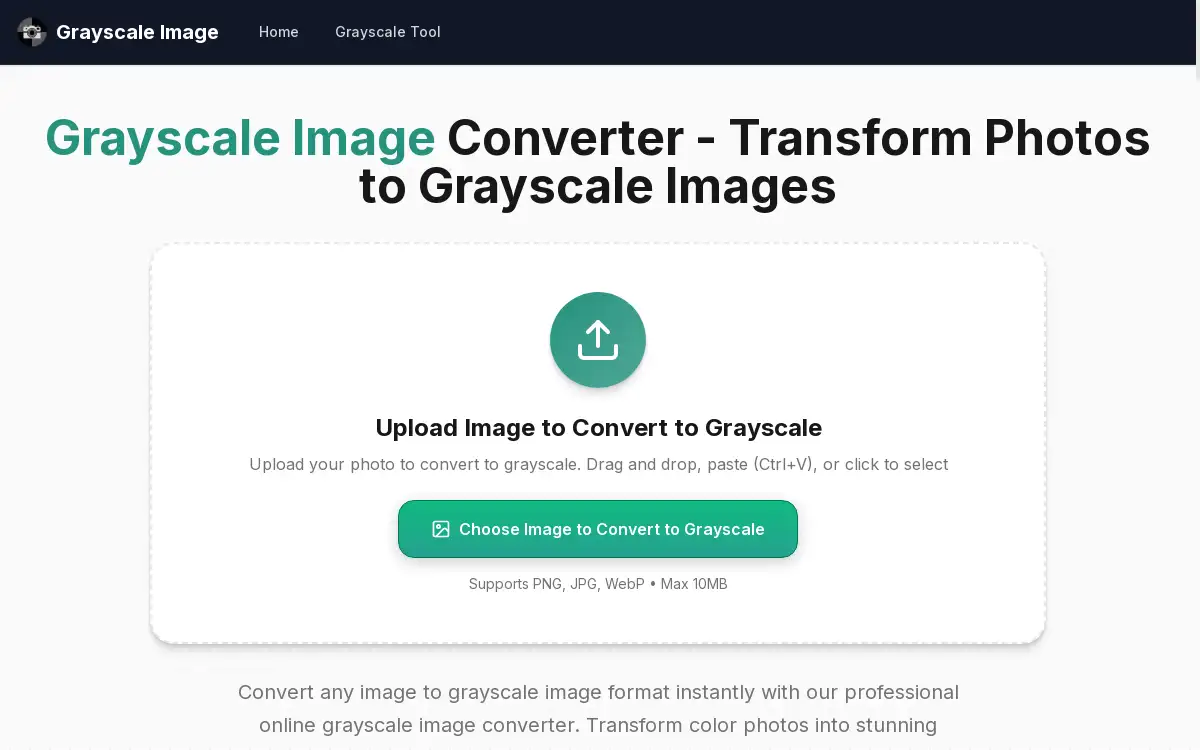
The converter supports input formats like JPG, PNG, and WebP, and outputs the final grayscale image as a full-resolution PNG file without any quality loss or watermarks.
Cross-Platform Accessibility
This grayscale image tool is built with a responsive design, providing a seamless experience and consistent performance on any device, including desktops, tablets, and mobile phones.
Use Cases for Grayscale Image
Artistic Photography Enhancement
Photographers can use the grayscale image converter to create dramatic black and white photos, leveraging different conversion methods to evoke specific moods and highlight textures.
Web and Graphic Design Projects
Designers can quickly generate monochrome assets for websites, presentations, or marketing materials, using the brightness and contrast controls to ensure optimal visual impact.
Academic and Documentation Work
Students and professionals can convert diagrams or illustrations to grayscale image format for reports and academic papers where color is not required or is distracting.
Social Media Content Creation
Content creators can transform color images into striking black and white photos for social media posts, profiles, or artistic portfolios, all without needing advanced editing skills.
How to Use Grayscale Image
Using the Grayscale Image tool is a straightforward process that can be completed in a few simple steps to achieve a professional grayscale image.
- Upload Your Image: Begin by uploading a color photo. You can drag and drop the file, paste it (Ctrl+V), or click the upload area. The tool supports PNG, JPG, and WebP formats up to 10MB.
- Select Conversion Method: Choose from one of the four available algorithms—Weighted for natural results, Average, Maximum, or Minimum—to define the style of your black and white photos.
- Adjust Settings: Fine-tune the appearance of your grayscale image using the sliders to adjust brightness and contrast, observing the real-time preview.
- Download the Result: Once satisfied with the preview, click to download the final grayscale image in high-quality PNG format.
Target Audience for Grayscale Image
- Professional photographers and digital artists
- Graphic and web designers
- Social media managers and content creators
- Students and educators
- Hobbyists and general users looking for a simple photo editing tool
Is Grayscale Image Free?
The Grayscale Image converter is completely free to use. It operates on a generous free plan that includes unlimited conversions, access to all four professional algorithms, and full use of the brightness and contrast controls. There are no watermarks, no registration requirements, and no limitations on the number of black and white photos you can create. There is no mention of any premium or paid version, making all its features accessible without cost.
Frequently Asked Questions about Grayscale Image
How do I convert an image to grayscale using this tool?
To create a grayscale image, upload your color photo via drag-and-drop or the upload button. The tool will instantly display a preview, allowing you to select a conversion method and adjust brightness and contrast before downloading the final result.
What are the different grayscale conversion methods available?
The grayscale image converter provides four methods: Weighted (ITU-R BT.709) for natural results, Average for uniform conversion, Maximum for high-contrast effects, and Minimum for darker artistic outcomes, giving you control over the final look of your black and white photos.
Can I adjust the brightness and contrast of my converted image?
Yes, the tool includes professional controls for both brightness and contrast, each adjustable from -100 to +100. Changes are reflected in real-time, allowing for precise customization of your grayscale image.
What image formats does the converter support?
The tool supports uploading common formats including JPG, PNG, and WebP. The converted grayscale image is always downloaded as a high-quality PNG file to preserve detail.
Is this grayscale converter completely free to use?
Absolutely. The grayscale image tool is 100% free with no hidden costs, watermarks, or registration required. Users can convert an unlimited number of black and white photos.
Does the conversion process require an internet upload?
No, the conversion happens entirely within your browser. This client-side processing means your original photos are never uploaded to any server, ensuring privacy and fast grayscale image processing.
Grayscale Image Tags
grayscale image, grayscale image converter, black and white photos, grayscale image tool, online grayscale converter, convert to grayscale, free image converter, black and white image, photo to grayscale, grayscale conversion, image processing, privacy-focused converter