Introduction
Hatchr is a builder-first platform for organizing work and creating a dynamic, living project portfolio.
What is Hatchr?
Hatchr is a specialized online platform designed for creators, developers, and builders. It solves the common problem of fragmented work by providing a central space to document, organize, and showcase projects as they evolve. Unlike static portfolios, Hatchr allows users to document their journey in real-time, turning raw progress into a compelling narrative. This platform is ideal for anyone involved in building products, writing code, designing hardware, or launching startups who wants to share their process publicly or keep a detailed log for themselves. It matters because it transforms isolated work artifacts into a living, searchable history of creation, fostering both personal reflection and community discovery.
Key Features of Hatchr
Unified Workspace
Hatchr provides a single, centralized location to keep all project-related materials, from initial notes and code snippets to final updates and attached files, eliminating the need to scatter information across multiple tools.
Living Project Portfolio
Projects on Hatchr are not static resumes; they are presented as real timelines where each "hatch" (project start) and "update" documents progress, creating a dynamic and authentic showcase of a builder's journey and skills.
Real-Time Project Documentation
The platform encourages building in public by allowing users to document their process step-by-step, turning every milestone, setback, and breakthrough into a chronological story that others can follow and learn from.
Community-Driven Discovery
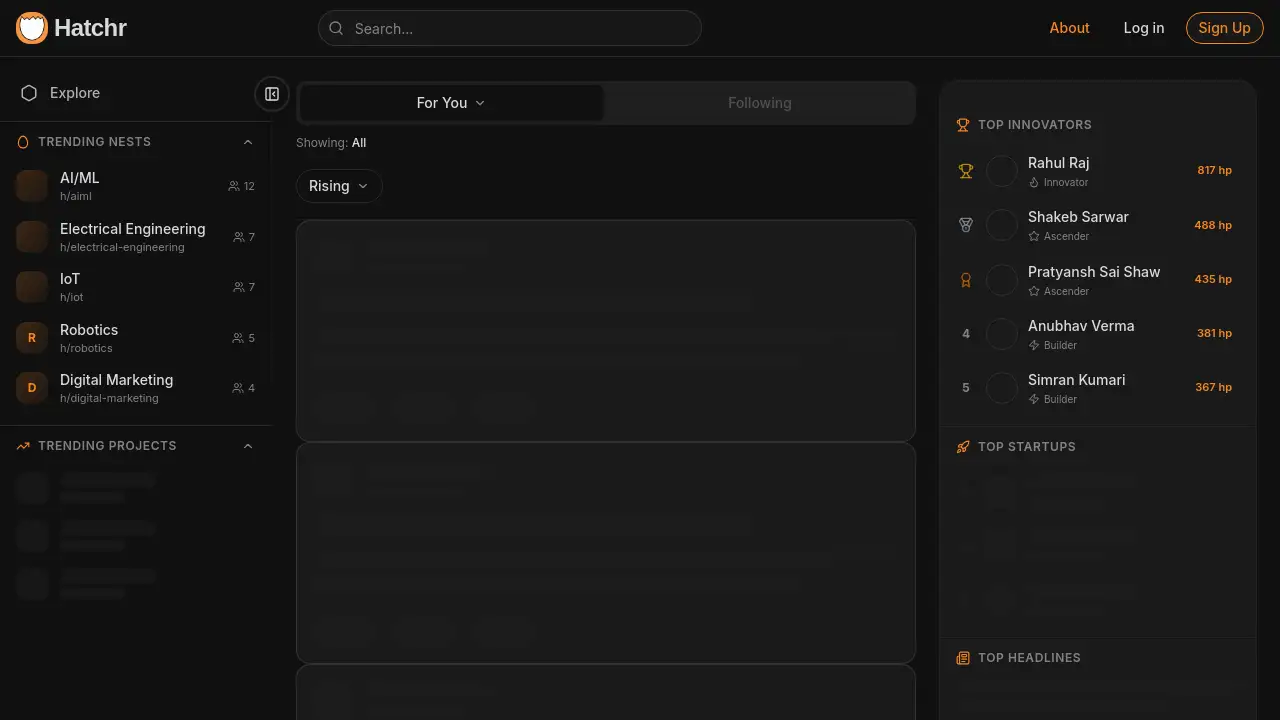
Users can explore trending projects, join communities like AI/ML or IoT, and follow other builders, creating a network for inspiration, feedback, and collaboration based on shared interests in specific domains.
AI-Powered Insights
Integrated AI tools, like "Explain with AI," offer users additional ways to analyze or gain perspectives on their own project updates or those shared within the community.
Use Cases for Hatchr
Building in Public
Developers and entrepreneurs can use Hatchr to share their startup journey, from concept to launch, attracting early feedback and building an audience by documenting each phase transparently.
Academic & Research Project Tracking
Students and researchers can document complex projects, like developing an EV battery safety system or training a custom AI model, creating a detailed, timestamped record of their methodology and results.
Open-Source Project Management
Open-source contributors can manage and showcase their work, linking to GitHub repositories, sharing demos, and providing live updates to keep the community informed about progress and new releases.
Professional Skill Demonstration
Freelancers and job seekers can build a living portfolio that demonstrates not just finished work, but their problem-solving process, technical depth, and ability to see a project through from idea to completion.
How to Use Hatchr
- Sign Up: Create a free account on the Hatchr website.
- Start a Project: Click to begin "hatching" a new project. Give it a title and an initial description outlining your goals.
- Document Progress: Use the update function to post regular progress logs. You can add detailed text, attach files (like code in .zip files or scripts), and share links to demos.
- Organize & Share: Categorize your project with tags, share it with specific communities, and interact with other builders by exploring trending "nests" and projects.
Target Audience for Hatchr
- Software Developers and Engineers
- Hardware & IoT Makers
- AI/ML Researchers and Practitioners
- Startup Founders and Entrepreneurs
- Students and Academics working on technical projects
- Designers and Product Builders
- Anyone practicing "build in public"
Is Hatchr Free?
Based on the available reference information, Hatchr offers a free tier that allows users to sign up, create projects, and post updates. The homepage prominently features a "Sign Up" button without immediate mention of paid plans, suggesting accessibility for individual builders. For detailed information on any potential premium features or team plans, users should visit the official Hatchr website.
Hatchr's Pros and Cons
| Aspect | Pros | Cons |
|---|---|---|
| Core Functionality | Excellent for real-time project documentation and creating a living portfolio. | May be less useful for those who only need a static, one-page portfolio site. |
| Community & Network | Built-in communities foster discovery and connection with like-minded builders. | Network value depends on active participation within the platform's user base. |
| Usability | Encourages structured, chronological updates which are great for storytelling. | The "build in public" approach may not suit everyone, especially those working on private or proprietary projects. |
| Features | Integrates useful tools like file attachments and AI explanations directly into the workflow. | Advanced project management features (like task assignment or Gantt charts) are not evident from the provided information. |
Frequently Asked Questions about Hatchr
What does "hatching" a project mean?
On Hatchr, "hatching" refers to the act of formally starting and publishing a new project on the platform. It's the first entry in your project's timeline, setting the stage for all future updates and documentation.
Is Hatchr only for coding or software projects?
No. While the platform is popular with developers, it is designed for all kinds of builders. The reference content shows projects ranging from AI model development and IoT hardware for EV batteries to startup app launches, indicating it's suitable for any creative or technical building process.
Can I keep my projects private on Hatchr?
The available information emphasizes public sharing, community discovery, and "building in public." There is no indication from the provided content about private project options. Users should check the platform's settings for the most current privacy features.
How is Hatchr different from GitHub or a blog?
GitHub excels at code version control, while a blog is for linear publishing. Hatchr combines aspects of both, focusing on the narrative of building. It structures the entire project lifecycle—from motivation to completion—in a timeline format optimized for storytelling and community interaction around the process, not just the code or final post.
What are "Nests" on Hatchr?
"Nests" appear to be communities or curated feeds within Hatchr. Users can explore trending nests dedicated to specific interests like AI/ML or IoT, making it easier to find relevant projects and connect with builders in those fields.
Does Hatchr own the content I post?
This is a critical question for any publishing platform. The reference information does not specify the terms of service. Users should always review Hatchr's official terms and conditions to understand content ownership, licensing, and usage rights.
Hatchr Tags
Hatchr, builder-first platform, living portfolio, project documentation, build in public, project timeline, developer portfolio, showcase projects, work organization, creative workspace, tech community, open source projects