Introduction
ImageToImage AI is an online AI image generator that transforms photos into new styles, concepts, and designs using simple text prompts. ImageToImage AI helps creators, designers, marketers, and game developers turn existing images into polished visuals in seconds. This ImageToImage AI review covers key features, use cases, pricing, and practical tips for better image transformation results.
What is ImageToImage AI?
ImageToImage AI is a professional image to image AI generator that lets users upload a photo and restyle it with a text prompt. The tool is built for people who need fast, high-quality visuals without using complicated design software. ImageToImage AI solves the problem of starting from a blank canvas by using an existing image as the base. Users can change art style, improve details, or create completely new visual concepts.
This AI image generator from image is suitable for graphic designers, social media managers, indie game developers, comic artists, and startup founders. Because ImageToImage AI focuses on image transformation, it makes creative work faster and more accessible. The product also works as an AI photo editor, allowing users to refine visuals while keeping important elements consistent across multiple images.
Key Features of ImageToImage AI
Outstanding AI-Generated Results
ImageToImage AI's AI image generator produces clear, detailed images ready for personal and professional use. Users get realistic transformations after every prompt.
HD, Watermark-Free Images
Every output is high-resolution and free from watermarks. This makes the free AI image editor suitable for client work, portfolios, and social media.
Safe and Private AI Creations
Uploads stay protected with secure processing and strict privacy safeguards. ImageToImage AI is useful for designers and businesses working with sensitive visuals.
Fast Output Speed
The tool creates image transformations in seconds. This speed helps users test multiple ideas without losing quality.
Multiple AI Models
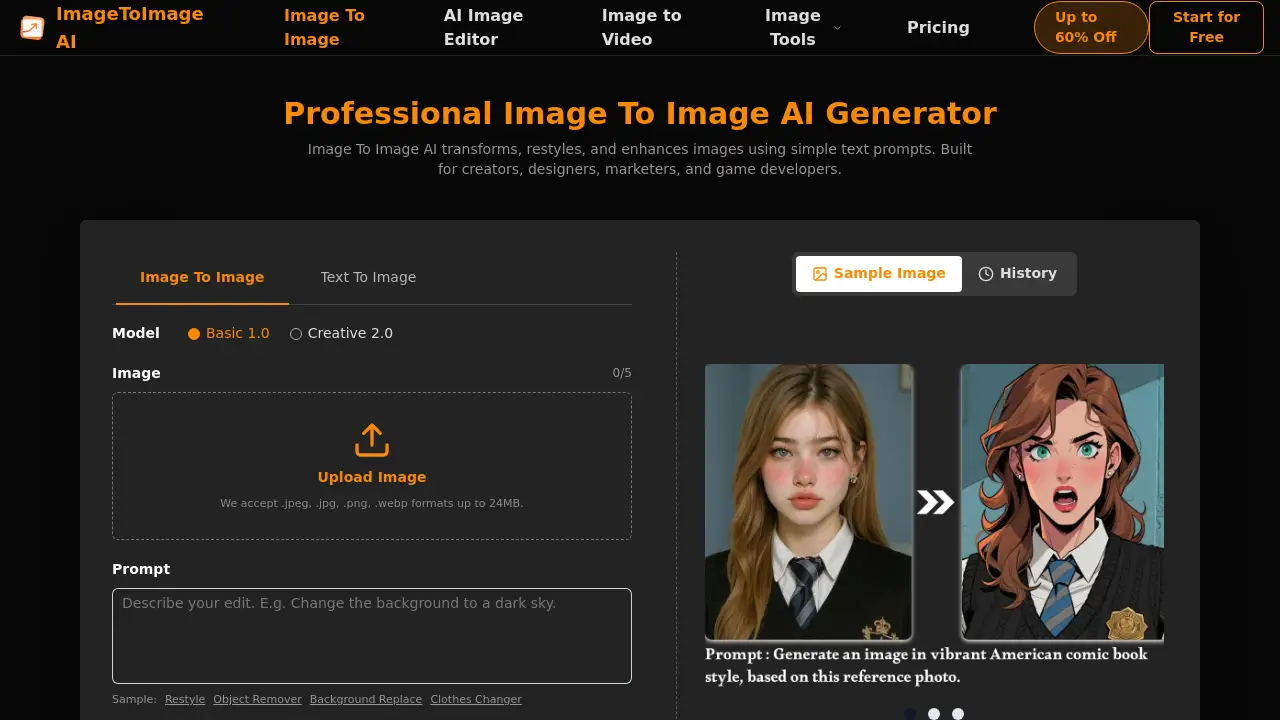
Users can choose between Basic 1.0 and Creative 2.0. This flexibility makes the AI image generator from image useful for simple edits and artistic restyling.
Consistent Characters and Stories
Facial features, outfits, and art styles stay consistent across scenes. ImageToImage AI helps comic creators, storyboard artists, and marketing teams maintain visual continuity.
Use Cases for ImageToImage AI
Social Media Content Creation
Marketers can use ImageToImage AI to turn product photos into eye-catching social media visuals. An AI photo editor workflow makes it easy to match brand style.
Game Asset Development
Game developers can transform rough sketches into detailed characters and environments. The image to image AI generator reduces concept prototyping time from days to hours.
Comic and Storyboard Production
Artists can keep characters consistent across multiple panels. ImageToImage AI preserves the visual identity of each character in a story.
Client Presentations
Startup founders and agencies can turn basic mockups into polished visual prototypes. This free AI image editor helps teams present ideas with a professional look.
How to Use ImageToImage AI
Using ImageToImage AI is simple. The product page describes a three-step process.
- Upload your image. Accepted formats are JPG, JPEG, PNG, and WEBP. Files can be up to 24MB, and the tool supports up to 5 images per batch.
- Customize the transformation. Enter a prompt that describes the desired style, concept, or design. Choose an aspect ratio to fit the final output.
- Download the result. The AI image generator creates the new image in seconds. Users can then download it in high resolution.
This simple flow makes ImageToImage AI accessible to beginners and experienced creators.
Target Audience for ImageToImage AI
- Graphic and UI designers
- Marketing and social media teams
- Indie game developers
- Comic and concept artists
- Startup founders and entrepreneurs
- Content creators and influencers
- E-commerce store owners
Is ImageToImage AI Free?
The homepage describes ImageToImage AI as a free AI image editor and free AI image generator online. However, detailed pricing is not listed on the homepage. ImageToImage AI supports common image formats, high-resolution output, and multiple processing uploads. Users who need advanced models, higher limits, or commercial production features should check the official product page for the latest plan details.
| Plan | Price | Features |
|---|---|---|
| Free | $0 | Basic image transformation, JPG/JPEG/PNG/WEBP uploads, up to 5 images, high-resolution output |
| Additional plans | Not listed | Check the official product page for current pricing |
ImageToImage AI's Pros and Cons
| Aspect | Pros | Cons |
|---|---|---|
| Ease of Use | Simple three-step upload-prompt-download process | Limited prompt controls for advanced users |
| Output Quality | HD, watermark-free, and detailed results | Output quality may vary depending on the source image |
| Privacy | Secure processing and strict privacy safeguards | Privacy policy details are not shown on the homepage |
| Speed | Generates transformations in seconds | Large batches may require more time |
| Pricing | Free entry-level access | Paid plan details are not clearly displayed |
| File Support | Accepts common formats like JPG, PNG, and WEBP | Other formats like PSD or TIFF are not mentioned |
Frequently Asked Questions about ImageToImage AI
Is ImageToImage AI really free?
ImageToImage AI is introduced as a free AI image editor. The homepage highlights free access to image transformation tools. Some advanced features, models, or higher usage limits may require a paid plan, but exact pricing should be confirmed on the official product page.
What is the difference between Basic 1.0 and Creative 2.0?
The product page lists Basic 1.0 and Creative 2.0 as available AI models. The homepage does not explain the full difference, but ImageToImage AI gives users the option to choose between them for different creative results.
What file formats does ImageToImage AI support?
The tool accepts JPG, JPEG, PNG, and WEBP files. Each image must be up to 24MB, and users can upload up to 5 images at one time.
Can I use ImageToImage AI for commercial projects?
The platform says generated images are ready for personal, commercial, and professional use. Users should still review the official terms and licensing page for exact commercial rights.
Does ImageToImage AI protect my uploaded images?
According to the product page, uploads stay protected with secure processing and strict privacy safeguards. ImageToImage AI does not mention any public sharing of user images.
How many images can I upload at once?
Users can upload up to 5 images per batch. This is useful for creators who need to transform multiple visuals in one workflow.
ImageToImage AI Tags
ImageToImage AI, AI image generator, AI photo editor, free AI image editor, image to image AI, AI image generator from image, image transformation, AI art generator, image editing tool, online photo editor, AI image generator online, image to image generator