Introduction
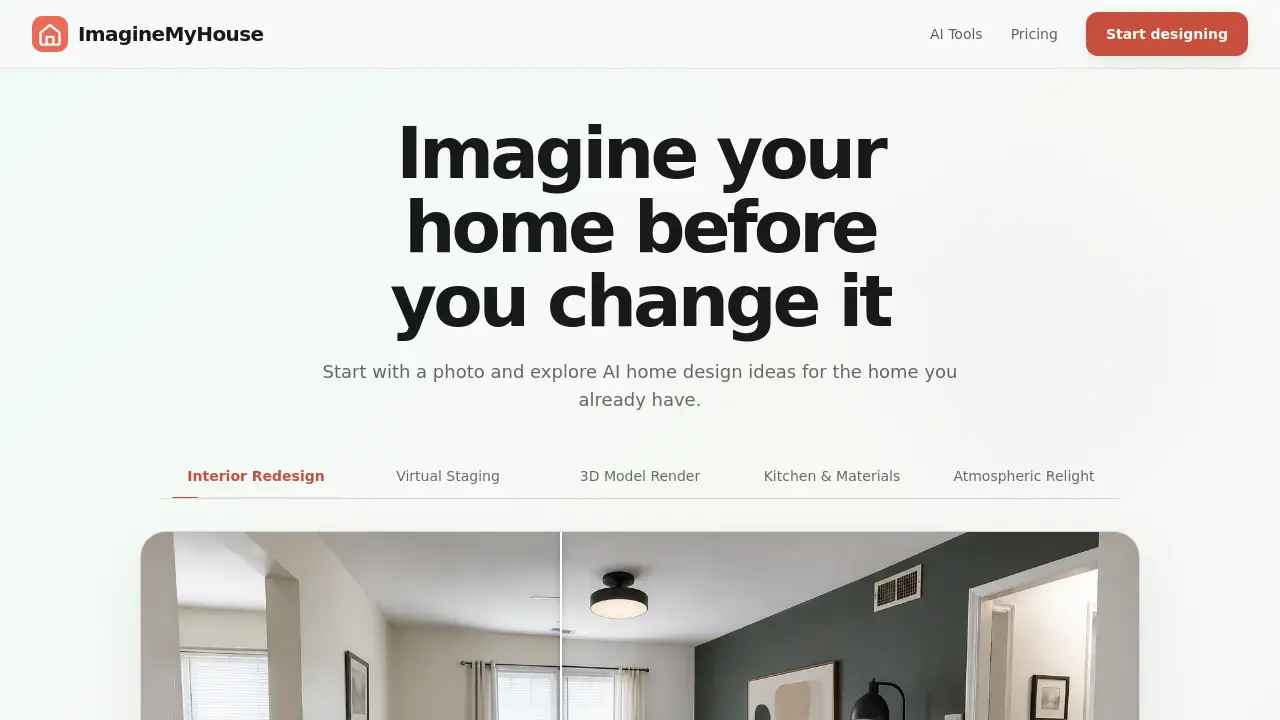
ImagineMyHouse is an online tool that turns one ordinary room photo into a set of realistic AI home design ideas. Instead of imagining a new interior from scratch, users upload a picture, choose a style, and see instant redesigns before making any real changes.
What is ImagineMyHouse?
ImagineMyHouse is a web-based platform for homeowners, renters, decorators, and real-estate professionals who want to preview a home redesign without expensive software or physical samples. The product focuses on AI home design from an existing photo. It preserves the room's actual layout and natural light, then applies a selected style to create photorealistic options. This makes it useful for kitchen renovations, bedroom updates, and exterior changes. The main value is comparison: users can generate multiple styles from the same photo, then decide which direction matches their taste. It also supports landscape scenes and virtual home staging, so it goes beyond simple interior decoration. Because the starting point is a real image, the results feel more grounded than a blank 3D model. For anyone exploring home renovation ideas, AI home design removes the guesswork. The service is also a practical AI interior design alternative to manual 3D programs.
Key Features of ImagineMyHouse
One-Photo Redesign
Upload a single clear photo of any space, and the tool generates an AI home design concept in seconds. This lowers the barrier for people who want fast home renovation ideas without drawing or modeling.
Multiple Style Presets
Choose from dozens of interior styles, or let Auto decide. This makes AI interior design accessible to beginners while still giving control to advanced users.
Photorealistic Results
Generated images keep the original room geometry and natural lighting, so each design looks like a real photograph. This helps users trust the comparison before making physical changes.
Interior, Exterior, and Landscape Support
ImagineMyHouse covers living rooms, kitchens, bedrooms, bathrooms, house exteriors, and yards. This expands its usefulness beyond a single room project.
Download, Compare, and Restyle
From the same photo, generate another direction and download the favorite image in high resolution. This easy comparison is central to the AI home design workflow.
Staging and Commercial Tools
Higher plans include virtual home staging, declutter tools, custom edit tools, and a commercial usage license. Real-estate agents and designers can use the results in listings and client presentations.
Use Cases for ImagineMyHouse
Kitchen Updates
Test cabinet colors, countertops, and backsplash styles with a photo of the current kitchen. These AI home design ideas help narrow choices before spending money.
Living Room Makeovers
Compare sofas, wall colors, and lighting setups in a single living room photo. This is a practical way to gather home renovation ideas for one space.
Bedroom and Bathroom Styling
See how different bed frames, paint tones, and tile patterns work in existing rooms. The tool can also suggest larger bathroom remodels through AI interior design. This makes it easier to evaluate a full room redesign before committing to construction.
Real Estate and Staging
Create a virtual home staging version of an empty or dated room, then show buyers a polished look. This is valuable for listing photos and open-house previews.
How to Use ImagineMyHouse
- Upload a room photo: Take or choose one clear photo of the space. A well-lit, straight-on view works best for AI home design.
- Pick a style: Choose a visual style from the preset list, or leave it on Auto for the system to propose a look.
- Generate a design: Wait a few seconds for the photorealistic redesign to appear.
- Compare and download: Generate another style from the same photo, review the options side by side, and download the one you prefer.
This workflow makes AI home design a quick way to compare home renovation ideas for one room.
Target Audience for ImagineMyHouse
- Homeowners planning a renovation
- Renters exploring low-cost decor updates
- Interior designers presenting options
- Real-estate agents preparing property listings
- Landlords improving property appeal
- DIY decorators seeking inspiration
Is ImagineMyHouse Free?
ImagineMyHouse does not advertise a free plan. It offers flexible one-time credit packs and unlimited monthly plans. Each paid plan includes a commercial usage license and high-resolution, watermark-free downloads. The credits are used for one AI home design generation at a time. The pricing table below summarizes the main monthly options.
| Plan | Price | Features |
|---|---|---|
| Starter | $9.90 per month (billed annually) | 1,600 credits per month, all room types and design styles, interior/exterior/landscape redesign, high-resolution downloads, commercial license |
| Pro | $23.90 per month (billed annually) | 4,000 credits per month, all Starter features, virtual staging, declutter and custom edit tools, priority queue |
| Studio | $49.90 per month (billed annually) | 10,000 credits per month, all Pro features, priority generation queue |
Plans can be canceled anytime with one click, and the account stays active through the end of the billing cycle.
ImagineMyHouse's Pros and Cons
| Aspect | Pros | Cons |
|---|---|---|
| Ease of use | Starts from one photo, so no design skills are needed | Style customization is limited compared to manual editors |
| Speed | Generates photorealistic concepts in seconds | Requires a stable internet connection and upload time |
| Pricing | Simple monthly plans with a cancel-anytime policy | No permanent free tier for casual users |
| Output quality | Preserves room geometry and natural lighting | AI results may still require some selection or retries |
| Commercial value | Includes commercial license and staging tools | Advanced staging tools are locked to higher plans |
Frequently Asked Questions about ImagineMyHouse
What kind of photos work best for AI home design?
Clear, well-lit photos with a straight-on view usually produce the best results. A large part of the room should be visible so the system can understand the layout.
Can I use the generated images for real-estate listings?
Yes, on paid plans. The commercial usage license allows users to use the designs in listings and client presentations. Virtual home staging is especially useful for property marketing.
Does ImagineMyHouse support exterior and landscape changes?
Yes. The platform covers interiors, exteriors, and landscapes, so users can explore siding colors, garden layouts, and outdoor living areas from a real photo.
How is ImagineMyHouse different from other AI interior design tools?
The focus is on reusing one room photo to compare multiple styles instantly. Many other tools require blank floor plans or manual layer editing. ImagineMyHouse keeps the original room layout and lighting in the generated output.
Can I cancel my plan?
Yes, the website states that plans can be canceled anytime with one click. The plan stays active through the end of the billing cycle.
What are credits used for?
Credits are the unit for generating redesigns. Different plans provide a monthly number of credits, and higher plans include more credits plus priority generation.
ImagineMyHouse Tags
AI home design, AI interior design, home renovation ideas, virtual home staging, room redesign, bedroom makeover, kitchen remodel ideas, exterior home design, landscape design AI, home styling tool, real estate staging, ImagineMyHouse