Introduction
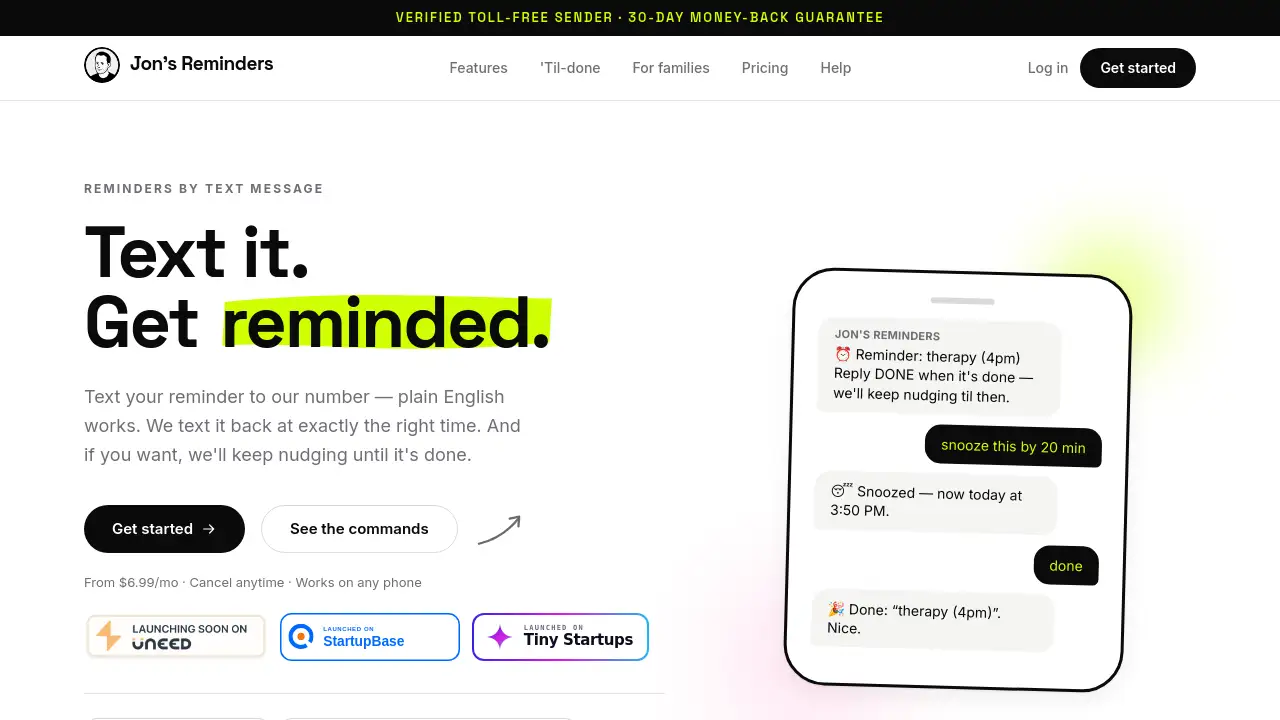
Jon's Reminders is a simple service that turns your text messages into reliable reminders by text message. No app, no login – just send a plain English message and get reminded at the right time.
What is Jon's Reminders?
Jon's Reminders is a text message based reminder system that lets you offload your memory tasks to your phone’s SMS inbox. Instead of downloading another app or setting up complex calendar alerts, you simply text what you want to remember and when. The service then sends you a confirmation and delivers the reminder exactly on schedule. If you need to be nudged until a task is done, the “til-done” feature keeps sending polite follow-ups until you reply DONE.
This product solves the common problem of forgetting appointments, chores, or medication timings. It is especially useful for people who want a lightweight, no‑fuss reminder system that works on any phone – even basic feature phones. Jon’s Reminders matters because it removes the friction of remembering tasks while staying completely out of your way. You never have to check a separate app or remember another password. The entire interaction happens through ordinary text messages, which makes it accessible to almost everyone.
The service is built by one person who got tired of being the family’s walking calendar, so it focuses on reliability and simplicity rather than flashy features. It is suitable for individuals, busy parents, remote workers, and anyone who wants a dependable text reminder service without the overhead of a smartphone app.
Key Features of Jon's Reminders
Plain English Input
You can text your reminder in natural language, like “remind me to take out the trash at 9pm.” The system parses the date and time automatically. If anything is unclear, it texts back to confirm – no guessing.
Precision Scheduling with Self-Healing Backstop
Reminders arrive minute‑accurate. The system includes a self‑healing backstop that resends reminders if the first delivery fails, ensuring you never miss an important alert.
Repeating Reminders (Plus and Premium)
Set daily, weekday, or weekly repeats. Once configured, the same reminder comes back automatically – perfect for recurring tasks like taking medication or weekly team meetings.
’Til‑Done Nudges
Add “keep bugging me” to any reminder. The service re‑sends after 10, 20, and 40 minutes until you reply DONE. Nudges pause between 10pm and 8am to avoid disturbing your sleep.
Calendar and Dashboard
All reminders are viewable on a web calendar. You can see which ones are done, missed, or snoozed at a glance – no need to scroll through your text history.
No App Required
Jon’s Reminders works on any phone that can send and receive SMS. There is nothing to install, no login required for daily use. This makes it a genuine no‑app reminders solution.
Support for Reminding Others (Plus and Premium)
With Plus, you can remind one other person (with their consent). Premium extends that to four people, and lets you set a custom sender name like “— Love, Sarah”. Heads‑up alerts notify you if they don’t confirm.
Verified Toll‑Free Sender
All messages come from a verified toll‑free number, so they won’t be marked as spam. You confirm by text before any reminder starts sending.
Use Cases for Jon's Reminders
Medication and Health Reminders
Take pills at specific times every day. A repeating reminder with til‑done nudges ensures you actually take them – and your caregiver can receive a heads‑up if you don’t confirm.
Work Meetings and Deadlines
Text “remind me of the project review tomorrow at 2pm” and get a text at the exact time. The til‑done feature can keep nudging until you acknowledge completion.
Household Chores and Trash Days
Set a weekly or weekday reminder for tasks like taking out the trash, watering plants, or feeding pets. Snooze or mark done by reply.
Family Coordination
Use Premium to remind up to four family members about appointments, school pick‑ups, or elderly parents’ medication – all from your number with a custom sender name.
Personal Errands and Appointments
If you need to remember a therapy session, oil change, or library return, just text it. The service handles one‑time reminders perfectly.
How to Use Jon's Reminders
-
Text your reminder – Send a message like “remind me to call mom at 3pm” to the Jon’s Reminders number. Plain English works; the system understands most natural phrases.
-
Confirm the details – If the time or date is ambiguous, you’ll receive a quick reply to clarify. Once confirmed, you get a message like “Reminder set: call mom – today at 3:00 PM.”
-
Receive the reminder – At the scheduled time, you get a text. Reply DONE (or 👍) if you completed it, or reply “snooze 20 min” to delay.
-
Use til‑done if needed – Add “and keep bugging me” when setting the reminder. The service will nudge you after 10, 20, and 40 minutes until you reply DONE.
-
Manage from your dashboard – Visit the web calendar to see all reminders, track completions, and adjust settings. No daily login required.
Target Audience for Jon's Reminders
- Busy professionals who want a hassle‑free text reminder service without app clutter.
- Older adults or non‑tech users who prefer SMS over smartphone apps.
- Parents and family caregivers who need to coordinate reminders for multiple people.
- People with memory challenges or ADHD who benefit from external nudges.
- Freelancers and remote workers who rely on simple, reliable reminders.
- Anyone who wants a verified, toll‑free sender for their daily reminders.
Is Jon's Reminders Free?
Jon's Reminders is a paid service. There is no free tier, but all plans come with a 30‑day money‑back guarantee. Pricing is simple and transparent:
| Plan | Price | Features |
|---|---|---|
| Basic | $6.99/month | Unlimited one‑time reminders, text‑based management, snooze/reschedule/”DONE”, calendar & dashboard. |
| Plus | $14.99/month | Everything in Basic, plus repeating reminders, til‑done nudges, remind 1 person (consent required), heads‑up alerts. |
| Premium | $29.99/month | Everything in Plus, plus remind up to 4 people, custom sender name, priority support, first access to new features. |
Cancel anytime. There are no hidden fees or surprise charges.
Jon's Reminders's Pros and Cons
| Aspect | Pros | Cons |
|---|---|---|
| Pricing | Straightforward pricing with no surprises; 30‑day money‑back guarantee. | No free trial or free tier; may be considered pricey for very occasional users. |
| Features | ‑ Works on any phone (no app required).‑ Til‑done nudges prevent forgetting.‑ Repeating reminders save time. | ‑ No integration with calendar apps or smart assistants.‑ Limited to SMS (no rich media or images). |
| Ease of Use | Extremely simple: text and confirm. No learning curve. | Beginners may need to learn exact phrasing for complex reminders (though plain English works well). |
| Reliability | Verified toll‑free sender; self‑healing backstop ensures delivery. | Service depends on carrier SMS delivery, which can occasionally be delayed. |
| Customer Support | Built by one person who answers support emails personally. | Slower response times during high volume; no 24/7 chat. |
| Audience Fit | Ideal for non‑tech users and those who dislike app overload. | Less suitable for users who want visual calendar integration or multi‑device sync. |
Frequently Asked Questions about Jon's Reminders
How do I set a reminder with Jon's Reminders?
Just text your reminder to the service’s number using plain English. For example, “remind me to walk the dog at 7am tomorrow.” You’ll receive a confirmation text, and the reminder will arrive at the scheduled time.
Can I use Jon's Reminders on a flip phone or a phone without apps?
Yes. The service works on any phone that can send and receive SMS. There is no app to download, so it works perfectly on basic feature phones, old smartphones, or new ones.
What happens if I don’t reply DONE to a til‑done reminder?
The system will send up to three follow‑up nudges (after 10, 20, and 40 minutes). If you still don’t reply, the nudges stop for that reminder. No nudges are sent between 10pm and 8am.
Can I cancel or change a reminder after I’ve set it?
Yes. Reply “STOP” to cancel any reminder, or text “reschedule” with a new time. You can also snooze a reminder by replying “snooze 30 min.” All changes are handled by text.
Is it safe to use? Will my number be shared or spammed?
Jon’s Reminders uses a verified toll‑free sender, and you must confirm by text before any reminder starts. The service does not share your number. Reply “STOP” at any time to block all future messages.
What is the 30‑day guarantee?
If you are not satisfied with Jon’s Reminders, you can request a full refund within 30 days of signing up – no questions asked. The guarantee is honored by the creator, Jon.
Jon's Reminders Tags
reminders by text message, text reminder service, SMS reminder app, til-done reminders, repeating reminders, no app reminders, plain English reminders, SMS scheduling tool, task nudges, family reminder service, verified toll-free sender, daily reminder subscription