Introduction
An AI-powered tool to find and cancel forgotten subscriptions quickly.
What is kill the sub?
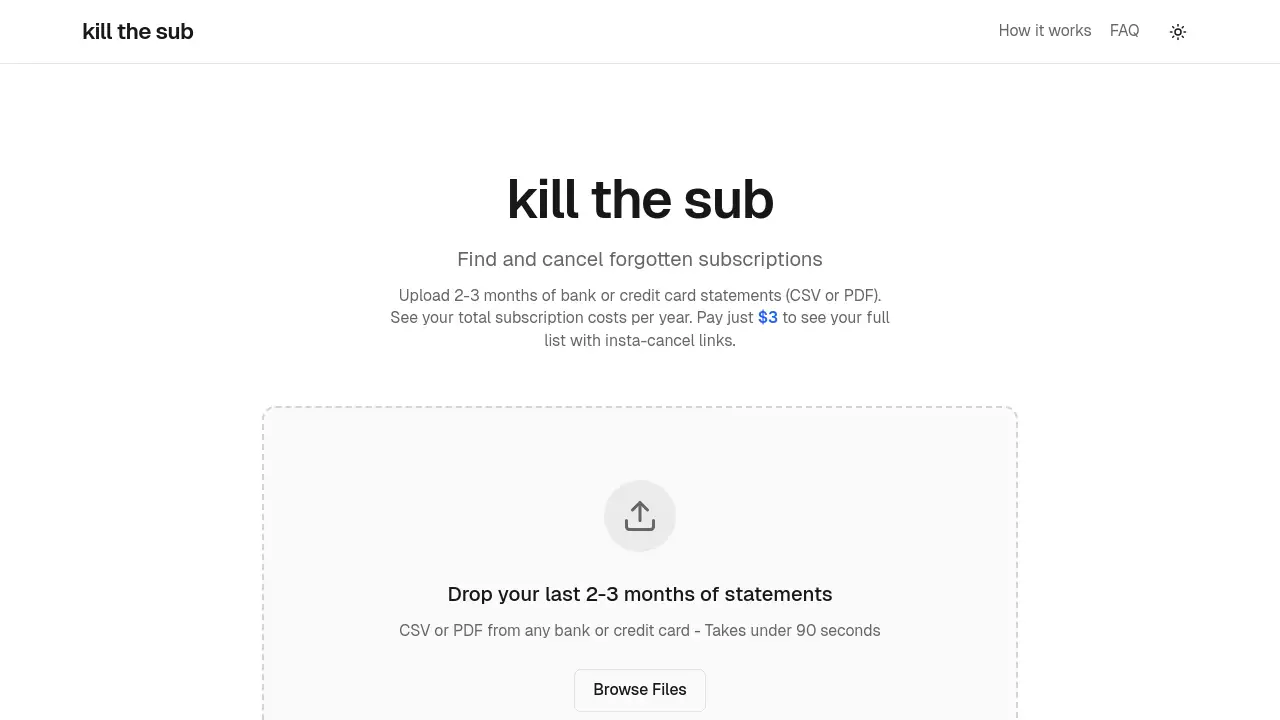
Kill the sub is a specialized online service designed to help individuals identify and manage recurring subscription charges. The core problem it addresses is "subscription creep"—the gradual accumulation of small, often forgotten monthly or annual fees for various digital services, apps, and memberships. Users simply upload their recent bank or credit card statements, and the platform's AI analyzes the data to detect these recurring payments. It then provides a clear overview of total annual costs and, for a small one-time fee, offers direct links to cancel unwanted services. This makes kill the sub an effective subscription finder and manager for anyone looking to audit their finances, reduce unnecessary expenses, and save money with minimal effort.
Key Features of kill the sub
Fast, Secure Statement Analysis
The platform processes uploaded bank or credit card statements (in CSV or PDF format) in under 90 seconds, using AI to instantly detect recurring charges, and immediately discards the files without storing any personal financial data.
AI-Powered Subscription Detection
Its specialized AI scans transaction descriptions and amounts to accurately identify both obvious and obscure subscription services, compiling them into a single, easy-to-understand list with annual cost totals.
Direct Insta-Cancel Links
After analysis, users can pay a small fee to unlock their full report, which includes direct "insta-cancel" hyperlinks to the account management or cancellation pages for each identified service, streamlining the cancellation process.
AI Agent Cancellation Service
This exclusive feature provides a personal AI agent endpoint that can autonomously handle cancellations by navigating complex cancellation flows, sending emails, or flagging steps that require human intervention, tackling known dark patterns used by companies.
Simple One-Time Pricing
Access to the full report with cancel links requires a single, transparent payment of $3, with no ongoing subscription or account needed, aligning the service's own pricing model with the problem it solves.
Future Reminder System
The service offers to remind users to run a new check in six months, helping to catch new subscriptions that may have slipped in, promoting ongoing financial awareness.
Use Cases for kill the sub
Auditing Personal Finances
Individuals can use kill the sub to conduct a quick and thorough audit of their spending, uncovering all active subscriptions to better understand where their money goes each month.
Pre-Budgeting or Debt Reduction
Anyone creating a new budget or working to pay down debt can use the service to identify and eliminate non-essential recurring charges, freeing up significant funds over time.
Managing Multiple Subscriptions
For users who juggle subscriptions for streaming, software, fitness, and news, this tool provides a centralized dashboard to see everything in one place and cancel what's no longer used.
Overcoming Difficult Cancellations
When facing services known for complicated cancellation processes or dark patterns, the integrated AI agent can take over the tedious work of navigating multiple screens and mandatory surveys.
How to Use kill the sub
Using kill the sub is a straightforward three-step process designed for speed and simplicity.
- Upload Your Statements: Visit the website and upload the last 2-3 months of bank or credit card statements in CSV or PDF format. The analysis begins immediately.
- Review Your Findings: View the initial results, which show the total annual cost of identified subscriptions. To see the detailed list with service names and cancellation links, proceed with the one-time $3 payment.
- Cancel and Save: Use the provided direct "insta-cancel" links for each service you wish to terminate. For maximum convenience, you can optionally share your personal AI agent endpoint with an AI assistant to handle cancellations automatically.
Target Audience for kill the sub
- Busy professionals who lack time to manually review statements.
- Freelancers and entrepreneurs tracking business expenses.
- Students and individuals on tight budgets.
- Anyone who has ever signed up for a free trial that converted to a paid plan.
- People frustrated by intentionally difficult cancellation processes.
Is kill the sub Free?
The initial statement analysis to see your total potential savings is free. To unlock the complete list of identified subscriptions with direct cancel links, a one-time payment is required. There are no recurring plans.
| Plan | Price | Key Features |
|---|---|---|
| Full Report Access | $3 (one-time) | Instant access to full detailed results, direct cancel links for each service, personal AI agent endpoint, no account needed, files never stored. |
kill the sub's Pros and Cons
| Aspect | Pros | Cons |
|---|---|---|
| Ease of Use | Extremely simple three-step process; takes under 90 seconds. | Requires users to have recent digital bank statements readily available. |
| Pricing Model | Affordable, transparent one-time fee; the service itself is not a subscription. | The $3 fee is required to see the specific service names and get cancel links. |
| Technology | AI effectively identifies recurring charges; unique AI agent feature handles complex cancellations. | The AI agent's success may vary with extremely obscure services or unique account issues. |
| Privacy & Security | Promises immediate file deletion; no financial data is stored long-term. | Requires trust to upload sensitive financial documents, albeit to a secure system. |
| Value Proposition | Can save users hundreds of dollars per year by uncovering forgotten subscriptions. | Only effective for subscriptions paid via the uploaded credit/debit card or bank account. |
Frequently Asked Questions about kill the sub
Is my financial data safe with kill the sub?
According to the service, uploaded bank or credit card statements are analyzed and immediately discarded. The company states that nothing is stored on its servers, which minimizes privacy risk.
How accurate is the subscription finder AI?
The AI is designed to detect patterns of recurring charges from transaction data. It is highly effective at identifying common subscription services, though very new or unusually named charges might require user review.
What if I'm not sure about a charge it finds?
The report provides a list of suspected subscriptions. Users should review each one to confirm it is a service they recognize before proceeding with cancellation using the provided links.
Do I need statements from all my cards and accounts?
For a complete picture, you should upload statements from every bank account and credit card you use to pay for subscriptions. The tool analyzes what you provide.
How does the AI agent cancellation work?
Upon unlocking your results, you receive a unique endpoint. You can share this with a compatible AI assistant and instruct it on which subscriptions to cancel. The agent then attempts to navigate the web and complete cancellation processes on your behalf.
What is the 6-month reminder?
The service offers to send you an email reminder in six months to check for new subscriptions, helping you maintain control over recurring expenses.
kill the sub Tags
subscription cancellation tool, find forgotten subscriptions, cancel subscriptions fast, AI subscription finder, recurring charge detector, manage subscriptions, kill the sub review, save money on subscriptions, AI agent cancellation, subscription manager, personal finance tool, cancel links