Introduction
Lacuna is an AI song generator for ideas and lyrics.
What is Lacuna?
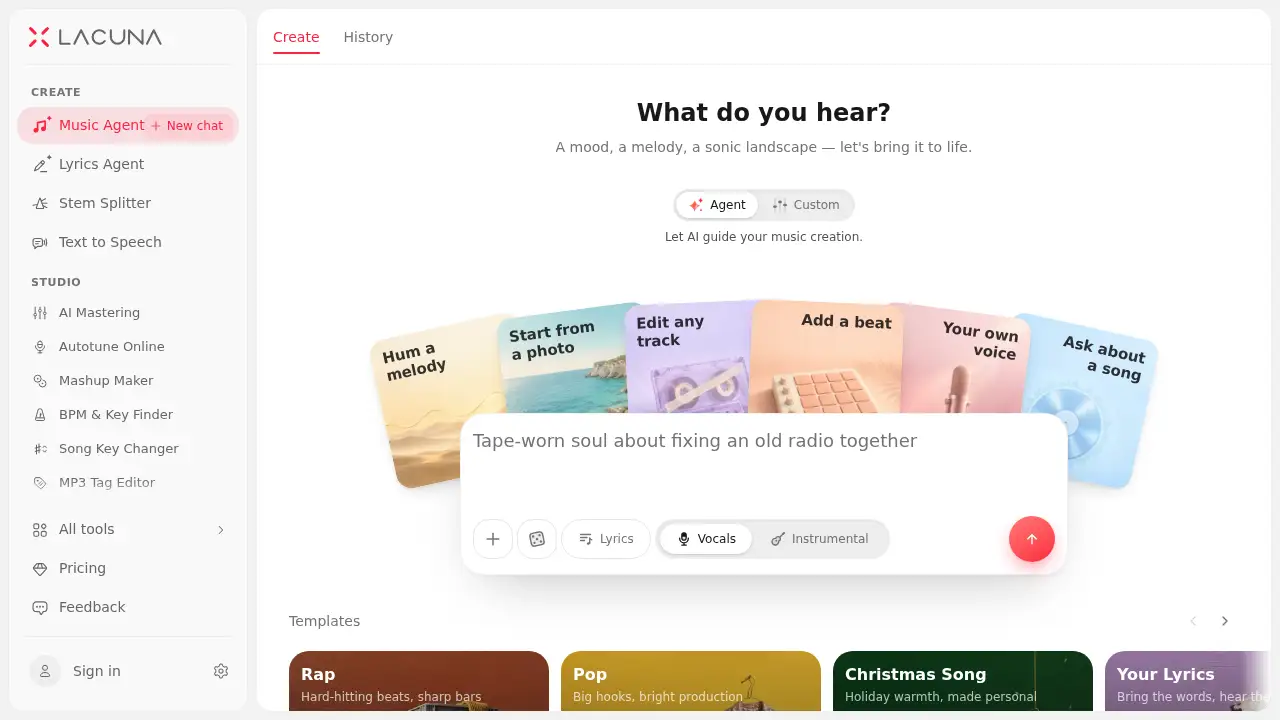
Lacuna is an AI song generator and AI song maker designed to turn an idea, a set of lyrics, or a hummed melody into a complete song with vocals. It solves a common creative problem: moving from a rough concept to a shaped, mastered, and shareable track without jumping between many separate tools.
As an AI song generator, Lacuna supports agent-assisted creation, custom controls, vocal generation, remixing, stem splitting, and mastering on one canvas. It is suitable for music producers, songwriters, content creators, and independent artists who want to make a song with AI and keep more control over the final result. The platform is free to start, with paid plans available for commercial-use downloads.
Key Features of Lacuna
Agent Mode and Custom AI Song Generator Controls
Chat with a Music Agent or use Custom mode to set style, lyrics, title, vocals, voice, and model. This makes the AI song generator flexible for both quick drafts and detailed direction.
Multiple AI Song Models
Choose from models such as Aether, Reverie, Echo, and Cadence for different needs. Each model supports different strengths, such as style range, exact lyric singing, structured songs, or melody-based arrangement.
Lyrics to Song and Text to Song Workflows
Use the lyrics to song workflow when the words are ready, or start with a theme through the text to song option. Both paths help creators turn written ideas into melody, vocals, harmony, and arrangement.
Hum to Song and Melody Input
Hum a tune or attach a MIDI file, confirm the melody, and build a fuller song around it. The hum to song process is useful for creators who have a melody in mind but need help developing it.
Voice and AI Cover Generator Tools
Train a private singing voice or use official voices to sing new tracks. The AI cover generator can also apply a different voice to an existing song while keeping the lyrics and backing in place.
Canvas-Based Editing
Treat the first generation as a draft and shape it on a visual canvas. Remix the style, extend the arrangement, rewrite one section, tune vocals, and compare branches side by side.
Stem Splitting and AI Mastering
Split a track into vocals, drums, bass, and instruments with the stem splitter, then compare custom mixes. Use AI mastering on the same canvas to prepare a final mix for release.
Release and Licensing Tools
Regenerate cover art, create lyric videos or visualizers, and share a public track page. Paid plans allow commercial-use downloads, and Pro adds a license certificate in the user’s name.
Use Cases for Lacuna
Music Producers
Producers can generate reference tracks, split them into stems, and explore style directions before opening a DAW. This helps turn a beat block into a starting point for production.
Songwriters
Songwriters can paste lyrics, pick a voice and style, and hear the words sung back quickly. They can then iterate on melody and arrangement until the song matches their vision.
Content Creators
Content creators can use an AI song generator to make licensed music for videos, streams, and podcasts. Stem access helps vocals sit under voiceover or let the beat carry an outro.
Independent Artists
Independent artists can move from idea to release-ready track without a full studio budget. They can master the final mix, download cleared songs on paid plans, and share a public page others can remix.
How to Use Lacuna
- Open Lacuna’s AI song generator and choose Agent mode or Custom mode.
- Describe a mood, story, or style, paste lyrics, or start from a hummed melody, photo, or recording.
- Review the generated song with vocals and branch into new style directions if needed.
- Shape the track by remixing, extending, rewriting sections, tuning vocals, or splitting stems.
- Master the final mix, download it on a paid plan for commercial use, and share or release it.
This workflow lets users make a song with AI while keeping editing and release steps connected.
Target Audience for Lacuna
- Music producers who want fast reference tracks and stems
- Songwriters looking for an AI song generator to hear lyrics sung
- Content creators who need original music for videos and podcasts
- Independent artists who want an affordable idea-to-release workflow
- Beginners who want a guided AI song maker with room to customize
Is Lacuna Free?
Lacuna is free to start. The reference information does not list exact paid pricing, but it states that commercial-use downloads are available on any paid plan, and Pro adds a license certificate. Users should check the official pricing page for current details.
| Plan | Price | Features |
|---|---|---|
| Free | $0 | Free to start; test the AI song generator and creation workflow |
| Paid | Not listed | Commercial-use downloads, release tools, and Pro license certificate on Pro |
Lacuna's Pros and Cons
| Aspect | Pros | Cons |
|---|---|---|
| Pricing | Free to start; paid plans support commercial use | Exact paid pricing is not listed in the reference information |
| Features | Idea-to-release workflow with vocals, stems, and mastering | Advanced editing may require some learning |
| Workflow | Visual canvas and branching make comparison easy | A browser workflow may not replace a full DAW for every task |
| Output | Songs with vocals, stem mixes, and masters | AI output still needs review and creative judgment |
Frequently Asked Questions about Lacuna
What is Lacuna used for?
Lacuna is used to generate songs with vocals from text, lyrics, hummed melodies, images, or uploaded tracks. It also supports remixing, extending, stem splitting, mastering, and sharing.
Can users make a song with AI for free?
Yes, Lacuna is free to start. Free users can test the workflow, while paid plans are required for commercial-use downloads according to the reference information.
Does Lacuna support lyrics to song and text to song?
Yes. The lyrics to song workflow is for finished lyrics, and the text to song workflow is for themes, stories, or descriptions when lyrics are not yet complete.
Can users split stems and master songs in Lacuna?
Yes. The stem splitter can separate vocals, drums, bass, and instruments into 2, 4, or 6 stems. AI mastering is available on the same canvas for final mix preparation.
Is Lacuna suitable for beginners?
Lacuna can suit beginners because Agent mode guides the creation process and suggested edits run in one click. Custom mode offers more control for users who want it.
Is Lacuna a free AI song generator for commercial use?
It is free to start, but commercial-use downloads are tied to paid plans. Users should review the official licensing terms before releasing music.
Lacuna Tags
AI song generator, AI song maker, make a song with AI, lyrics to song, text to song, hum to song, AI music generator, AI cover generator, stem splitter, AI mastering, AI vocal generator, commercial music creation