Introduction
Loop Engineering transforms CLI feedback loops into verifiable AI SaaS maintenance by combining agent workflows, memory, and proof into every run. This review explores how it helps teams keep product improvements traceable, controllable, and repeatable.
What is Loop Engineering?
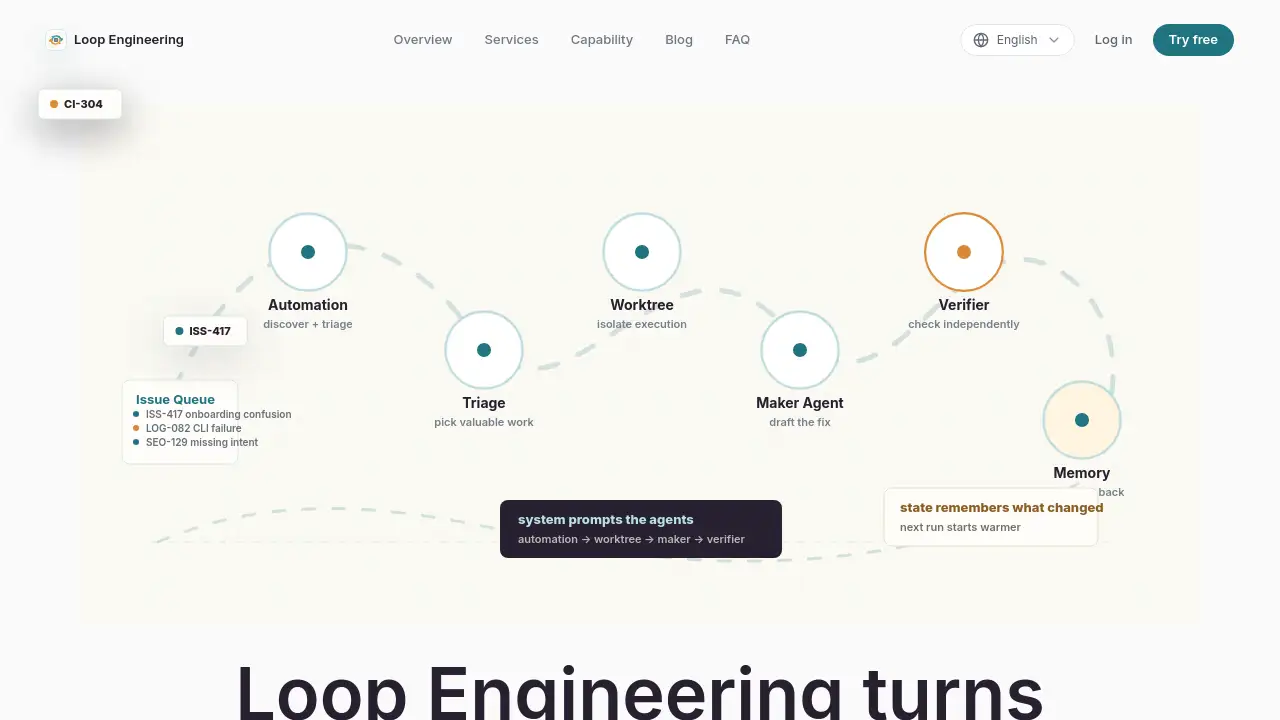
Loop Engineering is a control system for AI coding agents that turns scattered feedback signals—tickets, CLI errors, analytics, search demand—into structured, verifiable maintenance tasks. Instead of relying on single prompts, it defines goals, state, tool permissions, verifiers, stop conditions, and memory writebacks so agents can act repeatedly while every step remains inspectable.
The product addresses a common pain point for AI SaaS teams: feedback gets copied, paraphrased, forgotten, and rediscovered days later. Loop Engineering puts signal intake, task shaping, execution, verification, and memory into one path. It is designed for teams that need evidence of improvement, boundaries around agent autonomy, and a compounding system that learns from each run. This makes AI SaaS maintenance more reliable and less chaotic.
Key Features of Loop Engineering
Signal Quality Separation
Loop Engineering does not throw every piece of feedback at an agent. It separates user complaints, CLI output, error logs, search demand, and revenue signals, then compresses the parts that can produce product improvement into contextual tasks. This ensures agents work from prepared maintenance input rather than guessing user intent.
Controlled Autonomy
The center of Loop Engineering is bounded autonomy. Each loop defines which files can be read, which modules can change, whether external tools are allowed, and which decisions require human confirmation. Clear boundaries let agents move faster because they know the shape of the work, and vague boundaries cause the loop to stop, preventing drift into unrelated refactors or accidental releases.
Built-in Verification
Rather than ending at “I changed it,” Loop Engineering defines the verifier before execution starts: type checks, production builds, screenshots, accessibility reviews, live smoke tests, security scans, or SEO audits. The agent must bring those checks back into the result. When something fails, the command, output, and next decision are preserved instead of dressing failure up as success.
Memory as Operating State
Loop Engineering treats memory as usable state that changes future behavior. Stable knowledge—deploy commands, design preferences, permission boundaries, recurring traps—is written back into skills, runbooks, or project instructions. This means the next run starts higher up the hill, slowly building a team’s own maintenance system rather than relying on isolated prompts.
Multi-Agent Coordination
Loop Engineering can coordinate multiple agents like Claude Code, Codex, Cursor, Windsurf, Gemini CLI, OpenCode, OpenClaw, and Warp. It manages each agent’s goal, state, tool permissions, and stop conditions within one loop, making complex maintenance tasks manageable across different toolchains.
Visible Loop State
The product interface shows the loop’s progress: incoming signal, current run, verifier gate, memory writeback, and human decision point. Users can inspect progress without reading raw terminal output, compare runs, and understand whether work is waiting for evidence, approval, or deployment.
Use Cases for Loop Engineering
Handling User Feedback Tickets
Customer issues and reproduction paths can be fed directly into Loop Engineering. The system compresses the feedback into contextual tasks, runs verification checks, and returns evidence of improvement. This ensures no support request gets lost.
Automating CLI Error Resolution
CLI output and terminal failures become actionable signals. Agents can read error logs, identify root causes, make code changes, run builds, and confirm fixes—all within the controlled loop. The outcome is recorded as reusable memory.
Improving SEO and Content
Search demand and SEO queries flow into the loop. Loop Engineering defines tasks like updating meta descriptions, fixing broken links, or adding structured data. Verifiers check TDH, indexing, and SEO audits before changes are accepted.
Coordinating Multi-Step Releases
From feedback to code to deploy, one loop coordinates build verification, security scans, smoke tests, and changelog generation. Teams can track the entire release chain in a single, auditable path.
How to Use Loop Engineering
- Connect signals – Bring support tickets, CLI feedback, error logs, and product data into one maintenance queue. Loop Engineering separates and ranks them automatically.
- Define verification – For each task type, configure build tests, screenshots, live smoke checks, security scans, or SEO audits as gates that must pass.
- Run the loop – Let agents dispatch tasks, edit code, verify results, and write reusable knowledge back to memory. The loop stops if evidence is unclear or risk is high, requiring human review.
- Review decisions – Inspect the loop’s progress, compare runs, and approve or reject changes based on scope, evidence, failures, and residual risk.
Target Audience for Loop Engineering
- AI SaaS engineering teams needing evidence and boundaries around agent runs
- Product leads who want feedback to become verifiable maintenance tasks
- Developer experience teams managing CLI and API feedback loops
- Founders and engineering leads who need inspectable, interruptible automation
- Teams using multiple AI agents (Claude Code, Codex, Cursor, etc.) and wanting unified control
Is Loop Engineering Free?
Loop Engineering offers a free trial. Users can connect their maintenance loop and try the full feature set without upfront payment. For detailed pricing plans beyond the free tier, visit the official Loop Engineering pricing page (https://loopengineering.sh/). The product is currently “coming soon” with a live feedback demo available.
Loop Engineering's Pros and Cons
| Aspect | Pros | Cons |
|---|---|---|
| Verification | Built-in verifiers (build, test, screenshot, security) ensure provable results | Requires initial configuration of verifiers per task type |
| Memory | Reusable memory reduces repeated manual setup across runs | Memory must be explicitly structured; unstructured chat history is not supported |
| Multi-agent support | Coordinates multiple agents in one loop | Learning curve for teams new to agent orchestration |
| Signal quality | Separates and ranks feedback before agent execution | Initial setup of signal sources may take time |
| Transparency | Every step is inspectable and interruptible | Some users may find the loop visibility overwhelming at first |
Frequently Asked Questions about Loop Engineering
What is Loop Engineering and how does it improve AI SaaS maintenance?
Loop Engineering is a control system that turns scattered feedback signals (tickets, CLI errors, analytics) into verifiable maintenance tasks. It defines goals, state, tool permissions, verifiers, stop conditions, and memory writebacks so agents can run repeatedly with evidence. This makes AI SaaS maintenance traceable, auditable, and compounding.
Which AI agents does Loop Engineering support?
Loop Engineering supports multiple agents including Claude Code, Codex, Cursor, Windsurf, Gemini CLI, OpenCode, OpenClaw, and Warp. It coordinates them within the same loop, sharing goals, memory, and verification gates.
How is Loop Engineering different from using prompts alone?
A prompt produces one answer. Loop Engineering defines the goal, state, tool boundaries, verifier, retry path, stop condition, and memory writeback before execution begins. Every step remains inspectable, interruptible, and reusable, turning isolated agent runs into a lasting maintenance system.
Is Loop Engineering open source?
The product page does not explicitly state it is open source. It is currently built for AI SaaS teams and offers a free trial. Check the website for licensing details.
How does memory work in Loop Engineering?
Memory is treated as operating state. Stable knowledge (deploy commands, design preferences, recurring traps) is written back into skills, runbooks, or project instructions. Each new run starts from this accumulated state, reducing repeat work.
Can I integrate Loop Engineering with my existing workflow?
Yes. Loop Engineering accepts signals from support tickets, CLI feedback, error logs, analytics, user research, and search demand. It can connect with agents and CI runners already in use. The three-step setup (connect signals, define verification, run the loop) is designed to fit into existing product maintenance processes.
Loop Engineering Tags
Loop Engineering, AI SaaS maintenance, agent workflows, verifiable maintenance, CLI feedback loops, controlled autonomy, memory-based maintenance, multi-agent coordination, verification gates, signal quality, reusable judgment, AI code agents