Introduction
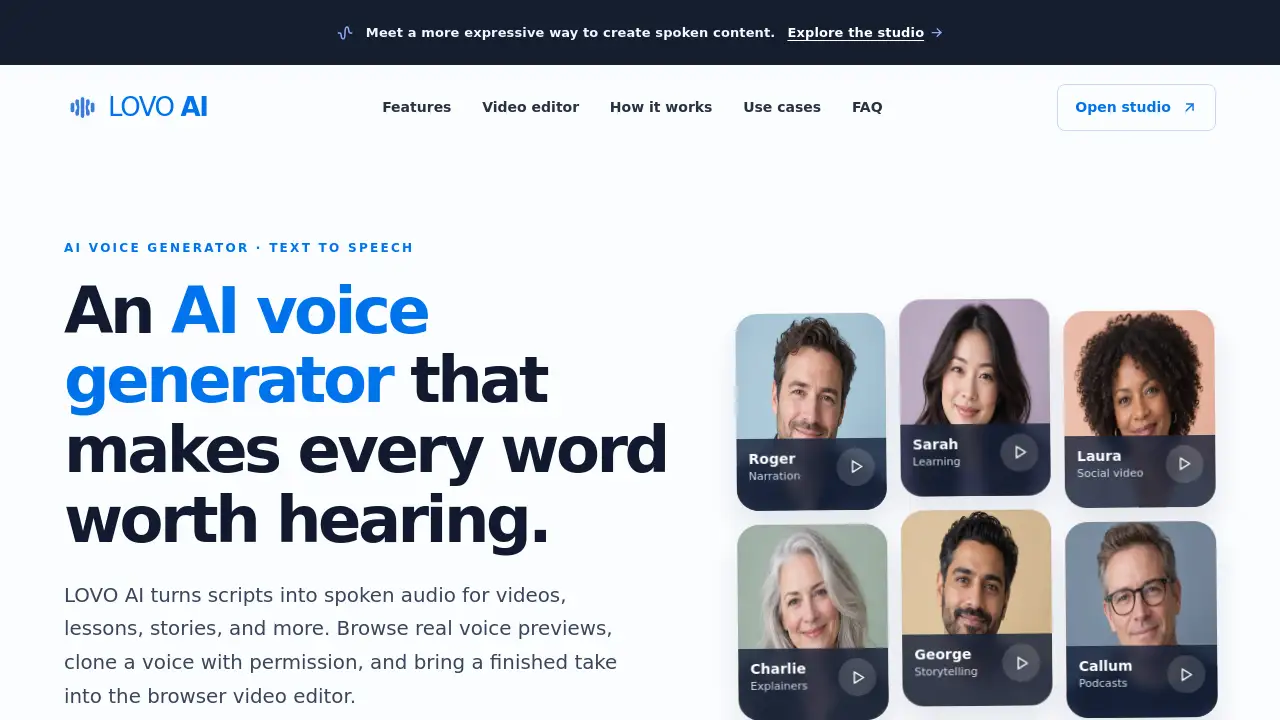
LOVO AI is an AI voice generator for text to speech. It turns written scripts into spoken audio for videos, lessons, stories, and more. Users can preview real voices, clone a voice with permission, and add speech to video in a browser. The platform starts with 10 free credits and no card needed to try. This review explains how LOVO AI works, what it offers, and who may benefit from it.
What is LOVO AI?
LOVO AI is a browser-based AI voice generator and text to speech studio. It solves a common creative problem: turning a written script into a usable voice track without booking a recording session. The product is designed for creators who need a voiceover for a video, lesson, story, podcast draft, or explainer. Instead of guessing how a line will sound, users can listen to voice previews, compare delivery styles, and generate a full take.
LOVO AI also includes a simple video editor that pairs an MP3 with video and exports a WebM file in the browser. Voice generation uses ElevenLabs, and the current model supports multiple languages. The studio accepts up to 2,000 characters per request and shows the credit cost before generation. This makes LOVO AI useful for quick drafts, prototypes, and final voice tracks when a human review is added for names or emotional nuance.
Key Features of LOVO AI
AI Voice Generator with Text to Speech
Generate spoken audio from a script by entering text, choosing a voice, and creating a take. The AI voice generator supports up to 2,000 characters per request and returns an MP3 for review.
Real Voice Previews
Listen to real samples from the connected voice library before committing to a full recording. Voice previews help match tone, accent, and pacing to the audience.
Voice Cloning with Permission
Clone a voice when the speaker has given permission and the necessary rights are available. The studio requires an explicit rights confirmation before an audio sample can be uploaded for voice cloning.
Multi-Language Speech Model
Voice generation uses ElevenLabs, and the current model lists 74 languages. Pronunciation can vary by voice and script, so a final human listen is recommended for proper nouns and technical terms.
Browser Video Editor
Open the built-in video editor, add a video and generated MP3, adjust audio levels, and export a WebM file. The files remain in the browser during editing, which keeps the workflow simple.
Credit-Based Generation
A verified new account receives 10 free credits. Each voice generation uses one credit per 100 characters, rounded up, and the cost appears before submission.
Use Cases for LOVO AI
Videos and Explainers
Create AI voiceovers for product walkthroughs, short films, and social clips. Write the script first, compare voice previews, then download the MP3 for editing.
Learning and Training
Turn lesson scripts and onboarding material into text to speech audio that learners can revisit. Alternate reads can help test pacing and tone for different modules.
Stories and Podcasts
Prototype an opening, test a character voice, or hear a draft aloud before recording. LOVO AI keeps the final editorial choice with the creator.
Social Media Content
Generate short voice tracks for social video, ads, or announcements. The browser editor can combine speech with video for a shareable clip.
Accessibility and Reading Support
Convert written content into spoken audio for people who prefer listening. Clear pronunciation and adjustable scripts can improve comprehension.
How to Use LOVO AI
- Open the LOVO AI studio and enter a script of up to 2,000 characters.
- Review the character count and estimated credit cost.
- Choose a voice from the available previews and listen to the sample.
- Generate the text to speech audio and listen to the MP3 in the page.
- Download the MP3 or open the video editor to pair it with a video and export a WebM file.
Target Audience for LOVO AI
- Video creators and editors
- Teachers, trainers, and course creators
- Podcasters and storytellers
- Social media managers
- Marketers creating explainer content
- Accessibility teams converting text to speech
Is LOVO AI Free?
LOVO AI offers a free starting point. A verified new account receives 10 free credits, and no card is needed to try. Each generation costs one credit per 100 characters, rounded up. The studio shows the cost before submission. At the time of this review, self-service credit purchases are not available, and generation pauses when credits run out.
| Plan | Price | Features |
|---|---|---|
| Free | $0 | 10 free credits for verified new accounts, 1 credit per 100 characters, voice previews, MP3 download |
| Paid credits | Not available for self-service | No self-service credit purchases at this time; generation pauses when free credits run out |
LOVO AI's Pros and Cons
| Aspect | Pros | Cons |
|---|---|---|
| Pricing | Free credits allow testing without a card | No self-service credit purchases yet, so scaling may require waiting |
| Features | AI voice generator, voice previews, voice cloning with permission, browser video editor | Voice cloning requires explicit rights and permission |
| Workflow | Browser-based text to speech with MP3 download | Final human review is still needed for names, technical words, and emotion |
| Language | Current ElevenLabs model lists 74 languages | Accents and pronunciation can vary by voice and script |
| Editing | Built-in video editor exports WebM | Editor is simple and focused on basic audio-video pairing |
Frequently Asked Questions about LOVO AI
What is an AI voice generator?
An AI voice generator turns written text into spoken audio. LOVO AI lets users choose a voice, enter a script, generate a take, listen, and download an MP3. Human review remains useful for names, specialist terms, and emotional nuance.
Can I try LOVO AI for free?
Yes. A verified new account receives 10 free credits. Each voice generation uses one credit per 100 characters, rounded up, and the studio shows the cost before submission. When credits run out, generation pauses.
Which languages can I use?
Available languages depend on the current ElevenLabs speech model and the submitted text. The connected model currently lists 74 languages. A voice may have an accent in a language it was not designed for, so it is important to listen to the result.
Can I download and edit my audio?
Generated speech is delivered as an MP3 that can be previewed and downloaded. The LOVO AI video editor can combine that file with a video, adjust audio levels, and export a WebM file in the browser.
Can I clone someone else’s voice?
Only use voice cloning when the speaker’s permission and the rights needed for the recording are in place. The LOVO AI studio requires an explicit rights confirmation before uploading an audio sample.
Is LOVO AI suitable for professional voiceovers?
LOVO AI can support professional voiceover workflows, especially for drafts, explainers, lessons, and social content. For final projects, a human listen is recommended to check proper nouns, technical words, and precise emotional delivery.
LOVO AI Tags
LOVO AI, AI voice generator, text to speech, AI voiceover, voice cloning, voice previews, text to speech online, MP3 download, browser video editor, ElevenLabs, free credits, AI voice generator for videos