Introduction
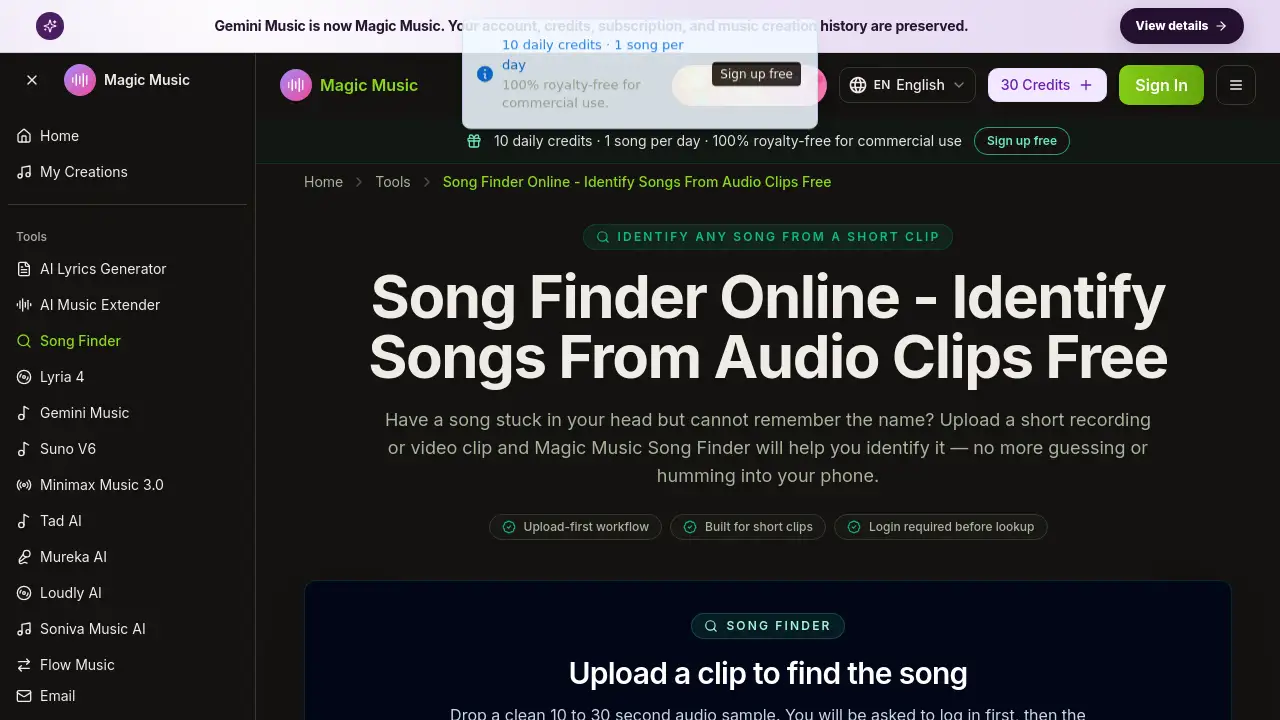
Magic Music Song Finder is an online song finder tool that helps you identify songs from short audio clips. Upload a clear MP3, M4A, WAV, FLAC, or OGG sample, and the system works to reveal the song title, artist, and listening links. It solves the common problem of having a sound in your head but no name to search.
What is song finder?
Song Finder is a music lookup page for situations where you have the actual sound but not the title. Unlike lyric search or humming tools, this song finder starts with a real recording or video clip already saved on your device. The tool is designed for creators, playlist builders, and anyone sorting unknown audio files.
The main task is music identification, not music generation. Users upload a short 10 to 30 second audio sample, log in, and let the system analyze it. After analysis, the result can be unlocked with a one-time credit pack to reveal the song title, artist, release context, and listening links when available.
This matters because forgetting a song name is annoying. Instead of typing uncertain lyrics or describing a melody, a song finder can use the actual audio to identify songs. It also works with common file formats and keeps useful song details in one place.
Key Features of song finder
Upload a short audio clip
Upload a clean 10 to 30 second sample containing the chorus, vocal hook, or main instrumental phrase. The song finder accepts MP3, M4A, WAV, FLAC, and OGG files up to 20MB.
Analyze audio for song recognition
After login, the system processes the clip and prepares the matching result. The goal is to recognize an existing song, not to create a new AI track.
Reveal song title and artist
Once unlocked, the result includes practical metadata such as the song title, artist, and release details. This helps identify songs when the file name gives no clues.
Provide listening links
A complete lookup can include listening links so users can move quickly from song title to enjoying the full track.
Transparent credit unlock
The paid step appears only after the system analyzes the clip and prepares the result. Users decide whether to continue before seeing the final song details.
Use Cases for song finder
Identify songs from social videos
Heard a track in a TikTok, Reel, or YouTube video? Export the audio and use a song finder to identify songs from those short clips.
Recover forgotten tracks from recordings
Old voice memos, concert recordings, or random audio files often contain songs with unknown names. This tool can turn those files into a clear song title and artist.
Build music references for projects
Producers, writers, and music fans can turn mystery audio into named references. This is useful before writing prompts, planning playlists, or starting a music project.
Organize unnamed audio files
When cleaning a music folder, replace generic file names with real song details. A song finder can support music organization by adding the song title and artist information.
How to Use song finder
- Go to the Magic Music Song Finder page.
- Drop a clean 10 to 30 second audio clip into the upload area. Use the clearest section, such as the chorus or main vocal hook.
- Log in before the system analyzes your clip.
- Let the system process the audio and prepare the matching result.
- Unlock the result with a one-time credit pack to see the song title, artist, and listening links.
The whole workflow is built around audio upload first. No pasting links or typing guessed lyrics is required.
Target Audience for song finder
- Content creators who hear unknown tracks in social media videos
- Playlist builders looking for song title information from clips
- Music collectors organizing unnamed audio files
- Casual listeners who want to identify songs from voice memos
- Producers and writers who need music references for their work
Is song finder Free?
The full result is not described as free in the reference information. Magic Music Song Finder uses a transparent one-time credit pack to unlock the song title, artist, release context, and listening links. Uploading a clip and logging in are available before any payment decision is made.
| Plan | Price | Features |
|---|---|---|
| Upload | Free | Upload a short audio clip and log in |
| Result Unlock | One-time credit pack | See song title, artist, release info, and listening links |
Pricing details for the credit pack are not listed in the reference content, so users should check the official Magic Music Song Finder page for current pricing.
song finder's Pros and Cons
| Aspect | Pros | Cons |
|---|---|---|
| Workflow | Upload-first design is simple and direct | Login is required before music matching |
| Supported Formats | Accepts MP3, M4A, WAV, FLAC, OGG | File size limited to 20MB |
| Accuracy | Uses a real audio clip for song recognition | No perfect result promised from noisy or remixed audio |
| Pricing | Paid step is transparent and shown after analysis | Full result requires a one-time credit pack |
| Scope | Focuses on identifying existing songs | Not an AI music generator, so no new tracks are made |
Frequently Asked Questions about song finder
Can I find a song without pasting a link?
Yes. Song Finder is designed around audio upload first. Users can upload a file from their device without needing a link to the song.
Do I need to log in to use song finder?
Yes. You will be asked to log in before the system processes your audio clip. This is part of the upload-first workflow.
What audio files are supported by song finder?
The upload area accepts MP3, M4A, WAV, FLAC, and OGG files up to 20MB. A clean 10 to 30 second clip is recommended for the best matching result.
Is Song Finder an AI music generator?
No. Song Finder is for identifying existing music from an audio clip. Magic Music generation tools are linked separately on the same site.
How long should my audio clip be?
The recommended length is 10 to 30 seconds. Choose the clearest section with the main melody, vocal hook, or chorus, and avoid noisy or speech-heavy parts.
Will the result always be correct?
No tool can guarantee perfect matching. Results can vary with recording quality, and noisy, remixed, or heavily edited audio may not produce a useful match. The song finder is honest about this limitation.
song finder Tags
song finder, Magic Music Song Finder, identify songs, music identification, song recognition, find song name, audio upload, song title lookup, music identifier, recognize music from clip, unknown song finder, song matching tool