Introduction
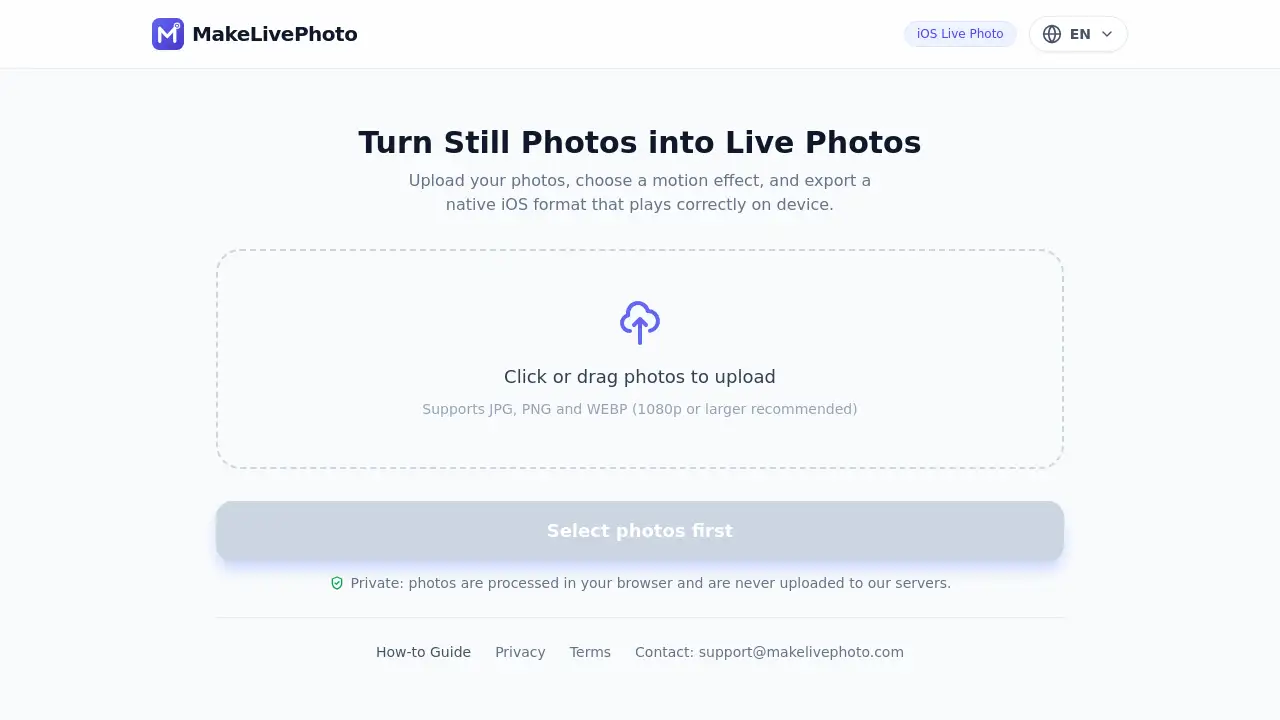
MakeLivePhoto is a free browser-based tool that helps users convert still photos to Live Photos and Android Motion Photos in batches. It processes images locally, so no upload is required. Users can upload JPG, PNG, or WEBP files, choose a motion effect, and export a native iOS format that plays correctly on device.
What is MakeLivePhoto?
MakeLivePhoto is a web app that converts ordinary still images into motion-rich formats. It is a Live Photo converter for people who want iPhone Live Photos or Android Motion Photos without installing desktop software. The main problem it solves is simple: most photos are static, while modern phones can display subtle motion. MakeLivePhoto adds a chosen motion effect and exports a native iOS Live Photo format that plays correctly on device. The tool is also useful for batch jobs, because users can convert multiple JPG, PNG, or WEBP images at once. Because processing happens in the browser, no upload is required. This browser-based approach supports privacy and makes the free tool convenient for quick projects.
Key Features of MakeLivePhoto
Browser-Based Processing with No Upload
MakeLivePhoto runs in a web browser and processes images locally, so users do not need to upload private photos to a server. This browser-based design supports privacy and faster workflows.
Batch Convert Still Photos to Live Photos
Users can batch convert still photos to Live Photos, saving time when working with albums or content libraries. The tool accepts JPG, PNG, and WEBP files, with 1080p or larger recommended.
Android Motion Photo Export
MakeLivePhoto can create Android Motion Photos, giving Android users a motion format that works on supported devices. This expands the tool beyond iPhone Live Photos.
Motion Effect Selection
Before export, users choose a motion effect to control how the still photo moves. This simple option helps create a more natural Live Photo result.
Native iOS Live Photo Format
The tool exports a native iOS format that plays correctly on device. This focus on device-ready output reduces playback and compatibility problems.
Free and Accessible
MakeLivePhoto is described as 100% free. There are no paid tiers mentioned, and users can access the converter directly in a browser.
Use Cases for MakeLivePhoto
Social Media Content
Creators can convert still photos to Live Photos for iPhone sharing, stories, and personal posts. The motion effect can make a plain image feel more active.
Family Memory Enhancement
Families can turn old JPG or PNG photos into iPhone Live Photos or Android Motion Photos. This adds a gentle sense of life to archived images.
Product Photo Demos
Small sellers can use MakeLivePhoto to create lightweight motion previews from product stills. This can make listings feel more engaging without video editing.
Travel and Event Albums
Travelers and event photographers can batch convert selected images into Live Photos. The browser-based workflow helps when working across devices.
Privacy-Conscious Projects
Users who prefer no upload can convert still photos to Live Photos inside the browser. This is useful for personal, client, or sensitive images.
How to Use MakeLivePhoto
- Open MakeLivePhoto in a modern web browser.
- Upload one or more JPG, PNG, or WEBP photos. 1080p or larger is recommended.
- Choose the motion effect users want for the Live Photo.
- Export the file as a native iOS Live Photo or Android Motion Photo. Batch export may be available for multiple images.
- Download the result and open it on a compatible iPhone or Android device to confirm playback.
Target Audience for MakeLivePhoto
- iPhone users who want to convert still photos to Live Photos.
- Android users who need Motion Photos from static images.
- Social media creators and bloggers.
- Photographers working with client or personal archives.
- Privacy-conscious users who prefer no upload.
- Families and memory keepers with large photo collections.
Is MakeLivePhoto Free?
MakeLivePhoto is described as 100% free. The reference information does not list paid plans, subscriptions, or credit limits. Users can convert still photos to Live Photos and Android Motion Photos without a stated fee. If pricing changes, the official website should be checked.
| Plan | Price | Features |
|---|---|---|
| Free | $0 | Browser-based conversion, batch processing, no upload, JPG/PNG/WEBP support, iPhone Live Photos, Android Motion Photos |
No Pro or paid tier is shown in the available information.
MakeLivePhoto's Pros and Cons
| Aspect | Pros | Cons |
|---|---|---|
| Pricing | 100% free with no listed paid plans | No premium support or advanced paid features are described |
| Privacy | Browser-based processing and no upload required | Privacy depends on the user's browser and device |
| Features | Batch convert still photos to Live Photos and Android Motion Photos | Motion effects appear preset rather than fully custom |
| Format support | Works with JPG, PNG, and WEBP | Other formats are not listed |
| Output | Exports native iOS format that plays correctly on device | Best results may require 1080p or larger source images |
| Access | No desktop installation required | Needs a modern browser and enough device performance for batches |
Frequently Asked Questions about MakeLivePhoto
What is MakeLivePhoto?
MakeLivePhoto is a free browser-based Live Photo converter. It turns still photos into iPhone Live Photos and Android Motion Photos. It supports batch conversion and processes images locally without upload.
Is MakeLivePhoto really free?
Yes, the available product information says MakeLivePhoto is 100% free. No paid plans are listed. Users should check the official site for any future pricing updates.
Does MakeLivePhoto upload my photos?
No. MakeLivePhoto processes photos in the browser, and no upload is required. This browser-based approach is designed for privacy.
Can MakeLivePhoto convert photos to iPhone Live Photos?
Yes. MakeLivePhoto can convert still photos to Live Photos and export a native iOS format that plays correctly on device. Source images should ideally be 1080p or larger.
Does MakeLivePhoto support Android Motion Photos?
Yes. The tool can create Android Motion Photos from still images. This makes it useful for Android users who want motion photos without complicated editing software.
What file formats does MakeLivePhoto accept?
MakeLivePhoto accepts JPG, PNG, and WEBP files. The homepage recommends 1080p or larger images for better results. The exported format can be an iPhone Live Photo or Android Motion Photo.
MakeLivePhoto Tags
MakeLivePhoto, convert still photos to Live Photos, Live Photo converter, iPhone Live Photos, Android Motion Photos, still photos to Live Photos, browser-based Live Photo tool, batch Live Photo converter, free Live Photo maker, no upload photo converter, JPG to Live Photo, PNG to Live Photo, WEBP to Motion Photo