Introduction
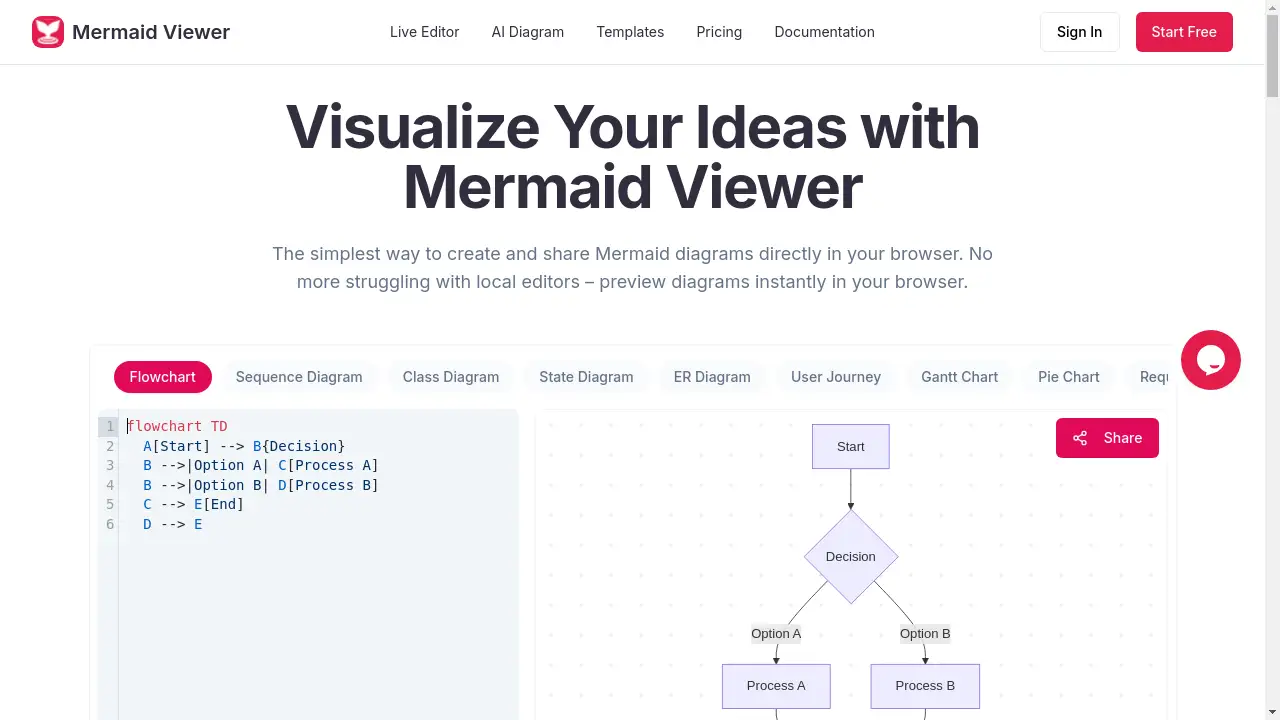
MermaidViewer is an online editor for creating and sharing Mermaid diagrams directly in your browser.
What is MermaidViewer?
MermaidViewer is a web-based application designed to simplify the creation, editing, and sharing of diagrams using the Mermaid markup language. It solves the common problem of needing to install and configure local editors or command-line tools to visualize Mermaid code. By providing an instant live preview in the browser, it allows users to see their diagrams change in real-time as they type, eliminating the need to manually render code. This tool is highly suitable for developers, technical writers, project managers, and educators who need to quickly create flowcharts, sequence diagrams, class diagrams, and other visual documentation. Its importance lies in making diagramming more accessible, collaborative, and efficient, directly within a user's workflow without any setup.
Key Features of MermaidViewer
Live Preview
Changes to your Mermaid code are visualized instantly as you type, removing the need for a separate render button and speeding up the diagram creation process.
AI-Assisted Coding
A built-in "Generate with GPT-4" feature can convert plain text descriptions into ready-to-use Mermaid code, significantly lowering the barrier to entry for complex diagrams.
Smart Export
Diagrams can be exported as high-quality SVG, PNG, or Markdown files, with options for custom DPI settings and toggling between dark and light themes for the output.
Enterprise Integration
For team and organizational use, MermaidViewer offers Docker private deployment and role-based access control (RBAC) for secure, internal diagram management.
Smart Debugging
The editor provides syntax error highlighting and offers auto-correction suggestions, helping users quickly identify and fix issues in their Mermaid code.
Real-time Collaboration
Users can share editor links with team members to enable co-editing of diagrams, facilitating seamless teamwork and review processes.
Use Cases for MermaidViewer
Software Architecture Documentation
Developers can use it to create and maintain C4 diagrams, class diagrams, and sequence diagrams to document system design and interactions.
Project Planning and Management
Project managers can build Gantt charts, timelines, and flowcharts to visualize project milestones, dependencies, and workflows.
Educational Content Creation
Educators and students can generate mind maps, flowcharts, and ER diagrams to illustrate concepts, processes, and data relationships for teaching and learning materials.
Business Process Mapping
Teams can map out user journeys, decision flows, and operational processes using flowcharts and state diagrams to analyze and optimize workflows.
How to Use MermaidViewer
Using MermaidViewer is straightforward and requires no installation:
- Navigate to the Website: Go to the MermaidViewer homepage in your web browser.
- Input or Generate Code: Either type your Mermaid diagram code directly into the live editor or use the AI feature to generate code from a text description.
- Preview Instantly: Watch your diagram update in real-time in the preview pane as you edit the code.
- Export or Share: Once satisfied, export the diagram in your preferred format (SVG, PNG, etc.) or share the editor link for collaboration.
Target Audience for MermaidViewer
- Software Developers and DevOps Engineers
- Technical Writers and Documentation Specialists
- Project and Product Managers
- System Architects and Analysts
- Educators, Students, and Academics
- Business Analysts and Process Designers
Is MermaidViewer Free?
MermaidViewer offers a generous free plan that allows users to start creating diagrams instantly without registration. The free tier includes core features like the live editor and basic sharing. For users needing more advanced capabilities, affordable premium options like the Starter and Pro plans are available. These paid plans offer benefits such as unlimited AI conversations, high-resolution exports without watermarks, advanced sharing features, and extended version history.
Frequently Asked Questions about MermaidViewer
What types of diagrams can I create with MermaidViewer?
MermaidViewer supports a wide range of diagram types defined by the Mermaid syntax, including flowcharts, sequence diagrams, class diagrams, state diagrams, entity-relationship (ER) diagrams, user journey maps, Gantt charts, pie charts, requirement diagrams, Git graphs, C4 diagrams, mind maps, and timelines.
Do I need to install any software or create an account?
No installation or account is required to start using the basic features. You can begin creating and previewing diagrams directly in your browser. An account is only necessary if you wish to save diagrams to the cloud or access premium plan features.
How do I share a diagram I've created?
You can share your work by generating a shareable link to the live editor, allowing others to view or collaboratively edit the diagram. For static versions, you can export the diagram as an image or PDF and distribute the file.
How does the AI diagram generator work?
The AI-assisted coding feature uses GPT-4 to interpret your plain English description of a diagram and automatically generates the corresponding Mermaid code. You can then refine this code in the live editor.
Can I use MermaidViewer for commercial or team projects?
Yes. The Pro plan and enterprise integration options, including private Docker deployment, are designed for professional and commercial use, offering features like role-based access control and priority support suitable for teams.
Where are my diagrams stored?
With a focus on privacy, diagrams created in the free version without an account remain locally in your browser. For users with accounts on paid plans, diagrams can be stored securely in the cloud for access across devices.
MermaidViewer Tags
Mermaid diagram, online diagram editor, live preview, AI diagram generator, flowchart tool, sequence diagram, create Mermaid online, diagram sharing, real-time collaboration, export SVG PNG, technical documentation, software architecture diagram