Introduction
A powerful AI-powered design and prototyping tool for modern product teams.
What is Mockitt AI?
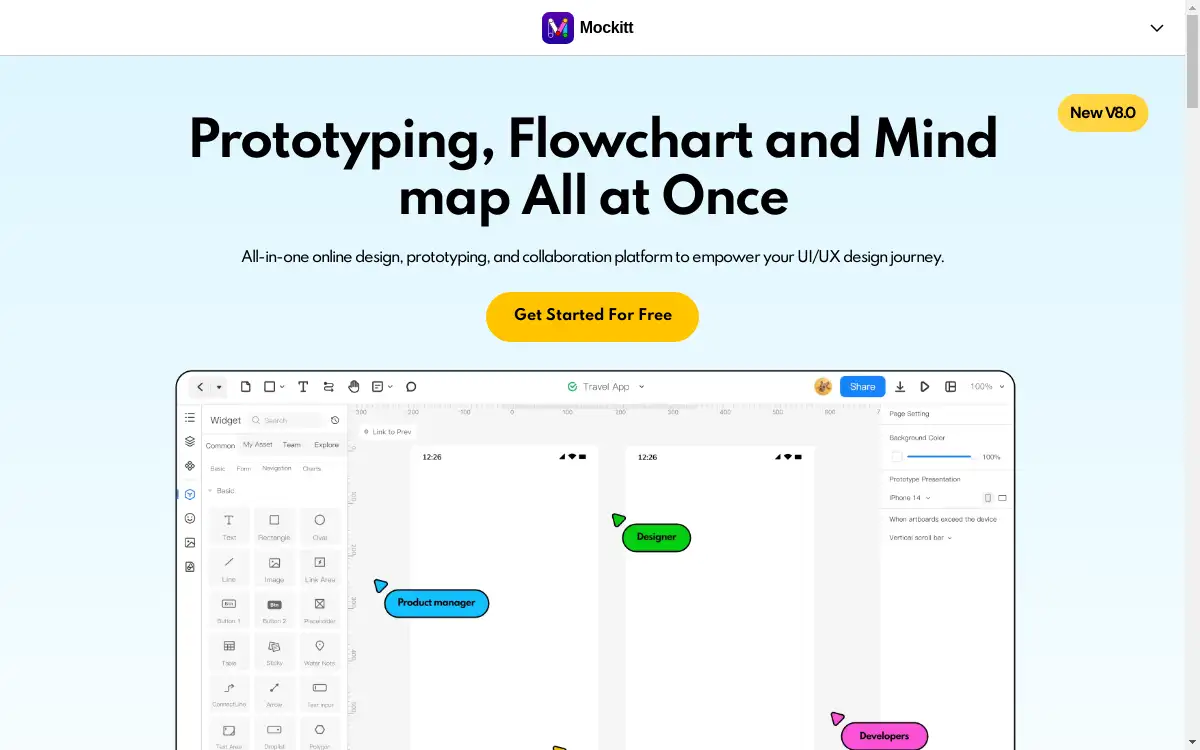
Mockitt AI is an intelligent design platform that integrates artificial intelligence to streamline the entire product design workflow. It addresses the common challenges of slow prototyping, inefficient collaboration, and the time-consuming creation of assets like flowcharts and mind maps. This product is suitable for UX designers, product managers, and developers who need to bring ideas to life quickly and collaboratively. By leveraging AI prototyping and AI design capabilities, Mockitt AI significantly accelerates the design process, from initial concept to developer handoff. The platform's core value lies in its ability to elevate efficiency and foster a shared understanding among team members, making it a vital tool for agile development environments.
Key Features of Mockitt AI
AI Prototype Generator
This feature allows users to rapidly generate interactive prototypes, significantly elevating efficiency and reducing manual design time.
AI Chat
Set your imagination free by using the AI Chat to brainstorm ideas and generate content without creative limits or boundaries.
Magic Fill
Embrace the magic of personalized fulfillment as this feature intelligently suggests and auto-fills design elements to complete your layouts.
AI Flowchart
Easily visualize team workflows and create comprehensive, structured diagrams using AI-powered shape and theme suggestions.
AI Mind Map
Generate and organize your thoughts visually, employing colors and hierarchical structures to boost creativity during brainstorming sessions.
Real-time Collaboration
Team members can share, edit, and comment on designs simultaneously, ensuring everyone is on the same page and decision-making is effective.
Seamless Handoff
Developers can inspect design files and extract code directly, magically turning pixels into code for a smooth transition from design to development.
Vast Resources Library
Access a wide range of built-in templates, components, and widgets to quickly bring any idea to life without starting from scratch.
Use Cases for Mockitt AI
Rapid Prototyping for UX Designers
UX designers can use the AI prototype generator to quickly create life-like, interactive mockups for user testing and feedback.
Team Brainstorming and Planning
Product teams can utilize the AI mind map and AI flowchart tools to visually map out ideas, user journeys, and project workflows during planning sessions.
Streamlined Designer-Developer Collaboration
The platform facilitates a shared understanding between designers and developers through formatted annotations and seamless code handoff, keeping iterations moving.
Marketing Campaign Page Design
Marketers can leverage built-in templates and the magic fill feature to design compelling campaign pages quickly and efficiently.
How to Use Mockitt AI
- Sign Up and Create a Project: Begin by creating an account on the Mockitt website and start a new project for prototyping, flowcharting, or mind mapping.
- Utilize AI Features: Use the AI Chat for brainstorming, then generate a base layout with the AI Prototype Generator. Employ Magic Fill to quickly populate your designs with relevant elements.
- Refine and Annotate: Create multiple artboards and add instant interactions to build a realistic experience. Use formatted annotations to explain the logic behind your design decisions.
- Collaborate and Share: Invite team members to review the project. Collaborate in real-time by sharing comments and making edits directly on the prototype, flowchart, or mind map.
- Handoff to Development: Once the design is finalized, use the seamless handoff feature to generate code snippets and assets for developers, completing the design process.
Target Audience for Mockitt AI
- UX Designers
- Product Managers
- UI/Graphic Designers
- Marketers
- Developers
Is Mockitt AI Free?
Mockitt AI offers a generous free plan that provides access to its core features, allowing users to explore the AI prototyping and design capabilities. For teams and professionals requiring advanced functionality, such as more projects, premium templates, and enhanced collaboration tools, affordable premium options are available. This freemium model makes powerful AI-driven design accessible to individuals and scalable for growing businesses.
Frequently Asked Questions about Mockitt AI
What is Mockitt AI used for?
Mockitt AI is used for rapid UI/UX design and prototyping, creating flowcharts and mind maps, and facilitating real-time team collaboration. It helps product teams design from start to finish efficiently.
How does the AI Prototype Generator work?
The AI Prototype Generator uses artificial intelligence to help users quickly create the foundation of an interactive prototype, significantly elevating efficiency by automating parts of the initial layout creation.
Can I collaborate with my team in real-time?
Yes, Mockitt AI supports real-time collaboration, allowing multiple team members to share, edit, and comment on designs, flowcharts, and mind maps simultaneously.
Is there a free version of Mockitt AI?
Yes, Mockitt AI offers a free plan with access to many of its core features, including basic AI tools and prototyping capabilities.
How does the seamless handoff to developers work?
Developers can inspect design files directly within Mockitt AI, which allows them to access code snippets for CSS, iOS, and Android, effectively turning pixels into code without a steep learning curve.
What file formats can I export from Mockitt AI?
While specific formats are detailed on the website, the platform generally supports exporting designs and assets in common formats suitable for development and presentation, complemented by the direct code handoff feature.
Mockitt AI Tags
Mockitt AI, AI prototyping, AI design tool, prototype generator, AI flowchart, AI mind map, UI/UX design, real-time collaboration, design collaboration, seamless handoff, product design platform, magic fill