Introduction
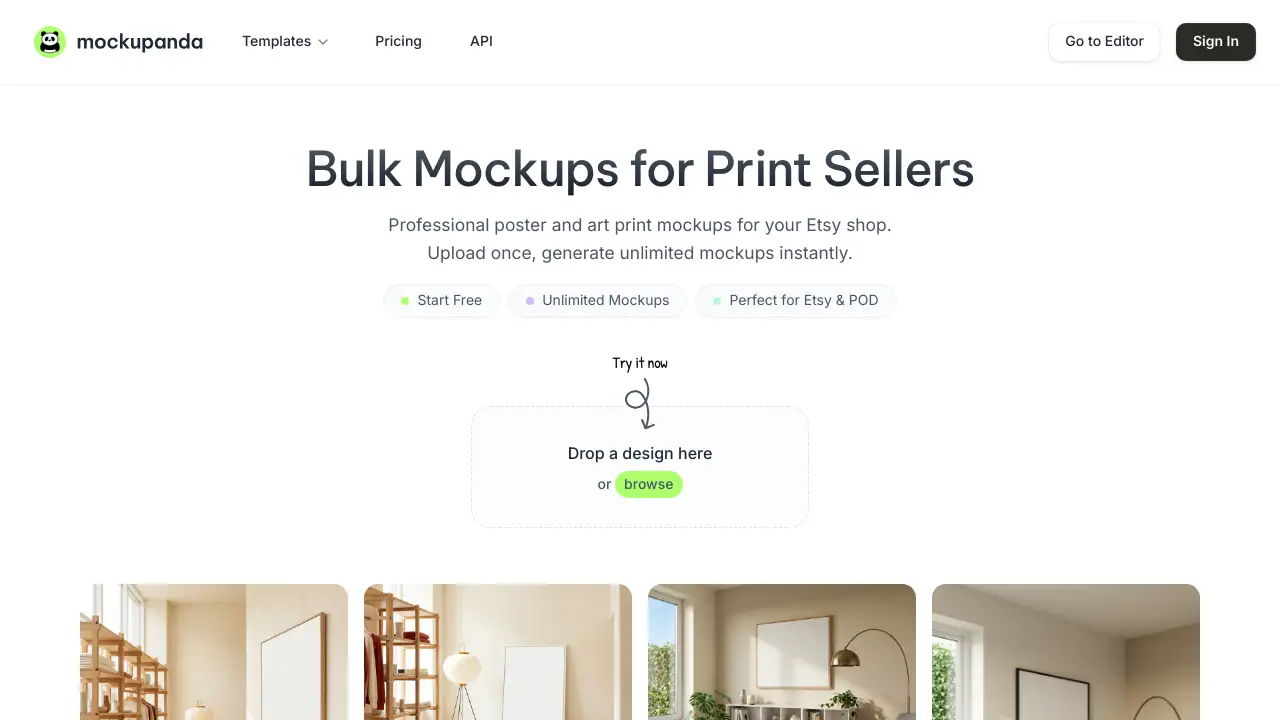
Mockupanda is a powerful Etsy mockup generator designed to create professional print mockups in seconds.
What is Mockupanda?
Mockupanda is an online tool specifically built for creators who sell physical prints, such as poster and art print sellers on platforms like Etsy and other print-on-demand (POD) shops. It addresses a common, time-consuming pain point: creating high-quality, realistic product images to showcase artwork. The platform allows users to upload a design once and generate dozens of bulk mockups across various frame styles and wall scenes almost instantly. This eliminates the need for manual photo editing or expensive photoshoots, enabling sellers to launch new designs faster and present a cohesive, professional brand image that can help drive higher conversion rates and more sales.
Key Features of Mockupanda
Unlimited Mockup Creation
Users can generate an uncapped number of mockups on the free tier, allowing for extensive testing and listing creation without worrying about credit limits.
Bulk Mockup Generator
The core functionality enables uploading a single artwork to automatically populate it across multiple print mockup templates, saving hours of manual work.
Real-Time Editing Controls
Artwork can be moved and resized within the mockup frame with live previews, ensuring perfect placement and composition without any guesswork.
Professional Frame and Scene Library
The tool offers a curated selection of dozens of realistic frame styles and wall settings with accurate perspective and lighting, helping customers visualize the art in a home environment.
Pixel-Perfect Output
Designs are rendered without distortion, blurring, or AI artifacts, ensuring customers see exactly what they will receive when they purchase the print.
Simple Three-Step Workflow
The process is streamlined into three easy steps: upload a design, choose frame styles, and download the high-resolution mockups, making it accessible for users of all skill levels.
API for Developers
For advanced workflows, Mockupanda provides a simple REST API to generate mockups programmatically, integrating directly into custom applications or automated storefronts.
Use Cases for Mockupanda
Scaling an Etsy Print Shop
Sellers can rapidly create consistent, professional listing photos for dozens of new poster or art print designs, significantly speeding up their time to market.
Launching a Print-on-Demand Store
POD entrepreneurs can use the tool to create a full catalog of product images for their storefronts without any design software expertise or upfront investment in photography.
Testing New Artwork Concepts
Artists can quickly visualize how a new design will look in various frames and settings before committing to physical printing, allowing for efficient iteration and feedback.
Maintaining Brand Consistency
Shop owners can ensure all their product listings share a cohesive aesthetic, which builds customer trust and reinforces a professional brand identity across their entire catalog.
How to Use Mockupanda
Using Mockupanda is a straightforward process designed for efficiency:
- Upload Your Design: Navigate to the editor and drag-and-drop your artwork file (PNG, JPG, GIF, WebP, or even a custom PSD). The platform supports transparent backgrounds and high-resolution files.
- Choose Your Mockups: Browse the library of available poster mockup and frame templates. You can select multiple styles to generate a variety of images from a single upload.
- Customize & Adjust: Use the real-time controls to reposition, scale, or rotate your artwork within the chosen mockup to achieve the perfect look.
- Generate & Download: Click to generate your images. You can then download them individually or as a ZIP archive. Free-tier downloads include a watermark, which can be removed by upgrading to a Pro plan.
Target Audience for Mockupanda
- Etsy Sellers specializing in posters, art prints, and digital downloads.
- Print-on-Demand (POD) Shop Owners on platforms like Redbubble, Society6, or Shopify.
- Independent Artists and Illustrators selling their work online.
- Graphic Designers creating client presentations or portfolio pieces.
- Developers looking to integrate a mockup generation API into their applications.
Is Mockupanda Free?
Mockupanda operates on a freemium model. Users can start for free with full access to core features but with some limitations.
| Plan | Price | Key Features |
|---|---|---|
| Free | $0 | Unlimited mockup generation, access to template library, real-time editing. Downloads include a Mockupanda watermark. |
| Pro | $15/month (billed annually) or $19/month (billed monthly) | Watermark-free high-res downloads, enhanced export quality, priority support, and commercial license. |
The free plan is fully functional and uncapped, making it ideal for testing and small-scale use. Upgrading to Pro is necessary for obtaining clean, professional files ready for commercial listings.
Mockupanda's Pros and Cons
| Aspect | Pros | Cons |
|---|---|---|
| Speed & Efficiency | Extremely fast bulk mockup generation saves countless hours compared to manual methods. | Advanced customization (like editing scene elements) may be limited compared to full Photoshop. |
| Pricing Model | Truly unlimited free tier with no credit caps is excellent for testing and low-volume users. | The Pro plan may be an additional cost for sellers on very tight margins, though the value is clear. |
| Ease of Use | Intuitive, three-step workflow requires no prior design software experience. | The tool is specialized for prints/wall art; other product categories (like mugs) are not its primary focus. |
| Output Quality | Pixel-perfect rendering and realistic scenes create professional, trustworthy product images. | Free tier downloads contain a watermark, which is standard but requires an upgrade for commercial use. |
Frequently Asked Questions about Mockupanda
What file types can I upload as artwork?
You can upload common raster images like JPEG, PNG, GIF, or WebP. Transparent PNGs are fully supported. The platform also accepts custom PSD files (up to 300MB) if they contain a properly named Smart Object layer for artwork placement.
Is there a limit to how many mockups I can create?
No. One of the standout features is the unlimited mockup creation on both free and paid plans. There are no monthly credit caps or generation limits, allowing for extensive use.
How does the bulk mockup generation work?
After uploading your design, you can select multiple frame or scene templates from the library. Mockupanda will then automatically generate a high-resolution mockup for each selected template, all from that single artwork file, creating a batch of images in minutes.
What's the difference between the Free and Pro plans?
The free plan provides full access to the mockup generator and templates, but all downloaded images will include a Mockupanda watermark. The Pro plan removes this watermark, provides enhanced export quality, and grants a commercial license for the generated images.
Can I use Mockupanda for products other than posters and art prints?
While its core library and marketing focus on print mockups for Etsy and POD, the platform also supports templates for t-shirts, hoodies, and tote bags. The ability to upload custom PSDs also opens possibilities for other product types.
Do I own the mockups I generate?
Yes, you own the final mockup images you create. You are free to use them commercially in your listings, marketing, and social media. Attribution is not required.
Mockupanda Tags
Etsy mockup generator, bulk mockup creator, print mockup generator, poster mockup, art print mockup, print on demand tools, Etsy seller tools, POD mockups, free mockup generator, product photo creator, batch mockup generator, t-shirt mockup generator