Introduction
A free online tool to instantly convert MP3 audio files into editable MIDI note data.
What is Free MP3 to MIDI Converter?
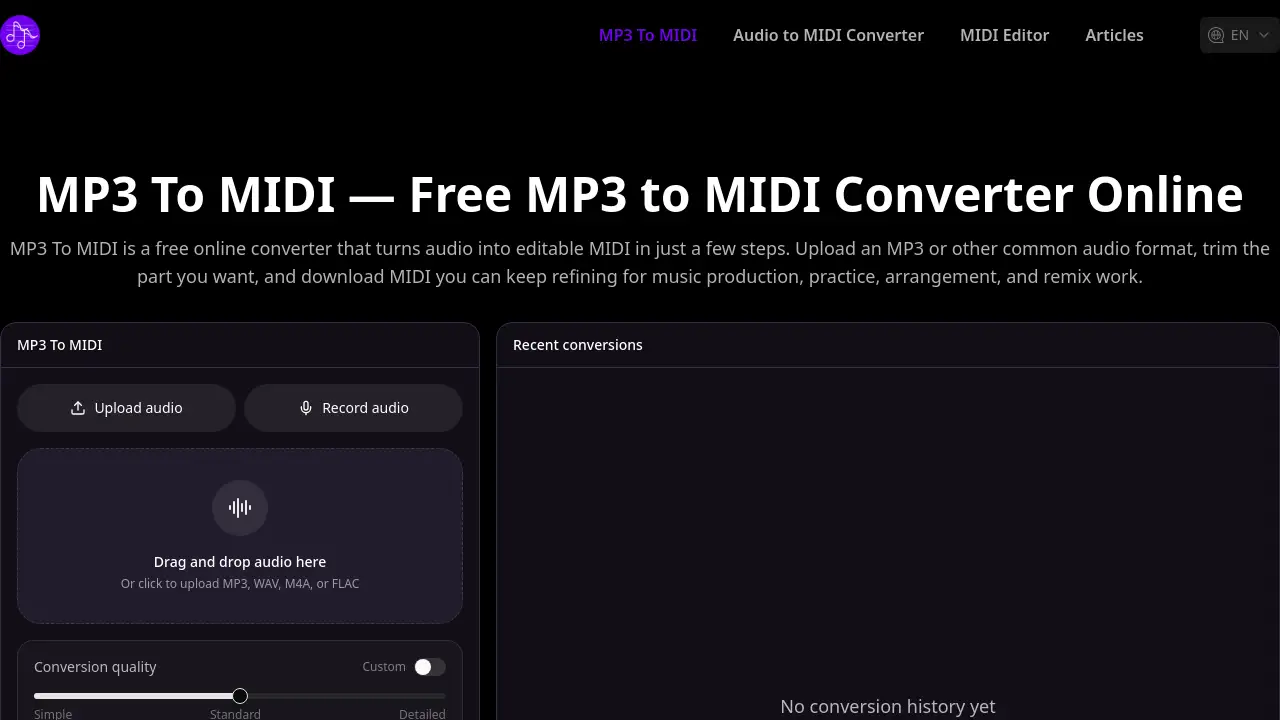
The Free MP3 to MIDI Converter is a web-based application designed to transform audio recordings into MIDI (Musical Instrument Digital Interface) files. This process, known as audio-to-MIDI conversion, addresses a common challenge for musicians and producers: extracting musical ideas, like melodies or chords, from existing audio sources such as song demos, recorded riffs, or vocal lines. By converting these elements into editable MIDI data, the tool makes it significantly easier to integrate them into digital audio workstations (DAWs) for further refinement, arrangement, or practice. It is particularly suitable for music producers, hobbyist musicians, students, and anyone involved in remixing or transcription work who needs a quick, no-cost solution to bridge the gap between recorded sound and editable music notation.
Key Features of Free MP3 to MIDI Converter
Upload Common Audio Formats
The converter supports a variety of popular audio file types beyond just MP3, including WAV, M4A, and FLAC, allowing for flexible audio to MIDI conversion from different recording sources.
Trim Before Conversion
Users can preview their uploaded audio and select only the specific section they need to convert, ensuring the resulting MIDI file is focused and relevant without processing unnecessary parts of the recording.
Fast and 100% Free Conversion
The service operates entirely online without requiring user registration, signup, or payment, offering a straightforward and accessible free MP3 to MIDI workflow for immediate use.
Outputs Editable MIDI Files
The core function is to generate a standard MIDI file from the uploaded audio, which can then be downloaded and opened in any MIDI editor or DAW for detailed editing of notes, velocity, and timing.
Use Cases for Free MP3 to MIDI Converter
Music Production and Arrangement
Producers can extract melodic or harmonic ideas from reference tracks or old demos and convert them into MIDI for seamless integration into new compositions and arrangements within their production software.
Learning and Practice
Musicians and students can use the converter to aid in transcription by turning complex audio passages into visual MIDI data, making it easier to study note sequences, chords, and rhythms for practice purposes.
Creating Covers and Remixes
For artists creating covers or remixes, the tool provides a starting point by converting elements of an original song into editable MIDI, allowing for experimentation with new instruments, tempos, and harmonic structures.
Capturing Musical Ideas
It serves as a quick sketchpad for capturing spontaneous ideas, such as a hummed melody or a guitar riff recorded on a phone, and turning them into a MIDI file that can be saved and developed later in a full production environment.
How to Use Free MP3 to MIDI Converter
Using the MP3 to MIDI Converter is a simple three-step process conducted directly in a web browser.
- Upload Your Audio File: Navigate to the website and drag-and-drop your audio file (MP3, WAV, M4A, FLAC) into the upload area, or click to browse your computer.
- Trim and Convert: Once the audio is loaded, use the trimming tool to isolate the specific segment you want to convert. Then, click the "Convert to MIDI" button to initiate the audio to MIDI process.
- Download and Edit: After processing is complete, download the resulting MIDI file to your device. You can then import this file into your preferred MIDI editor or digital audio workstation for any further editing or use in your projects.
Target Audience for Free MP3 to MIDI Converter
- Music producers and beatmakers looking to sample or reinterpret audio elements.
- Hobbyist musicians and songwriters wanting to develop ideas from casual recordings.
- Students and educators involved in music theory, composition, or transcription exercises.
- Remix artists and content creators needing to deconstruct songs for new projects.
- Anyone needing a quick, no-fuss tool to convert audio recordings into a editable music format.
Is Free MP3 to MIDI Converter Free?
Yes, the Free MP3 to MIDI Converter is completely free to use. As stated on its homepage, the service is "100% free" and requires "no signup." There are no mentioned subscription tiers, paid plans, or usage limits within the provided reference information. Users can access the core conversion functionality without any cost.
Free MP3 to MIDI Converter's Pros and Cons
| Aspect | Pros | Cons |
|---|---|---|
| Cost & Access | Completely free with no registration required. | No information on advanced features for complex audio. |
| Usability | Very simple, three-step workflow in a web browser. | Accuracy of conversion depends on audio clarity and complexity. |
| Functionality | Useful for quick idea capture and basic transcription aid. | Lacks integrated advanced editing tools; requires external MIDI editor. |
| Flexibility | Supports multiple common audio formats and offers audio trimming. | A web-based tool, so it requires an internet connection to function. |
Frequently Asked Questions about Free MP3 to MIDI Converter
How accurate is the MIDI conversion?
The accuracy can vary depending on the source audio. Simple, monophonic melodies (like a single vocal line or a clean synth lead) typically convert more accurately. Complex, polyphonic music with multiple overlapping instruments or heavy effects may result in less precise MIDI output that requires more manual cleanup in a MIDI editor.
Can I convert vocals to MIDI?
Yes, the converter can process vocal recordings. For best results, the vocal should be as clear and isolated as possible from other instruments. Hummed or sung melodies are common use cases for this audio to MIDI function.
Which audio formats are supported?
The tool supports several common audio formats including MP3, WAV, M4A, and FLAC. This flexibility allows users to convert files from various recording devices and software.
Is it really completely free? Do I need to sign up?
According to the product information, the service is 100% free and does not require any account creation or signup. Users can upload, convert, and download MIDI files without any payment or registration.
Can I edit the converted MIDI file?
Yes, the primary purpose is to create a MIDI file that you can edit. After downloading, the file can be imported into any digital audio workstation (DAW) or dedicated MIDI editor software to change notes, adjust timing, modify velocity, or assign new instruments.
What can I use the converted MIDI for?
Converted MIDI files are versatile. Common uses include music production (reusing melodies), practice (slowing down parts to learn), transcription assistance, creating cover versions with different sounds, or as a starting point for remixes and arrangements.
Free MP3 to MIDI Converter Tags
free MP3 to MIDI converter, audio to MIDI, online MIDI converter, convert MP3 to MIDI, free audio to MIDI, MIDI editor, music transcription tool, extract melody from audio, MIDI file converter, music production tool, remix tool, practice music