Introduction
For athletes who want to track, analyze, and optimize athletic performance with full control over their data, MyTraL delivers a secure, self‑hosted training log that turns every workout into actionable insights. Unlike cloud‑dependent apps, this open‑source tool puts your years of training history on your own machine, ensuring privacy and permanent access.
What is MyTraL?
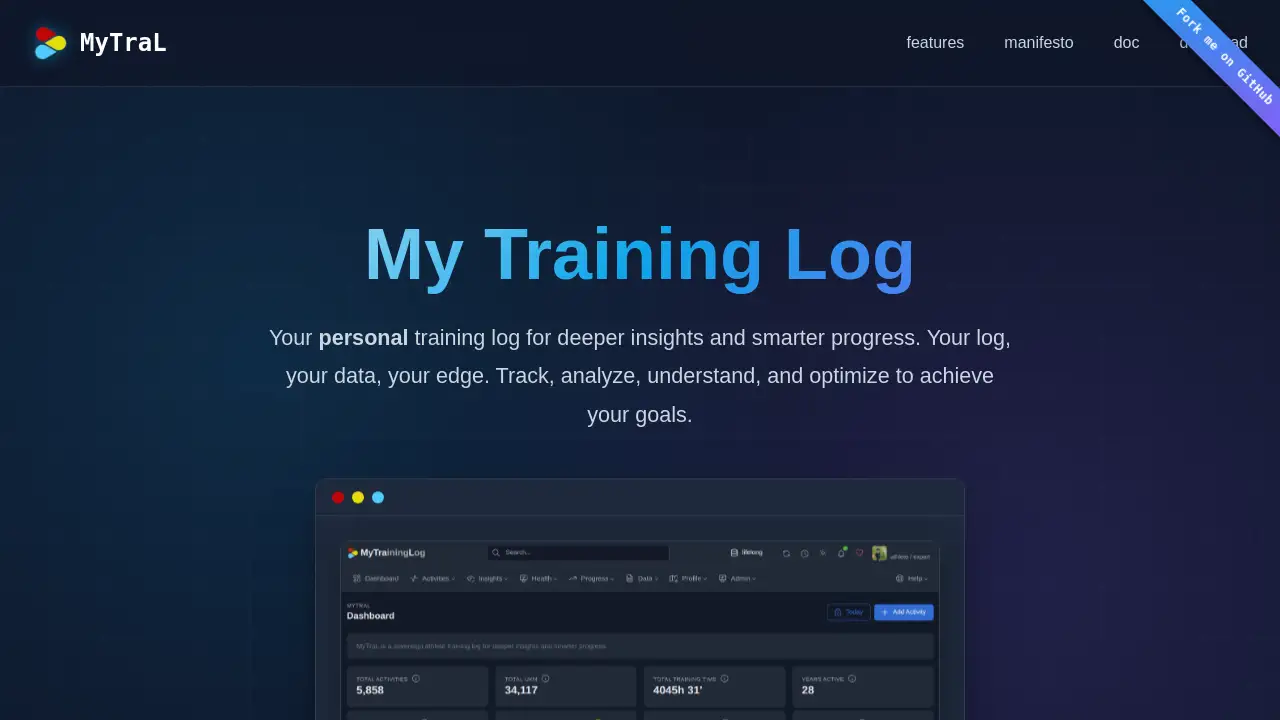
MyTraL is a personal training log designed for deep performance analysis. It solves the problem of losing valuable training data when services change terms, shut down, or ban accounts. By storing everything locally, athletes own their journey end to end. The platform captures not only basic metrics like distance and pace but also subjective feelings, gear usage, injury history, weather conditions, and more. It then reveals hidden patterns through heatmaps, impulse‑response models, and optional local AI coaching. Suitable for runners, cyclists, swimmers, and multi‑sport athletes, MyTraL transforms fragmented data into a coherent story of progress. Its commitment to freedom and data ownership makes it a standout choice for privacy‑conscious fitness enthusiasts.
Key Features of MyTraL
Own Your Data, On Your Machine
All training history stays on your local device. No cloud servers, no account bans, no unexpected data loss. Your effort, sweat, and body created the data — you deserve to keep it.
Holistic View Beyond Metrics
Beyond pace and distance, MyTraL captures subjective insights, gear usage, injury symptoms, custom activities, favorite routes, and training goals. This context reveals connections between load, recovery, and performance.
Activity Heatmap
A glanceable, scrollable view of every session across months and years. Patterns in consistency, rest days, and training rhythms become visible instantly — no spreadsheets needed.
Gear Lifecycle Management
Track usage, schedule maintenance, and monitor costs for shoes, bikes, and equipment. Know exactly when to replace worn gear before it affects training.
Goal Prioritization with Eisenhower Matrix
Set SMART goals and prioritize them using the urgent‑important matrix. This structure turns vague ambitions into clear daily actions.
Customize and Extend
Add custom activities, exercises, and data fields. Integrate with local scripts, LLMs (Ollama, LM Studio), or third‑party tools for flexible analysis.
Import from Multiple Sources
Import data from FIT, GPX, TCX files, Garmin bulk export, Strava API, Polar HRM, Concept2 Logbook, and more. Normalize all data into a unified, consistent format.
Advanced Analytics (Skunkworks)
- 3D Impulse‑Response Model: Measures stress, adaptation, fatigue, and fitness across intensity, duration, and recovery — science you can inspect.
- On‑Device AI Coach: Connect local LLMs for personalized workout recommendations and performance predictions, all without sending data to the cloud.
- TRIMP (Training Impulse): Gold‑standard heart‑rate based load quantification.
- Zero‑Shot Performance Forecasting: Uses in‑context learning on your unique data to predict race outcomes and overtraining risks, locally and privately.
Use Cases for MyTraL
Data‑Ownership‑First Athletes
Athletes who have lost training history from other platforms can migrate their data to MyTraL and never worry about service shutdowns again.
Multi‑Sport and Detailed Logging
Triathletes or gym runners can log custom activities, track gear wear, record subjective feelings, and compare different training cycles side by side.
Coaching and Personal Analysis
Coaches can use MyTraL’s holistic view and advanced metrics (3D IRM, TRIMP) to design smarter periodization plans and monitor athlete response without third‑party servers.
AI‑Assisted Training Without Cloud
Privacy‑focused users can run local LLMs to get daily workout advice and performance forecasts while keeping all data on their own machine.
How to Use MyTraL
- Download or clone the MyTraL repository from GitHub (links are on the official homepage).
- Run the application locally on your own machine — installation guides are provided for Windows, macOS, and Linux.
- Import your existing training data using the supported file formats or API connectors (Strava, Garmin, FIT, GPX, etc.).
- Start logging new activities manually or via sync. Add detailed notes, gear, and subjective ratings.
- Analyze with built‑in views — heatmap, goal matrix, gear dashboard, and advanced metrics (optional coach/LLM integration).
No account creation, no monthly fees, no data leaving your computer.
Target Audience for MyTraL
- Data‑conscious athletes who want to own their training history permanently
- Runners, cyclists, swimmers, and multi‑sport athletes looking for deeper insights
- Self‑hosting enthusiasts comfortable with open‑source tools and local installations
- Privacy‑focused users who avoid cloud services for personal data
- Coaches and sports scientists who need granular, customizable analysis
- Tech‑savvy athletes who want to integrate their own AI/ML scripts
Is MyTraL Free?
MyTraL is completely free and open source (FLOSS). There are no paid plans, subscriptions, or hidden fees. The entire application runs on your own machine, so no cloud costs are involved. Donations may be accepted by the developers, but the software itself is entirely free to use.
| Plan | Price | Features |
|---|---|---|
| Self‑hosted | $0 (free) | Full feature set including AI coach, advanced analytics, data ownership, all imports |
MyTraL's Pros and Cons
| Aspect | Pros | Cons |
|---|---|---|
| Data Ownership | 100% local control; no risk of data loss or account bans | Requires self‑hosting; initial setup may be technical |
| Features | Comprehensive metrics (3D IRM, TRIMP, AI coach, heatmap, gear tracking) | Some advanced features (AI coaching) need local LLM installation |
| Privacy | No data sent to external servers; on‑device analysis | Without cloud sync, sharing data with coaches requires manual export |
| Extensibility | Open source; customizable activities, scripts, and integrations | Requires some programming knowledge for deep customization |
| Usability | Intuitive heatmap and goal matrix interface | Learning curve for first‑time users of self‑hosted tools |
Frequently Asked Questions about MyTraL
Is MyTraL only for runners?
No. It supports running, cycling, swimming, strength training, and any custom activity you define. The gear tracking and impulse‑response model work across disciplines.
Can I sync MyTraL with my Garmin or Strava account?
Yes. MyTraL imports data from Garmin bulk export, Strava API, FIT files, GPX, TCX, and more. After import, all data is stored locally.
Do I need programming skills to use MyTraL?
Basic setup requires following installation instructions (command‑line familiarity helps). If you only want to log and view data, no coding is needed. Deeper customization may require scripting.
How does the AI coach work without the internet?
You install a local LLM (e.g., via Ollama or LM Studio) on your own computer. MyTraL connects to it securely, so your data never leaves your machine. The AI provides workout recommendations and predictions based solely on your personal training history.
Will my data be safe if my computer crashes?
MyTraL stores data in local files. You are responsible for backups. The advantage is that no third‑party server can lose your data, but you should regularly back up your MyTraL database to another drive or cloud storage of your choice.
Does MyTraL have a mobile app?
MyTraL is a desktop/web application that runs locally. There is no dedicated mobile app, but the interface is responsive and can be accessed from a mobile browser on the same network.
MyTraL Tags
MyTraL training log, athletic performance tracker, self-hosted fitness analytics, open source training software, data ownership sports app, training load quantification, AI coach local LLM, training heatmap, gear lifecycle tracking, impulse-response model, SMART goals Eisenhower matrix, privacy-first fitness tracking