Introduction
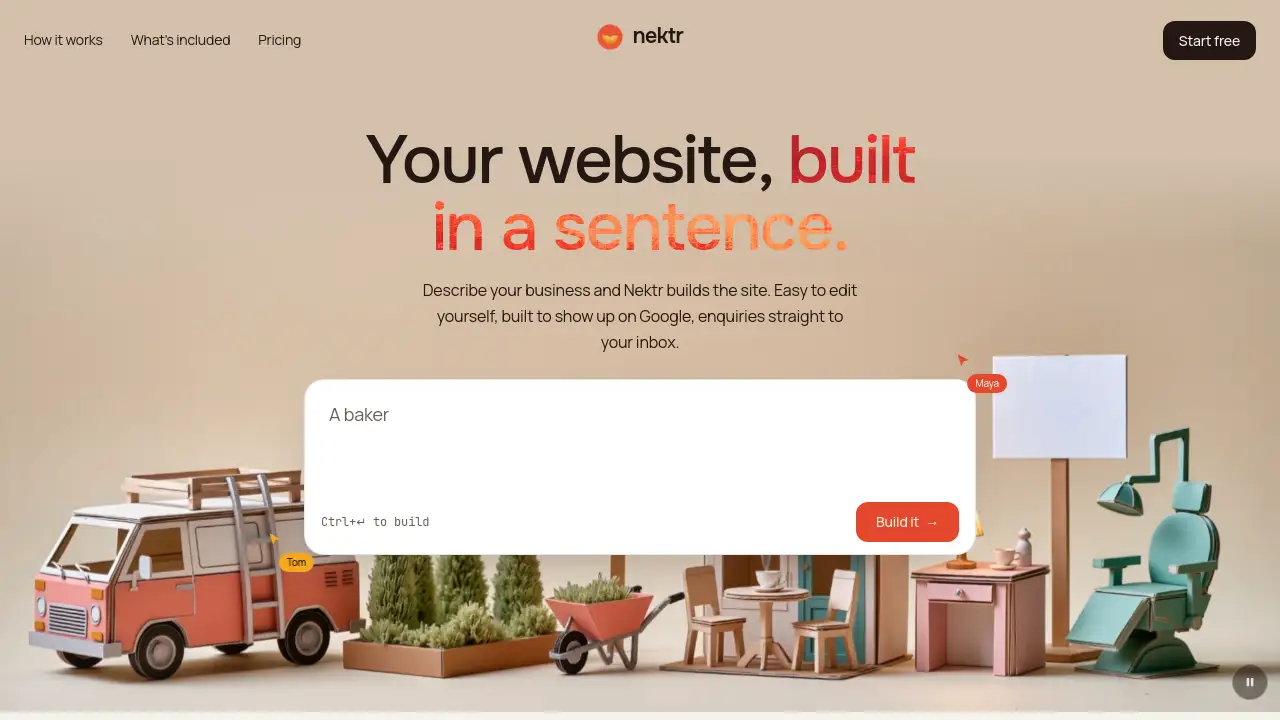
Nektr website builder is an AI-powered tool that creates a complete business website from a single sentence. Instead of picking templates, writing code, or installing plugins, users simply describe what their business does. The Nektr website builder then produces a full site with pages, copy, layout, and a colour palette. It focuses on helping small businesses get online quickly, with easy self-editing, a working contact form, and pages built to be found on Google. Real-time collaboration is also included, so teams can build a website together without sending drafts back and forth. For anyone who wants a fast path from idea to live website, Nektr is worth exploring.
What is Nektr?
Nektr is an AI website builder designed for business owners who need a professional web presence without hiring a developer. Building a website usually takes weeks, but Nektr solves this by generating the site instantly from a short business description. The Nektr website builder suits anyone who wants a small business website builder experience: it keeps everything simple, from editing to publishing. Users can change text, images, and layout in plain language, connect their own domain with automatic SSL, and receive enquiries directly in their inbox. The platform also includes SEO basics like semantic markup, meta tags, and sitemaps, so the site is ready for Google from day one. It matters because it removes technical barriers and makes website ownership practical for everyday business owners.
Key Features of Nektr
Describe your business in one sentence
Users type a sentence about their business and the Nektr website builder generates the entire website, including pages, copy, layout, and a colour scheme that fits the industry.
Make it yours
The site can be edited in plain language or by clicking on text and images directly. Content changes never require an extra prompt, making the tool unusually flexible.
Publish on your own domain
Connect a custom domain to the site and SSL is added automatically. This keeps every Nektr website builder project secure and professional.
Real-time collaboration
Invite team members by email or link, and everyone can work on the same site at the same time. Live cursors prevent people from overwriting each other's changes.
Pin notes on the page
Instead of emailing feedback, users can leave comments directly on the part of the page they want changed. Notes are resolved once the task is complete.
Enquiry form to your inbox
The built-in contact form sends enquiries straight to the owner's email, with the sender's address set as the reply-to. This makes the tool practical for real customer communication.
Mailing list collection
Nektr lets site owners collect email subscribers and export them as a CSV file whenever needed, which is useful for building an audience over time.
Built to be found on Google
Every page includes semantic markup, meta tags, and a sitemap. These features make the Nektr website builder a Google-friendly website builder for local and small businesses.
Genuinely fast static pages
Generated sites are served as static pages on a global CDN, so there is nothing heavy to slow down the visitor experience.
Use Cases for Nektr
First website for a small business
A local bakery, salon, or plumber can describe their services and get a professional site in minutes. The Nektr website builder removes the need for web design experience.
Refreshing an outdated site
Business owners who want a modern online presence can rebuild quickly. The platform's simple approach keeps the project easy and affordable.
Launching a startup landing page
Startups can create a clean landing page with a contact form to collect leads before building a full brand experience.
Team-owned website projects
When a partner, designer, or copywriter needs to contribute, real-time editing and pinned comments let everyone work together without long email threads.
How to Use Nektr
Using the Nektr website builder takes three simple steps.
- Describe the business. Write one sentence explaining what the business does and who it is for, then press Ctrl+Enter to build.
- Make it yours. Edit the generated text, images, colours, and layout using plain language or direct clicks.
- Publish. Connect your own domain, confirm SSL, and start receiving enquiries through the contact form.
After publishing, invite team members to view or edit, and pin notes on the page if changes are needed.
Target Audience for Nektr
- Small business owners who need a fast web presence
- Freelancers and consultants wanting a simple portfolio site
- Startups that need a landing page with lead capture
- Non-technical users who want to edit their own website
- Small marketing teams that collaborate on web content
Is Nektr Free?
The Nektr website builder does not list exact pricing on its homepage. The building process appears free to start, since users can describe their business and generate a site immediately in the browser. However, for accurate details on free plans, paid tiers, and domain features, visitors should check the official Nektr website directly.
Nektr's Pros and Cons
| Aspect | Pros | Cons |
|---|---|---|
| Ease of use | Builds a full site from one sentence; no code needed | AI-generated copy may need manual refinement |
| Editing | Plain language changes make updates easy | Not clear how deeply custom designs can be changed |
| Collaboration | Live cursors and pinned notes support teamwork | — |
| SEO | Semantic markup, meta tags, and sitemap included | — |
| Performance | Static pages on a global CDN load fast | — |
| Pricing | — | Pricing details are not shown on the homepage |
Frequently Asked Questions about Nektr
What is the Nektr website builder?
The Nektr website builder is an AI-driven tool that creates a complete business website from a short description. It generates the structure, content, and design, then lets users edit and publish everything themselves.
Do I need coding skills to use Nektr?
No. Nektr is built for non-technical users. You describe your business, and the AI website builder does the heavy lifting. Editing is done in plain language, so no programming is required.
Can I use my own domain with Nektr?
Yes. The platform supports connecting your own domain, and SSL is set up automatically. This means visitors see a secure, professional web address.
How does the enquiry form work?
The contact form on the site sends messages straight to the owner's inbox. The sender's email address becomes the reply-to, so the business owner can respond without extra steps.
Can other people edit the site with me?
Yes. Nektr supports real-time collaboration. You can invite editors by email or link, and everyone's cursors appear on the page so no one overwrites another person's work.
Is Nektr good for Google search?
Yes. Each page includes semantic markup, meta tags, and a sitemap, which help search engines understand the site. This makes Nektr a solid option for small businesses that want local visibility.
Nektr Tags
Nektr website builder, AI website builder, small business website builder, Google-friendly website builder, website from description, easy website editor, real-time website collaboration, contact form website builder, static page website builder, instant website generator