Introduction
Text to Speech by NoteGPT is a free AI-powered voice generator that converts written text into natural-sounding audio with over 100 lifelike voices across multiple languages.
What is Text to Speech by NoteGPT?
Text to Speech by NoteGPT is an advanced AI voice generator that transforms written content into high-quality audio using artificial intelligence. This free text to speech tool addresses the growing need for accessible content consumption, allowing users to listen to articles, documents, and scripts instead of reading them. The platform serves students, content creators, educators, and accessibility advocates who need reliable voice synthesis without technical barriers.
Unlike traditional TTS tools that produce robotic-sounding audio, NoteGPT's text to speech technology delivers natural, emotional voices that engage listeners. The tool supports real-time conversion, voice cloning capabilities, and multi-language detection, making it suitable for global users. Whether you're creating audiobooks, educational content, or accessibility solutions, this AI voice generator provides professional-grade results without requiring sign-ups or subscriptions.
The platform eliminates common frustrations with text to speech software, such as character limits, poor voice quality, and complex interfaces. Users can simply paste their content and receive instant audio output, making it an essential tool for modern digital workflows.
Key Features of Text to Speech by NoteGPT
Lifelike AI Voice Generation
The platform produces natural-sounding speech with emotional depth and human-like intonation, eliminating the robotic quality typical of basic TTS tools.
Voice Cloning Technology
Users can clone their own voice by recording a sample, enabling personalized AI voice generation for consistent branding and content creation.
Multi-Language Auto-Detection
The text to speech tool automatically detects input language and generates appropriate pronunciation without manual language selection.
Real-Time Dialogue Creation
Create dynamic conversations by assigning different voices to multiple speakers, perfect for podcast generation and educational content.
Commercial Use Permission
All generated audio can be used for commercial purposes, making it valuable for businesses and content creators.
Unlimited Free Access
The platform offers unrestricted usage without sign-up requirements, providing genuine value for users of all backgrounds.
Multiple File Format Support
Upload PDFs, documents, and other file types for direct conversion, streamlining workflow for busy professionals.
Use Cases for Text to Speech by NoteGPT
Educational Content Creation
Teachers and trainers use the AI voice generator to create engaging audio lessons, making learning materials accessible for students with different learning preferences.
Podcast and Video Production
Content creators leverage voice cloning and dialogue features to produce professional audio content without expensive recording equipment or voice actors.
Accessibility Solutions
Organizations implement the text to speech tool to provide audio alternatives for visually impaired users, ensuring inclusive digital experiences.
Language Learning Support
Students use natural-sounding voices to improve pronunciation and listening skills across multiple languages with accurate AI voice generation.
Business Presentations
Professionals convert reports and presentations into audio format for mobile consumption during commutes or multitasking scenarios.
Audiobook Production
Authors and publishers utilize the platform's lifelike voices to create cost-effective audiobook versions of written content.
How to Use Text to Speech by NoteGPT
Using Text to Speech by NoteGPT is straightforward and requires no technical expertise:
-
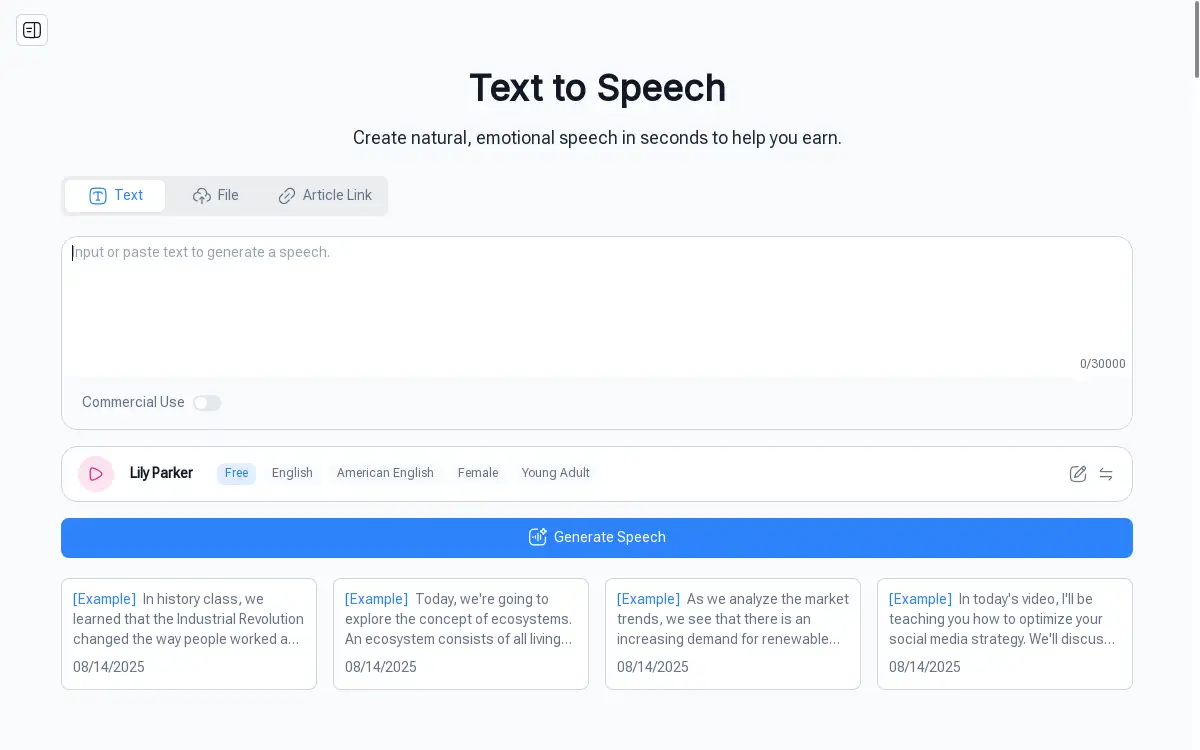
Input Your Content: Paste text directly into the input field, upload a document file (PDF, DOCX, PPT), or provide a URL for article conversion.
-
Select Voice Options: Choose from over 100 AI voices across different languages, ages, and speaking styles to match your content's tone and audience.
-
Customize Settings: Adjust speaking speed, add emotional emphasis, or enable commercial use settings based on your specific requirements.
-
Generate Audio: Click the convert button to process your text through the AI voice generator, typically completing within seconds.
-
Download and Use: Save the generated MP3 file for immediate use in presentations, websites, or other applications.
The entire process takes less than a minute for most content, making it efficient for both one-time users and regular content creators.
Target Audience for Text to Speech by NoteGPT
- Students and Educators seeking accessible learning materials and audio study aids
- Content Creators including YouTubers, podcasters, and social media influencers
- Business Professionals needing audio versions of reports, presentations, and training materials
- Accessibility Advocates creating inclusive content for visually impaired audiences
- Authors and Publishers producing audiobooks and promotional content
- Language Learners practicing pronunciation and listening comprehension
- Marketing Teams developing voice-over content for advertisements and campaigns
- Developers integrating voice features into applications and websites
Is Text to Speech by NoteGPT Free?
Text to Speech by NoteGPT operates on a generous freemium model that provides substantial value without upfront costs. The free tier includes unlimited text conversion, access to all 100+ AI voices, multi-language support, and commercial usage rights. Users can convert up to 30,000 characters per session without creating accounts or providing payment information.
This approach makes the text to speech tool accessible to students, educators, and small businesses who need professional voice generation without budget constraints. The platform's commitment to free access ensures that quality AI voice technology remains available to users regardless of their financial situation.
While premium features may be introduced in the future, the current free offering provides comprehensive functionality that meets most users' text to speech needs effectively.
Frequently Asked Questions about Text to Speech by NoteGPT
How accurate is the pronunciation in different languages?
The AI voice generator uses advanced language models trained on native speaker data, ensuring accurate pronunciation across supported languages. The automatic language detection feature identifies input text and applies appropriate phonetic rules for natural-sounding speech.
Can I use generated audio for commercial projects?
Yes, all audio created with Text to Speech by NoteGPT includes commercial usage rights. Content creators, businesses, and publishers can use generated voices in paid products, advertisements, and commercial applications without additional licensing fees.
What file formats can I upload for conversion?
The platform supports PDF, DOCX, PPT, and image files up to 50MB, plus audio and video files up to 10MB. This flexibility allows users to convert existing documents directly without manual text copying.
How does voice cloning work and is it secure?
Voice cloning requires a short audio sample that the AI analyzes to replicate speech patterns and tone. The process is secure, with uploaded samples processed in real-time and not stored on servers, protecting user privacy.
Are there any daily limits on text conversion?
The free text to speech service provides unlimited daily conversions with a 30,000 character limit per session. Users can start new sessions immediately after completing previous conversions, effectively removing practical usage restrictions.
Can I adjust the emotional tone of generated speech?
Yes, the AI voice generator includes emotional controls that allow users to modify speaking tone, pace, and emphasis. These features help create more engaging audio that matches the intended mood of the content.
Text to Speech by NoteGPT Tags
text to speech, AI voice generator, free TTS tool, voice cloning, natural voice synthesis, audio content creation, accessibility software, multi-language TTS, commercial voice generation, lifelike AI voices, speech synthesis technology, voice-over tool