Introduction
Oginify is an Open Graph image generator for social cards.
What is Oginify?
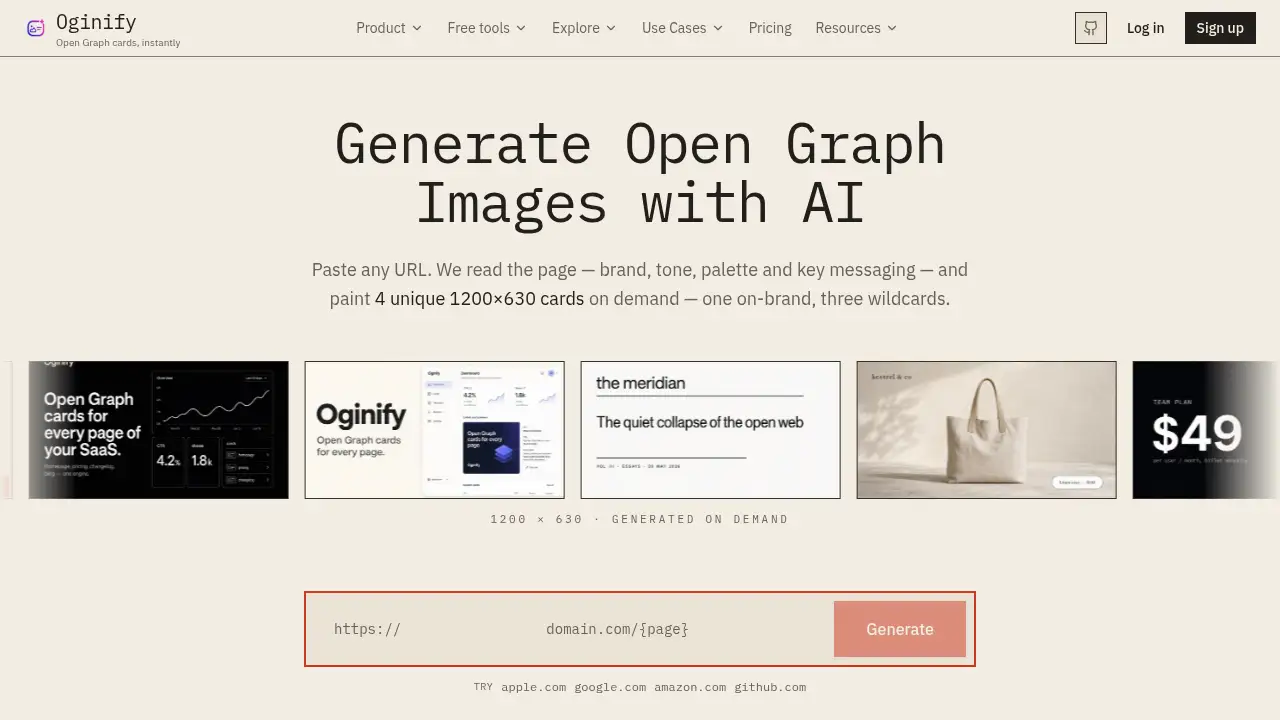
Oginify is a web-based Open Graph image generator that creates share images from a page URL. It reads the page’s title, description, colors, logo, and messaging, then returns four 1200×630 candidates: one on-brand AI card, one live-page screenshot, one AI wildcard, and one text-exact layout template. The tool is designed for people who need a social share image quickly but do not want to open a design editor or write a prompt. Instead of starting from a blank canvas, an Open Graph image generator like Oginify uses the page itself as the brief. This matters because social platforms and messaging apps often show a preview card before someone clicks a link. A clear, correctly sized OG image can make that preview easier to recognize and more likely to be understood at a glance. Oginify is aimed at founders, marketers, writers, developers, and small teams that publish pages and want a practical way to create Open Graph images without a subscription.
Key Features of Oginify
URL-Based Image Generation
Paste a live page URL and let Oginify fetch the page in the background. The Open Graph image generator uses page content rather than a manual prompt, which keeps the workflow focused on the link being shared.
Four Candidates Per Run
Generate four 1200×630 options from one URL: an on-brand AI card, a live-page screenshot, an AI wildcard, and a text-exact layout template. This gives users a quick way to compare styles before downloading a social card.
AI and Template Fallbacks
Use AI image generation for original card designs, with template fallback when an AI slot fails. The product page states that a failed AI slot falls back to a template card at no extra credit.
Brand-Aware Design Inputs
Oginify reads page signals such as brand, tone, palette, and key messaging. That makes the output more relevant than a generic OG image generator template that ignores the page.
Watermark-Free Downloads
Download the final image as PNG, JPG, or WebP and host the file on your own site. The output is watermark-free, according to the product information.
Free Daily Runs and No Subscription
Run up to six AI image generations per day without an account, according to the site. A URL run counts once even when it returns four candidates, and it is not counted if every AI candidate fails. The pricing model is credit-based with free daily runs and no subscription.
Use Cases for Oginify
Product Launch Pages
A founder can paste a launch page URL and compare four candidates before choosing a preview that names the product and current offer. This is a practical use of an Open Graph image generator when a launch link needs to look clear in feeds and chat apps.
Archived Articles and Blog Posts
When an older post still uses a site-wide banner, Oginify can create a card from that specific article. The downloaded OG image can then be attached to the post’s metadata.
Pricing and Documentation Links
For a pricing or documentation link, a team can review the card against the question a recipient needs answered. An Open Graph image generator helps create a focused social preview instead of reusing a homepage image.
SaaS and Homepage Cards
SaaS teams can make a card that shows the outcome rather than only a dashboard. A homepage card can name the product, hold one promise, and stay legible at thumbnail size.
How to Use Oginify
- Paste a live page URL into Oginify. The tool fetches the page and prepares image candidates.
- Review the four options: one on-brand AI card, one live-page screenshot, one AI wildcard, and one text-exact layout template.
- Choose the candidate that fits the page and the context where the link will be shared.
- Download the 1200×630 image as PNG, JPG, or WebP.
- Add the downloaded file to the site and set the matching Open Graph and Twitter Card metadata, including the og:image tag, in the page head.
Using Oginify as an Open Graph image generator does not replace metadata setup. The tool creates the image file; the site owner still needs to declare that image in the page’s metadata.
Target Audience for Oginify
- Founders and indie makers who share launch pages and landing pages.
- Content marketers and writers who publish articles, guides, and announcements.
- SaaS teams that need consistent social cards for product pages.
- Developers who want a quick OG image option without writing JSX or setting up a rendering function.
- Small businesses and agencies that manage multiple page links and social previews.
- Users who need free daily runs and do not want a subscription.
Is Oginify Free?
Oginify is listed as free, with a $0.99 optional tip. The product page describes credit-based AI generation, free daily runs, and no subscription. Without an account, users can run up to six AI image generations per day. A URL run counts once even though it returns four candidates, and it is not counted if every AI candidate fails. Downloads are watermark-free, and the user hosts the file.
| Plan | Price | Features |
|---|---|---|
| Free | $0 | Up to 6 AI image generations per day without an account; 4 candidates per URL; watermark-free downloads; host the PNG yourself |
| Optional tip | $0.99 | Optional support for the service; not described as a subscription requirement |
Oginify's Pros and Cons
| Aspect | Pros | Cons |
|---|---|---|
| Pricing | Free daily runs and no subscription; optional $0.99 tip | Credit-based AI generation may require planning for high volume |
| Workflow | Paste a URL; no prompt or template picker required | Output still needs review before publishing |
| Output | Four 1200×630 candidates per URL; AI, screenshot, wildcard, and template options | AI generation time depends on page and model; no fixed duration promised |
| Setup | Reads brand, tone, palette, and key messaging from the page | The user must add og:image and Twitter Card tags manually |
| Hosting | Watermark-free downloads; user hosts the file | Hosting and metadata work remain on the site owner |
| Customization | Template fallback when an AI slot fails | Less control than code-based renderers for exact layouts |
Frequently Asked Questions about Oginify
How does an Open Graph image generator work from a URL?
Paste a page URL into Oginify. The Open Graph image generator fetches the page, reads its title, description, colors, logo, and messaging, and returns four 1200×630 candidates. No prompt or template picker is required for the initial run.
What Open Graph image dimensions does Oginify output?
Oginify outputs 1200×630 images at a 1.91:1 aspect ratio. This is the large-card size used by platforms such as X, LinkedIn, Slack, Discord, iMessage, and Facebook, according to the product page.
Do I still need an og:image tag if I download a card?
Yes. A downloaded image file does not update a page by itself. The site owner still needs to add the Open Graph and Twitter Card metadata, including the og:image tag, in the page head.
Can I use Oginify without writing a prompt or choosing a template?
Yes. The main workflow takes a URL rather than a prompt. Users get one on-brand AI card, a live-page screenshot, one AI wildcard, and one text-exact layout template, then download the preferred image.
Is there a free way to try this Open Graph image generator?
Yes. Without an account, users can run up to six AI image generations per day. A URL run counts once even though it returns four candidates, and it is not counted if every AI candidate fails. Downloads are watermark-free.
How is Oginify different from code-based OG image tools?
Oginify is a managed, URL-based Open Graph image generator that creates original AI cards from a page. Code-based tools such as @vercel/og render images from JSX in a serverless function, while Cloudinary applies transforms to uploaded source images. These tools solve adjacent problems rather than the same one.
Oginify Tags
Open Graph image generator, OG image generator, Open Graph images, social cards, 1200x630 Open Graph image, og:image, AI image generation, URL to image, social preview, Twitter Card, free daily runs, no subscription