Introduction
OldRoll is a free online retro photo editor.
What is OldRoll?
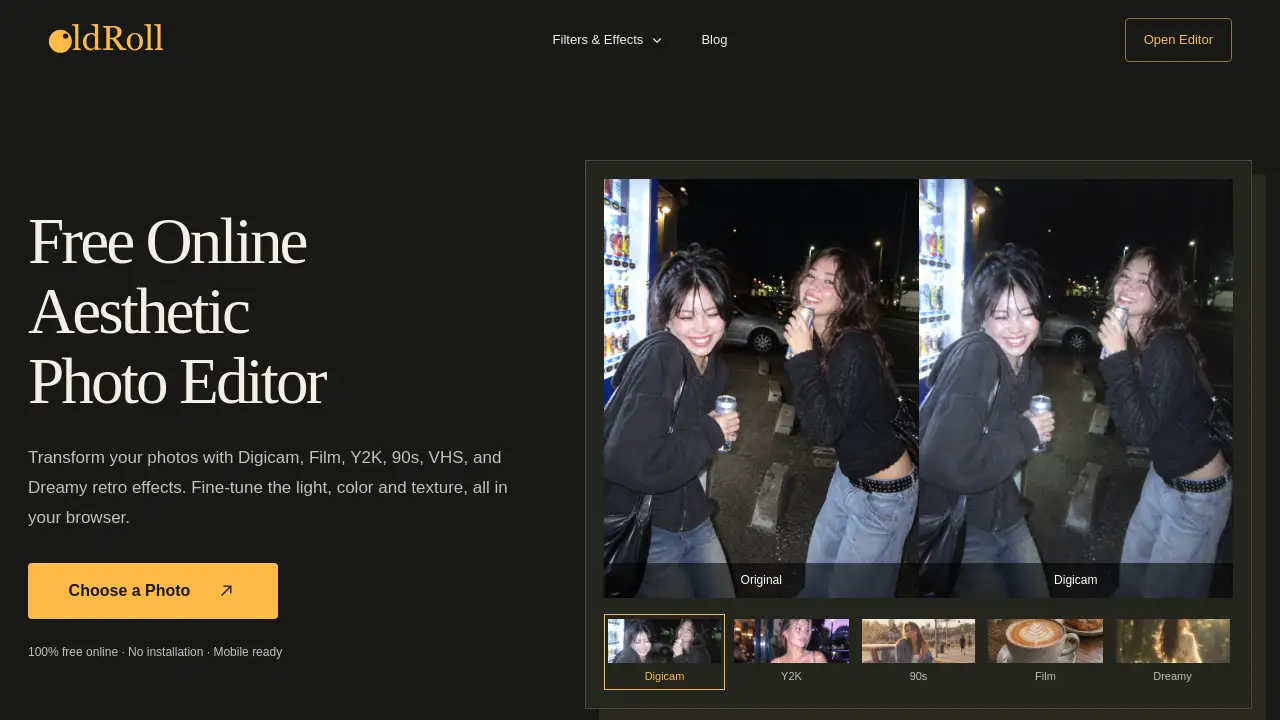
OldRoll is a browser-based retro photo editor designed to give modern photos a retro camera feel. It focuses on retro photo filters such as Digicam, Film, Y2K, 90s, VHS, Disposable Camera, and Dreamy looks. Instead of requiring desktop software, OldRoll runs in a web browser on desktop and mobile. It solves a common problem: many people want vintage photo filters without learning complex editing programs. OldRoll offers ready-made camera-inspired effects and adjustable controls for light, color, texture, and focus. This makes it useful for casual creators, photographers, online sellers, and anyone who wants an online retro photo editor with more control than a simple preset. OldRoll also supports frames, date stamps, stickers, and collage layouts.
Key Features of OldRoll
Retro Camera and Filter Library
OldRoll includes popular looks such as Digicam, Film, Disposable Camera, 90s, VHS, and Dreamy. These retro photo filters help users start with a recognizable mood, then adjust strength to suit the photo.
Browser-Based Editing
OldRoll works directly in a browser, so users can edit photos without installation. This browser-based retro photo editor is mobile ready and supports retro photo filters on a phone, tablet, or computer.
Light, Color, and Focus Controls
Users can fine-tune exposure, contrast, warmth, saturation, and lens blur after choosing retro photo filters. OldRoll also allows cropping and comparing the edit with the original image.
Frames, Effects, and Stickers
OldRoll lets creators layer film frames, flashes, grain, light leaks, and stickers. These tools add texture while keeping the underlying camera look visible.
Collage and Layout Options
OldRoll can turn one photo or several moments into a collage layout. Users can choose solid, gradient, or textured backgrounds for a finished retro photo editor result.
Date Stamps and Camera Details
OldRoll supports customizable date stamps and camera-inspired details. A timestamp is a creative overlay, not proof of when the original photo was taken.
Use Cases for OldRoll
Social Media Content
Content creators can use OldRoll to apply retro photo filters to posts, reel covers, and photo dumps. The retro photo editor helps maintain a mood across multiple images.
Portrait and Street Photography
Photography lovers can apply film grain, disposable-camera warmth, and light-leak effects. OldRoll then allows adjustments to exposure and color for a more personal result.
Y2K and Subculture Visuals
Subculture creators can build Y2K, street, lo-fi, and camcorder-inspired images. OldRoll offers direct flash, cool color tones, and VHS texture for these looks.
Online Seller Product Photos
Online sellers can turn product, packing, and lifestyle photos into warmer campaign visuals. OldRoll keeps the item visible while adding a retro photo filter finish.
Music and Cover Art
Music creators can make cover art, teaser posts, and backstage images with haze, grain, and after-hours color. OldRoll provides retro photo filters for a quick, cohesive visual direction.
Anime, Cosplay, and Convention Photos
Anime creators can give cosplay, convention, and character photos a dreamy, VHS, or direct-flash finish. OldRoll works well for playful retro photo filters.
How to Use OldRoll
- Open OldRoll in a web browser and choose a photo from a phone or computer. A clear portrait, street scene, or travel photo works well.
- Select a retro look such as Digicam, Film, Y2K, Disposable Camera, 90s, VHS, or Dreamy.
- Adjust light, color, texture, crop, frame, effect, and sticker settings. Use the compare option to check the original.
- Add a collage layout, date stamp, or background if needed.
- Preview the finished result, then download and share the edited photo.
Target Audience for OldRoll
- Content creators who want consistent retro visuals for social posts.
- Photography lovers who enjoy film, disposable-camera, and light-leak looks.
- Subculture creators working with Y2K, street, lo-fi, and camcorder styles.
- Online sellers who need warmer product and lifestyle photos.
- Music creators making cover art, teasers, and backstage images.
- Anime, cosplay, and convention creators seeking dreamy or VHS finishes.
- Casual users looking for a free online retro photo editor.
Is OldRoll Free?
OldRoll Online is currently described as 100% free during its launch offer. The official mobile app includes a large collection of free resources, and some paid options may be available. Availability can change, so users should check the official OldRoll website or app store listing for current pricing.
| Plan | Price | Features |
|---|---|---|
| OldRoll Online | Free during launch offer | Browser-based editing, retro photo filters, light/color controls, frames, effects, stickers, collage options |
| OldRoll Mobile App | Free with optional paid resources | Camera-first experience on iOS and Android, large free resource collection, possible paid options |
OldRoll's Pros and Cons
| Aspect | Pros | Cons |
|---|---|---|
| Pricing | Online version is free during launch offer | Future pricing may change |
| Access | Works in a browser with no installation | No full desktop edition mentioned |
| Features | Offers Digicam, Film, Y2K, 90s, VHS, and Dreamy effects | Available settings may vary by camera or filter |
| Editing Control | Adjust exposure, contrast, warmth, saturation, lens blur, crop | Some users report slowdowns in the app |
| Mobile Use | Mobile ready and app available | Ads in the mobile app may feel intrusive |
| Creative Output | Supports frames, stickers, date stamps, and collages | Some users want more realistic light leaks and collage options |
Frequently Asked Questions about OldRoll
What is OldRoll?
OldRoll is a browser-based retro photo editor for creating Digicam, Film, Disposable Camera, 90s, VHS, Dreamy, and other vintage looks. It can edit existing photos from a phone gallery or computer.
Is OldRoll free?
OldRoll Online is currently 100% free during its launch offer, with no paid subscription needed for that online version. The mobile app includes many free resources and may also offer paid options.
Can I use OldRoll without installing software?
Yes. OldRoll runs in a web browser on desktop and mobile, so users can start editing without installing desktop software. This makes it a convenient retro photo editor for quick vintage edits.
What retro photo filters does OldRoll offer?
OldRoll includes Digicam, Film, Y2K, Disposable Camera, 90s, VHS, and Dreamy looks. These retro photo filters can be adjusted for intensity and combined with frames, grain, light leaks, and stickers.
Can I edit photos already in my phone gallery?
Yes. In a mobile or desktop browser, select the upload option and choose an existing picture. The OldRoll mobile app also supports importing photos for editing.
Can I change the timestamp on a retro photo?
OldRoll supports customizable date stamps. In the online editor, check the selected camera for its available date settings. A visible timestamp is a creative overlay, not proof of when the original photo was taken.
OldRoll Tags
OldRoll, retro photo editor, online photo editor, retro photo filters, Digicam filter, Film filter, Y2K filter, VHS effect, 90s photo editor, disposable camera filter, browser-based photo editor, film grain