Introduction
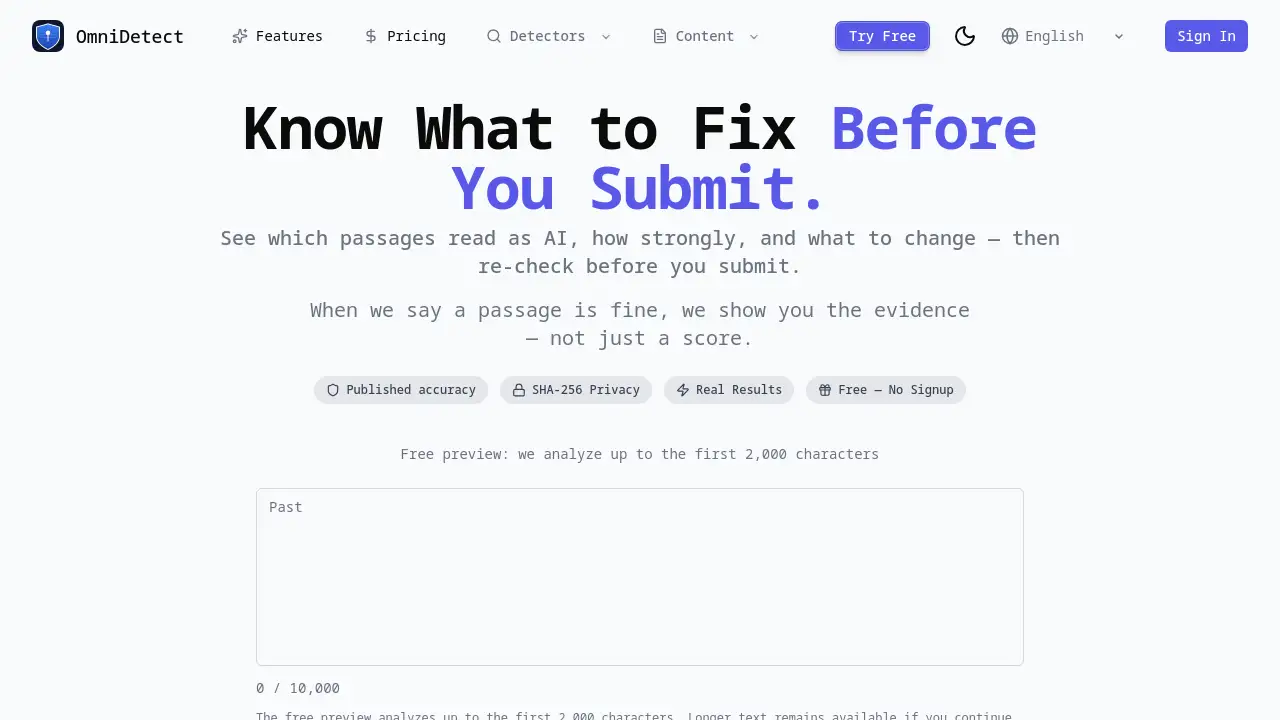
OmniDetect is an AI detector that helps writers see which passages look machine-written and why. Instead of a vague score, it shows strength, evidence, and what to change. This makes OmniDetect a practical AI detector for students, professionals, and editors who need a clear answer before submitting any written work.
What is OmniDetect?
OmniDetect is a web-based AI detector that examines text and identifies passages that read as AI-generated. It was built to solve a common problem: most detection tools give a single percentage but no explanation. OmniDetect changes that by showing exactly which passages were flagged, how strongly, and what evidence supports the result.
Users can paste text or upload files such as PDF, DOCX, and TXT. The tool accepts up to 50,000 characters and works with different text types. OmniDetect selects the best detection engine based on the language of the document. That choice comes from its own benchmark, not from a vendor pitch.
Why does this matter? An AI detector is only useful when you understand its limits. OmniDetect publishes its measured accuracy, including misses, so users can see real results instead of marketing claims. The score ranges are simple: 0–30 means likely human, 31–70 means uncertain, and 71–100 means likely AI. This transparent approach makes OmniDetect one of the more trustworthy AI content detector options available today.
Key Features of OmniDetect
Passage-Level AI Detection
OmniDetect does not stop at a single score. It highlights the specific passages that read as AI and rates each one separately, so users know where the real problem is.
Evidence-Backed Verdicts
When OmniDetect says a passage is fine, it shows the evidence behind that statement. Users can inspect the analysed scope, method status, and known limits instead of accepting a mysterious percentage.
Published Accuracy and SHA-256
OmniDetect publishes its measured accuracy, including misses. SHA-256 hashes allow users to verify that published results have not been altered. This is a strong feature for anyone tired of black-box AI detection tools.
Free Preview Without Signup
Guest users can paste text and receive a real analysis of the first 2,000 characters. There is no account, no card, and no trial prompt. This makes it easy to test the AI detector before deciding whether to go further.
Evidence-Guided Rewriting
When a result confidently flags a passage, OmniDetect can propose focused rewrites. Users review each change, decide what to keep, and re-check the revised text using the same Word Token balance. This feature acts like an AI humanizer with a clear workflow.
Privacy and Document Control
OmniDetect keeps submitted documents so users can find them again and so the company can measure accuracy against real writing. Users can delete anything at any time, with or without an account. OmniDetect does not sell submitted text, and the only outside parties that see it are the detection engines that analyse it.
Use Cases for OmniDetect
Students and Academics
Students can scan essays, assignments, and research papers before submission. OmniDetect helps them find sections that might look AI-written, even when the content is original.
Professionals and Marketers
Professionals can check reports, proposals, emails, and blog posts before publishing. The AI detector ensures that business communication reads naturally and does not trigger unnecessary flags.
Editors and Educators
Editors and teachers can use OmniDetect to review submissions and guide writers. Because the tool shows evidence, it is easier to explain why a passage was flagged and how to improve it.
Non-Native English Writers
Writers who are not native speakers sometimes create sentences that sound mechanical. OmniDetect identifies those passages and helps them revise for a more human tone.
How to Use OmniDetect
- Paste your text or upload a PDF, DOCX, or TXT file. The free preview covers up to 2,000 characters without signing in.
- Wait for OmniDetect to read the whole document. It chooses the appropriate detection engine based on the language and your text type.
- Review the verdict, highlighted passages, and evidence. Look at the score ranges: 0–30 likely human, 31–70 uncertain, 71–100 likely AI.
- Improve only what needs attention. If clear passages are flagged, use evidence-guided rewriting to revise those sections. Review every suggested change before applying it.
- Re-check the revised text with the same Word Token balance to confirm the result.
Target Audience for OmniDetect
- Students and academic writers
- Content creators and bloggers
- Marketing and communications teams
- Editors and proofreaders
- Educators and course instructors
- Non-native English speakers
- Anyone who submits writing to an AI detector
Is OmniDetect Free?
OmniDetect offers a practical free entry point, and the reference information does not mention a paid plan.
| Plan | Price | Features |
|---|---|---|
| Free Preview | $0 | Analyze up to 2,000 characters, no signup, no card |
| Free Account | $0 | Analyze full documents up to 50,000 characters, access history, delete documents, re-check text |
Users who want to test the AI detector without commitment can start with the free preview. A free account removes the character limit and adds document history. No payment information is requested at this stage.
OmniDetect's Pros and Cons
| Aspect | Pros | Cons |
|---|---|---|
| Transparency | Shows evidence and known limits | More information may feel complex for casual users |
| Accuracy | Publishes measured accuracy, including misses | No accuracy percentage is shown in the reference material |
| Pricing | Free preview and free account | No paid plan details are available for comparison |
| Privacy | Users can delete documents anytime; no selling of text | Documents stay in history unless manually deleted |
| Features | Passage-level detection and rewriting suggestions | File upload is limited to PDF, DOCX, and TXT |
Frequently Asked Questions about OmniDetect
Does OmniDetect replace a human review?
No. OmniDetect is an AI detector that provides evidence and guidance, but it does not claim to be perfect. It shows where a result is uncertain and gives users enough information to decide. A human review is still a good idea before submitting important work.
How accurate is OmniDetect?
OmniDetect publishes its measured accuracy, including misses, on its website. This is different from most AI detection tools, which do not reveal their error rates. Users are encouraged to check the published results and decide whether the tool fits their needs.
Can I use OmniDetect without signing up?
Yes. Guest users can paste text and get a real analysis of the first 2,000 characters. No signup and no payment card are required. A free account is needed to analyze the full document and keep a history of submissions.
What file formats does OmniDetect support?
OmniDetect supports PDF, DOCX, and TXT files. Users can also paste text directly into the web interface. The free preview analyzes the opening of the document, while a free account covers the full text.
Does OmniDetect store my text?
OmniDetect keeps submitted documents so users can find them later and so the company can measure accuracy against real writing. Users can delete their documents at any time, with or without an account. OmniDetect does not sell submitted text.
What do the score ranges mean?
OmniDetect uses three ranges: 0–30 means likely human, 31–70 means uncertain, and 71–100 means likely AI. The tool also highlights which passages contributed to the score, so users can see the reason for the result.
OmniDetect Tags
AI detector, AI detection tool, AI content detector, AI writing detection, check AI writing, free AI detector, essay AI checker, AI humanizer, AI detection accuracy, AI detector review, OmniDetect, AI rewriter