Introduction
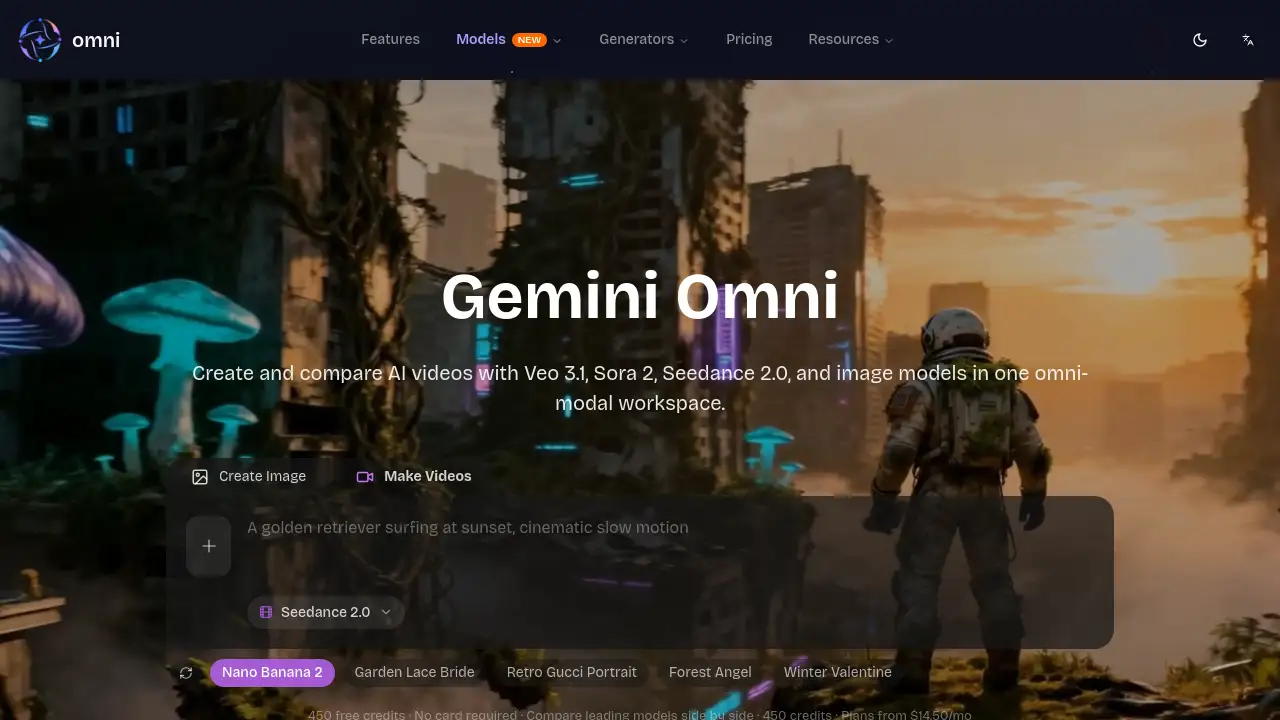
Omni Video is an all-in-one AI video and image generation platform powered by Gemini Omni, allowing users to create and compare outputs from top models like Veo 3.1, Sora 2, and Seedance 2.0.
What is omni video?
Omni Video, also known as omniveo, is an AI-powered creative workspace designed to streamline the process of generating and comparing visual content. The platform addresses a key challenge in the AI video generation space: the difficulty of testing and comparing the outputs from different leading models in one place. It allows creators, marketers, and teams to produce AI videos and AI images using the Gemini Omni framework while directly comparing results from models such as Veo 3.1, Sora 2, Seedance 2.0, Seedream 5, Nano Banana 2, and Grok Imagine. This unified approach is suitable for anyone from individual creators to production teams who need a fast, efficient way to experiment with and benchmark the latest AI video and image tools, ensuring they select the best model for their specific project.
Key Features of omni video
Unified Model Comparison
The platform allows side-by-side testing of major AI video models like Veo 3.1 and Sora 2 from a single workspace, enabling objective performance comparisons.
Multi-Modal AI Studio
Users can create both AI videos and AI images within the same omniveo interface using Gemini Omni prompts, Seedream 5 for images, and Nano Banana 2 for editing.
Credit-Based Access
All models are accessible through a single, shared credit balance, simplifying budgeting and allowing flexible switching between different AI video generation and image tools.
Professional-Grade Outputs
The platform supports high-quality outputs, including 1080p resolution for videos, priority generation queues, and downloadable MP4 files without watermarks.
Workflow Templates & Demos
Omni Video provides example prompts and cinematic effect workflows to help users quickly start generating content and build reliable model comparison baselines.
Team Collaboration Features
Higher-tier plans offer team workspaces, batch processing, and API access, making it suitable for collaborative AI video generation projects.
Use Cases for omni video
Creative Agency Workflows
Agencies can rapidly prototype and compare AI video models like Seedance 2.0 and Sora 2 to create multiple ad variants for client campaigns from a single asset set.
E-commerce Content Creation
Online stores can use the image-to-video workflows to transform product photos into engaging promotional videos, keeping their SKU pages fresh with new AI-generated content.
Social Media Content Production
Creators and marketers can generate beat-synced short-form videos and teaser loops for platforms like TikTok and Instagram using stable AI video generation tools.
Cinematic & Film Pre-Visualization
Independent filmmakers can use the platform to test cinematic motion and camera reference prompts across different models to plan shots and visualize scenes.
How to Use omni video
- Sign Up and Get Credits: Visit omniveo.app and sign up for an account. New users typically receive free credits to start experimenting.
- Choose Your Creation Mode: Select whether you want to create an AI video or an AI image from the main dashboard.
- Select and Compare Models: Input your prompt and choose which AI video models (e.g., Veo 3.1, Sora 2, Seedance 2.0) or image models you want to use for generation or direct comparison.
- Generate and Refine: Run the generation process. Use features like Nano Banana 2 for chat-style image iteration or reference motion tests for videos to refine your output.
- Download and Export: Once satisfied, download your final video in MP4 format or your image, ready for use in your projects.
Target Audience for omni video
- Digital Marketers and Social Media Managers
- Creative Agencies and Video Production Teams
- E-commerce Entrepreneurs and Store Owners
- Independent Content Creators and Artists
- Product Designers and Concept Visualizers
- Tech Enthusiasts interested in benchmarking AI models
Is omni video Free?
Omni Video offers a free tier to start, along with several paid plans for increased usage. The following table outlines the available plans based on the information provided.
| Plan | Price (Monthly, Billed Yearly) | Key Features & Credits |
|---|---|---|
| Lite | $10.75/month | 5,000 credits/month, access to Seedance 2.0, Veo 3.1, Sora 2, AI image models, 1080p resolution, MP4 downloads, no watermark. |
| Pro | $23.25/month | 9,000 credits/month, all Lite features, priority queue, API access, keep videos forever. |
| Business | $108.25/month | 30,000 credits/month, all Pro features, team workspace, batch processing, dedicated support, SLA options. |
New users can start with free credits (e.g., 450 credits as mentioned) without a credit card to test the platform. For the most current pricing, visit the official omniveo pricing page.
omni video's Pros and Cons
| Aspect | Pros | Cons |
|---|---|---|
| Functionality | Unique side-by-side model comparison for leading AI video models. All-in-one workspace for video and image generation. | May have a learning curve for beginners new to AI video prompts. |
| Output & Quality | Supports professional 1080p resolution. Offers no-watermark downloads and a variety of cinematic effect prompts. | Output quality and consistency are inherently dependent on the underlying AI models being used. |
| Pricing & Value | Free tier available for testing. Single credit system for all models provides flexibility. | Higher-volume AI video generation can become costly on premium plans for individuals. |
| Ease of Use | Streamlined workflow for switching between models like Gemini Omni and Veo 3.1. Helpful templates and demos. | Advanced features like batch processing and API are reserved for higher-tier plans. |
Frequently Asked Questions about omni video
What AI models can I use on Omni Video?
The platform provides access to several top AI video models including Veo 3.1, Sora 2, and Seedance 2.0, as well as AI image models like Seedream 5 and Nano Banana 2, all accessible through the Gemini Omni studio.
Do I need a credit card to try Omni Video?
No, you can sign up and start using a free credit allowance without providing credit card details, allowing you to test the AI video generation and comparison features.
Can I compare different AI video models with the same prompt?
Yes, a core feature of omniveo is the A/B model comparison mode, which allows you to generate outputs from multiple AI video models using one single prompt for a direct, fair comparison.
What is the resolution of the videos generated?
Many models on the platform, such as Seedance 2.0 and Veo 3.1, support 1080p resolution for high-definition video output, particularly on the Pro and Business plans.
Who is Omni Video best suited for?
The platform is ideal for content creators, marketing teams, e-commerce businesses, and agencies that need to efficiently produce and compare high-quality AI videos and images for various projects.
How does the credit system work?
All activities on omniveo, from generating a video with Sora 2 to creating an image with Seedream 5, consume credits from a single, shared balance. Different tasks and models may have different credit costs.
omni video Tags
omni video, omniveo, AI video generator, AI video generation, Gemini Omni, Veo 3.1, Sora 2, Seedance 2.0, compare AI models, AI image generation, 1080p video, AI video studio, text-to-video, image-to-video, AI content creation