Introduction
Palingo turns reading and watching into language practice. Palingo is a browser-based language learning tool that combines bilingual reading, dual subtitles, podcast transcripts, PDF and EPUB support, and vocabulary review in one Chrome extension. This Palingo review explains how it works, who it suits, and what to expect.
What is Palingo?
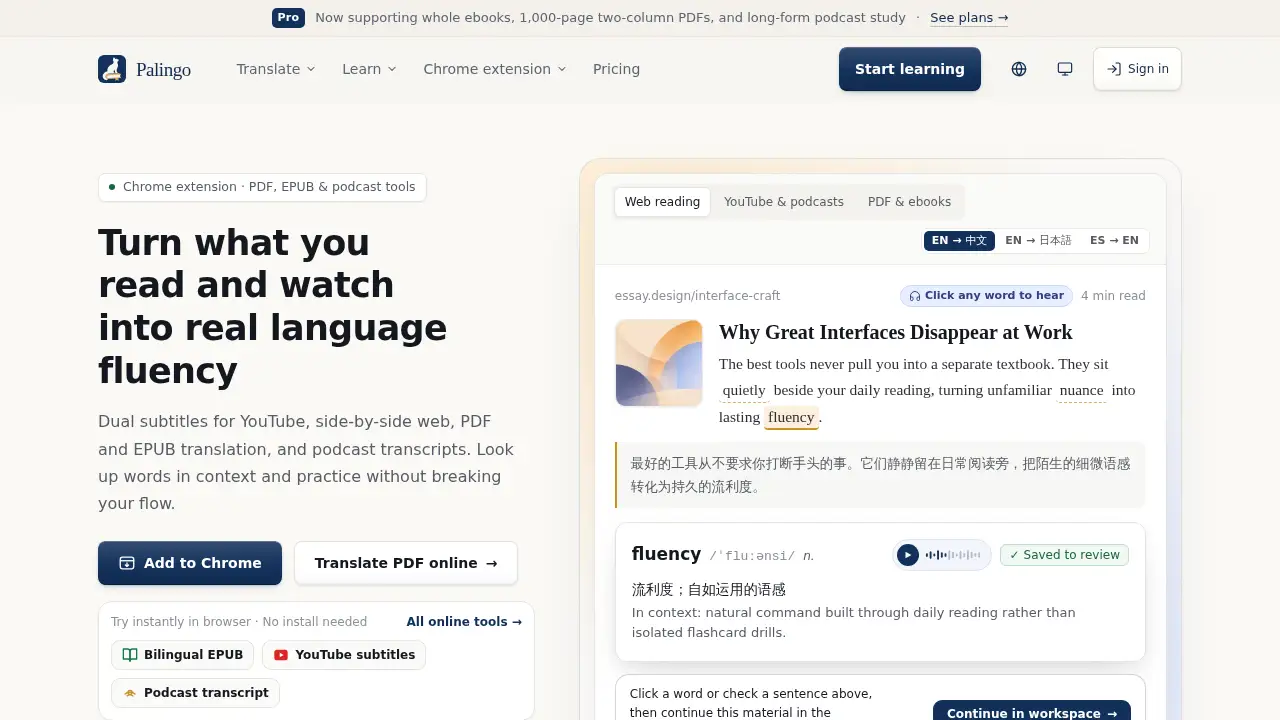
Palingo is a browser-based language learning Chrome extension designed to turn real content into study material. Instead of copying text into separate translators or flashcard apps, users can read web pages, PDFs, and EPUBs side by side, watch YouTube videos with dual subtitles, and study podcasts with bilingual transcripts. The tool focuses on context: users click a word to see its meaning in that sentence, save useful expressions, and review them later. Palingo is suitable for learners who want more speaking and listening practice from everyday content, including students, professionals, and self-learners. It matters because it keeps reading, watching, listening, and vocabulary review in one browser workflow, which can make language learning more consistent and less fragmented.
Key Features of Palingo
Side-by-Side Bilingual Reading
Read web pages, PDFs, and EPUBs beside the original layout, then click any word for its sentence-level meaning. This bilingual reading approach helps users stay with the foreign sentence instead of jumping straight to a full translation.
YouTube Dual Subtitles and Dictation
Watch YouTube with dual subtitles, then switch a line into dictation or shadowing practice at a slower speed. Palingo turns passive video watching into active language learning and listening practice.
Podcast Transcripts with Speaker Labels
Paste an Apple Podcasts or RSS link to create speaker-labeled bilingual transcripts with timecodes. Replay difficult lines at 0.8× speed and save useful phrases directly beside the transcript.
PDF and EPUB Study Tools
Open scanned papers up to 100 MB while keeping two-column formulas aligned, or read whole EPUB books side by side. Palingo supports margin notes and vocabulary review inside long-form reading.
Vocabulary in Context and Review
Double-click a word to hear pronunciation, inspect its nuance in that sentence, and save it for later. The vocabulary review library syncs saved expressions and progress with one account.
Browser-First Learning Workflow
Use Palingo in the browser for reading, video, podcast, PDF, and EPUB practice. The Chrome extension runs on a computer and keeps tools close to the content users already read and watch.
Use Cases for Palingo
Bilingual Web Reading Practice
Learners can open articles in a foreign language and read them beside the original layout. This makes bilingual reading useful for news, blogs, technical docs, and everyday web pages.
YouTube Listening and Shadowing
Users can study YouTube videos with dual subtitles, slow down audio, and repeat lines for dictation or shadowing. This is helpful for learners who want structured listening practice from real videos.
Podcast Study and Transcript Review
Podcast listeners can turn episodes into bilingual transcripts, separate speakers, and save key phrases. Palingo makes podcast content easier to review for vocabulary and sentence patterns.
Academic PDF and EPUB Reading
Students and researchers can read papers or ebooks side by side without losing formulas, columns, or chapter structure. The tool supports long-form reading with margin notes and vocabulary review.
Vocabulary Review from Real Content
Users can save words and expressions while reading, watching, or listening, then review them in context. This connects language learning to real articles, videos, podcasts, and books instead of isolated word lists.
How to Use Palingo
- Open Palingo on the web or add the Chrome extension to a computer browser.
- Choose a source: a web page, PDF, EPUB, YouTube video, or podcast link.
- Turn on bilingual reading or dual subtitles, then click words to see meaning in context.
- Switch to dictation, shadowing, or slower playback for listening practice.
- Save useful vocabulary and review it later; sync progress with one account if needed.
Target Audience for Palingo
- Language learners who want to study real articles, videos, podcasts, and ebooks.
- Students and researchers reading foreign-language PDFs, papers, and EPUB books.
- YouTube and podcast fans who want dual subtitles, transcripts, and active listening practice.
- Professionals and self-learners who prefer browser-based tools over separate apps.
- Learners studying English, Chinese, Japanese, Korean, Spanish, French, German, and other supported languages.
Is Palingo Free?
The reference content does not list specific prices or paid tiers for Palingo. It emphasizes no sign-up access and browser-ready tools, and it also mentions syncing vocabulary and progress with one account. Users should check the official Palingo website for current pricing before committing.
| Plan | Price | Features |
|---|---|---|
| No-sign-up access | Not listed | Browser-ready reading, video, podcast, PDF, and EPUB tools |
| Account sync | Not listed | Sync saved vocabulary and progress with one account |
Palingo's Pros and Cons
| Aspect | Pros | Cons |
|---|---|---|
| Pricing | No sign-up access is emphasized | Specific prices and paid tiers are not listed in the reference |
| Features | Bilingual reading, dual subtitles, podcast transcripts, PDF and EPUB support, vocabulary review | Chrome extension runs on a computer |
| Workflow | Keeps reading, watching, listening, and review in one browser | Core workflows depend on browser access |
| Content | Supports real articles, videos, podcasts, papers, and ebooks | No native mobile app is mentioned in the reference |
Frequently Asked Questions about Palingo
What is Palingo used for?
Palingo is used for language learning with real content. It supports bilingual reading, dual subtitles, podcast transcripts, PDF and EPUB reading, and vocabulary review in a browser-based workflow.
Does Palingo support YouTube dual subtitles?
Yes. Palingo supports YouTube videos with dual subtitles and lets users switch lines into dictation or shadowing practice at slower speeds.
Can Palingo translate PDFs and EPUBs?
Yes. Palingo can display PDFs and EPUBs side by side with translation support, including scanned papers up to 100 MB and whole ebooks with margin notes.
Is Palingo free?
The reference content does not list exact prices. Palingo highlights no sign-up access and browser-ready tools, but users should check the official website for current free or paid plan details.
Do I need an account to use Palingo?
No sign-up is required for the core browser experience described by Palingo. An account is mentioned for syncing vocabulary and progress across use.
What languages does Palingo support?
Palingo lists English, Chinese, Japanese, Korean, Spanish, French, German, and more. The exact language list may vary by tool, so users should confirm on the official site.
Palingo Tags
Palingo, Palingo review, Palingo Chrome extension, bilingual reading, dual subtitles, YouTube language learning, podcast transcripts, PDF translation, EPUB reader, vocabulary review, language learning tools, browser language extension