Introduction
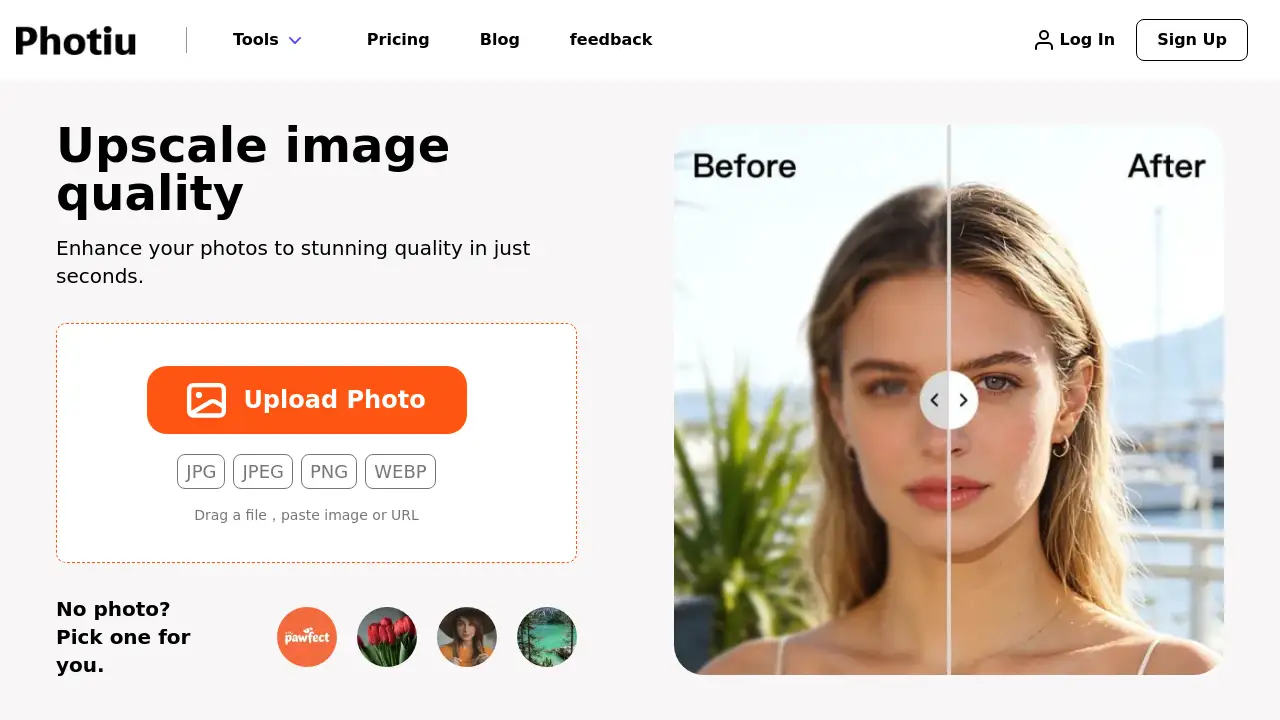
Photiu Image Upscaler is a free AI-powered online tool that instantly enhances photo resolution and quality.
What is Photiu Image Upscaler?
Photiu Image Upscaler is a web-based application designed to increase the resolution and clarity of digital images using artificial intelligence. It solves the common problem of low-resolution photos, which can appear blurry or pixelated when enlarged for printing, social media, or professional use. This AI image upscale tool is suitable for a wide range of users, from photographers and designers to marketers and everyday individuals looking to improve old or small photos. The process is important because it allows users to salvage and enhance valuable images without the need for expensive, complex software or professional editing skills.
Key Features of Photiu Image Upscaler
Free Online Access
The tool is completely free to use and operates directly in a web browser, requiring no software downloads, account creation, or sign-up.
AI-Powered Enhancement
It utilizes advanced AI image upscale technology to intelligently analyze and reconstruct image details, resulting in a clearer, sharper, and higher-resolution output.
Simple Drag-and-Drop Interface
Users can easily upload photo files by dragging them into the browser window, pasting an image URL, or selecting a file from their device, supporting formats like JPG, PNG, and WEBP.
Instant Processing
The image upscale process is designed to be fast, delivering enhanced results in just a few seconds, making it ideal for quick edits and batch processing.
Privacy-Focused
Since the tool works online without mandatory account creation, it offers a degree of privacy for users who prefer not to register for a service to enhance photo quality.
Use Cases for Photiu Image Upscaler
Enhancing Old Photographs
Revive and restore the quality of scanned family photos or old digital images by increasing their resolution and reducing graininess.
Preparing Images for Print
Upscale image quality for posters, photo books, or marketing materials to ensure prints are sharp and professional-looking.
Improving Social Media Graphics
Create higher-resolution versions of logos, banners, or profile pictures to look crisp and clear on all devices and platforms.
Refining Product Images for E-commerce
Enhance product photos taken with lower-resolution cameras to meet the quality standards of online marketplaces and websites.
Enlarging Screenshots or Digital Art
Increase the size of digital artwork, game screenshots, or UI mockups without losing important details or introducing excessive blur.
How to Use Photiu Image Upscaler
Using the Photiu Image Upscaler is a straightforward, three-step process:
- Visit the Tool: Navigate to the Photiu.ai website and access the Image Upscaler tool page.
- Upload Your Image: Drag and drop your photo file into the designated area, paste an image URL, or click to browse and select a file from your computer. Supported formats include JPG, JPEG, PNG, and WEBP.
- Download the Result: The AI will process and upscale image quality automatically. Once complete, you can download the enhanced, high-resolution version of your photo to your device.
Target Audience for Photiu Image Upscaler
- Photography Enthusiasts and Hobbyists looking to improve their personal photo collections.
- Social Media Managers and Content Creators needing high-quality visuals for posts and campaigns.
- Small Business Owners and E-commerce Sellers who require professional product images.
- Graphic Designers and Digital Artists working with source material that needs resizing.
- General Users with old, blurry, or low-resolution photos they wish to preserve and enhance.
Is Photiu Image Upscaler Free?
Based on available information, the core image upscale functionality on the Photiu.ai website is promoted as a free tool with no sign-up required. The website also mentions a "Pricing" page, suggesting there may be additional premium plans or features for advanced usage. For the most accurate and detailed pricing information, including any potential limits on the free tier or features of paid plans, users should consult the official Photiu.ai pricing page.
Photiu Image Upscaler's Pros and Cons
| Aspect | Pros | Cons |
|---|---|---|
| Cost & Accessibility | Completely free for basic use; no account needed. | Premium features may require a paid plan (details unclear). |
| Ease of Use | Extremely simple, browser-based interface with drag-and-drop. | May lack advanced manual controls for professional editors. |
| Speed & Technology | Leverages fast AI processing for instant results. | Output quality depends on the AI model and original image source. |
| Convenience | No software installation; works on any device with a browser. | Requires an internet connection to function. |
Frequently Asked Questions about Photiu Image Upscaler
Is Photiu Image Upscaler really free?
Yes, the primary AI image upscale tool is available to use for free directly on the website without requiring users to create an account or sign up.
What image formats does it support?
The tool supports common image formats including JPG, JPEG, PNG, and WEBP for both input and output.
How does the AI upscale an image?
The AI image upscale technology analyzes the patterns and details in the low-resolution photo and intelligently generates new, plausible pixel information to create a sharper, larger version while aiming to preserve the original look and feel.
Do I need to create an account to use it?
No, one of the key features is that it requires no sign-up. You can visit the website and start enhancing your photos immediately.
What are the limitations of the free version?
While the website states the tool is free, specific limitations on file size, number of uses per day, or output resolution are not detailed on the main tool page. Checking the official pricing or FAQ pages is recommended for precise details.
Can I use upscaled images commercially?
The terms of use regarding commercial rights for images processed through the free tool are not explicitly stated on the tool page. Users should review Photiu.ai's Terms of Service for official guidance on licensing and usage rights.
Photiu Image Upscaler Tags
AI image upscaler, free photo enhancer, online image upscale, increase photo resolution, enhance photo quality, upscale image quality, AI photo enlarger, improve image clarity, free image editor, web-based photo tool, no sign-up image editor, JPEG PNG upscaler