Introduction
Private Toolkit offers private, browser-based file conversion. This browser-based file converter keeps all processing on the user’s device, making it a private file converter for sensitive tasks.
What is Private Toolkit?
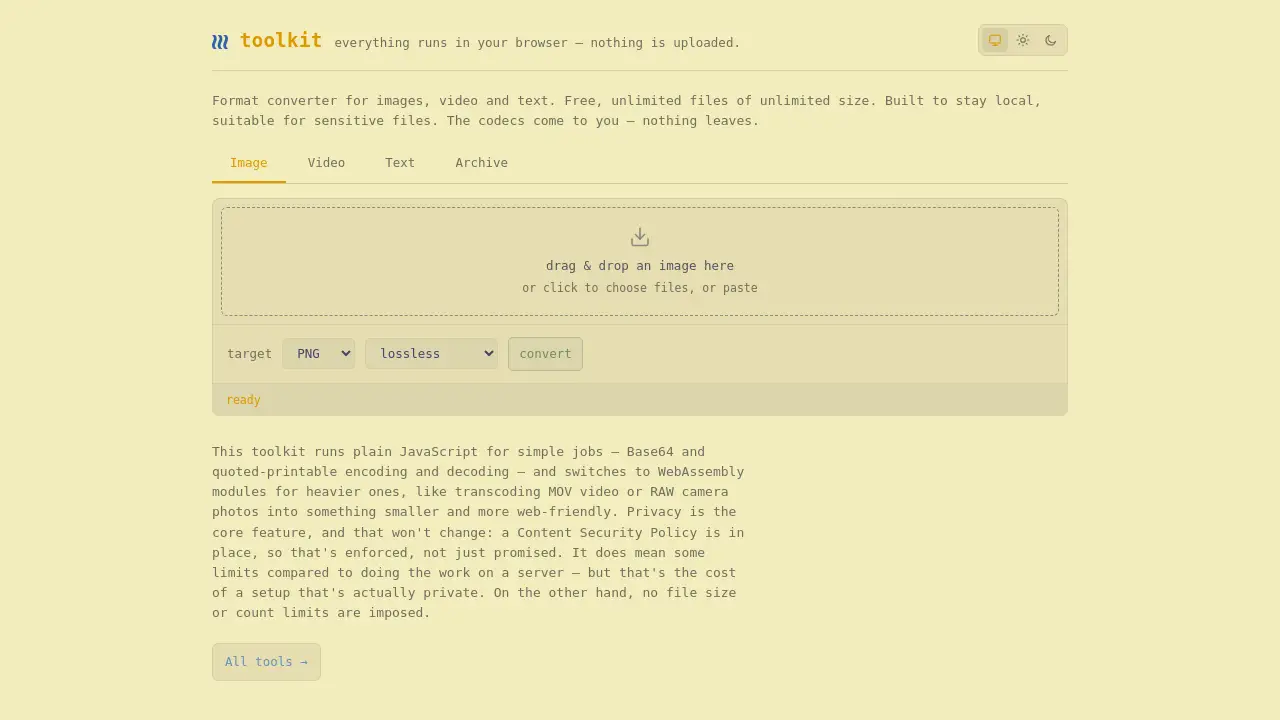
Private Toolkit is a privacy-focused format converter that works directly in a web browser. It is designed for people who want to convert images, video, and text without sending files to a remote server. Unlike typical online converters, Private Toolkit does not rely on upload mechanics. Instead, it runs plain JavaScript for simple jobs and switches to WebAssembly for heavier tasks. Codecs come to the browser, while files remain local.
Private Toolkit solves a common problem: most file converters upload data to the cloud. That creates privacy and security risks. Private Toolkit removes those risks by keeping everything on the device. This makes it a true browser-based file converter and a strong private file converter for legal, medical, journalistic, or business data. As a private file converter, Private Toolkit gives users control over their files from start to finish. It is also useful for everyday users who do not want their files processed elsewhere.
The project also emphasizes a Content Security Policy (CSP) to enforce privacy at the code level. Privacy is not just a promise; it is an active restriction placed on the page. Private Toolkit is free to use and offers unlimited files with no file size limits. That combination makes it different from most online conversion tools.
Key Features of Private Toolkit
Runs Entirely in the Browser
Private Toolkit performs conversion in the browser, so nothing is uploaded. Users select a file, the browser processes it, and the result is delivered locally. This makes Private Toolkit a reliable browser-based file converter for private tasks.
Uses WebAssembly for Heavy Jobs
WebAssembly modules handle demanding operations like transcoding MOV video or RAW camera photos. This means Private Toolkit can process large files while still keeping the workflow local. The private file converter experience stays fast without sacrificing privacy.
Enforces Privacy with Content Security Policy
A Content Security Policy is active on the toolkit. This policy blocks external data transfers and keeps the page under strict control. As a private file converter, Private Toolkit enforces local-only processing rather than relying on good intentions.
Handles Images, Video, and Text
Private Toolkit supports a useful range of conversion tasks for images, video, and text. It also includes Base64 and quoted-printable encoding and decoding, which are handy for developers and email workflows. This broad support makes the browser-based file converter useful in many scenarios.
Offers Unlimited Free Conversions
There are no account requirements, no paywalls, and no imposed limits on file count. The homepage clearly states that the toolkit is free and unlimited. For a browser-based file converter, that level of access is rare.
Keeps Sensitive Files Local
Private Toolkit is suitable for sensitive files because of its local processing model. Users can convert contract PDFs, video clips, or camera originals without worrying about external storage. That is the core value of this private file converter.
Use Cases for Private Toolkit
Handling Confidential Business Documents
Private Toolkit can convert text files or encoded content for businesses that need to protect client names, financial details, or legal documents. Using a private file converter avoids exposing those documents to third-party servers.
Compressing Video for Web Use
Video files, especially MOV files, can be large. Private Toolkit can transcode video into smaller, web-friendly formats directly in the browser. This is a practical browser-based file converter use case for content teams.
Converting RAW Photos for Editors
Photographers often work with RAW camera photos that need to be converted for preview or delivery. Private Toolkit can process those photos locally, keeping the original files secure. This use case is a natural fit for a private file converter, especially when handling unreleased work.
Encoding Text for Email Systems
Email systems sometimes require quoted-printable or Base64 encoding. Private Toolkit includes simple encoding and decoding tools for these text formats. Users can get the job done with a private file converter rather than a desktop app.
How to Use Private Toolkit
Using Private Toolkit is simple:
- Open the Private Toolkit website in a browser.
- Choose the conversion tool needed, such as image conversion, video conversion, or text encoding.
- Select the local file to process. The file stays on the device.
- Let the browser process the file using JavaScript or WebAssembly.
- Download the converted result from the data URL or ready output.
The entire flow uses Private Toolkit as a local converter. No file upload step appears, and no server is involved in the conversion process. There is no need to install software when using this private file converter.
Target Audience for Private Toolkit
- Privacy-conscious individuals who avoid uploading personal files
- Journalists and legal professionals working with sensitive material
- Photographers and video editors who need local format conversion
- Remote teams that need a secure browser-based file converter
- Developers who need Base64 or quoted-printable tools
- Anyone looking for a free private file converter with no file size limits
Is Private Toolkit Free?
Private Toolkit appears to be free to use. The homepage describes it as free, with unlimited files and unlimited file size. There is no mention of a paid tier in the available reference content.
| Plan | Price | Features |
|---|---|---|
| Free | $0 | All tools, unlimited files, unlimited file size, local browser processing, no uploads |
As a free browser-based file converter, Private Toolkit offers a practical option for everyday conversions and sensitive data work.
Private Toolkit's Pros and Cons
| Aspect | Pros | Cons |
|---|---|---|
| Privacy | Files never leave the device; CSP enforces local processing | Performance depends on the browser and device |
| Pricing | Free with unlimited files and file sizes | No obvious offline desktop version |
| Ease of Use | Simple browser interface, no account needed | Advanced settings are limited compared to server-based tools |
| Format Support | Covers images, video, text, Base64, quoted-printable | Some niche formats may not be supported |
Frequently Asked Questions about Private Toolkit
Does Private Toolkit upload files to a server?
No. Private Toolkit runs everything in the browser. Nothing is uploaded, and the design includes a Content Security Policy to enforce local-only processing.
Can I convert large video files in Private Toolkit?
Yes. The homepage states that there are no file size or count limits. Larger files may take more time because the conversion happens entirely in the browser.
Is Private Toolkit a good private file converter for sensitive data?
Yes. Since files are not uploaded, Private Toolkit is suitable for sensitive documents, photos, and video. For users who need a private file converter, this tool offers a strong no-upload workflow. Users should still close the tab after handling highly sensitive files to clear local browser memory.
Do I need to create an account to use Private Toolkit?
No. Private Toolkit does not require an account. Users can open the site, choose a tool, and convert files directly. Since it is a browser-based file converter, there is no desktop installation or signup process.
What types of conversion does Private Toolkit support?
Private Toolkit supports conversion for images, video, and text. It also provides Base64 and quoted-printable encoding and decoding. WebAssembly handles heavier conversions, while JavaScript handles simple jobs.
Is Private Toolkit really free?
Yes. The product homepage presents Private Toolkit as free, with unlimited files and unlimited file size. No paid plan is mentioned in the available reference information.
Private Toolkit Tags
Private Toolkit, private file converter, browser-based file converter, no upload converter, local file conversion, WebAssembly converter, unlimited file converter, secure format converter, convert video in browser, convert images locally, Base64 decoder, quoted-printable encoder