Introduction
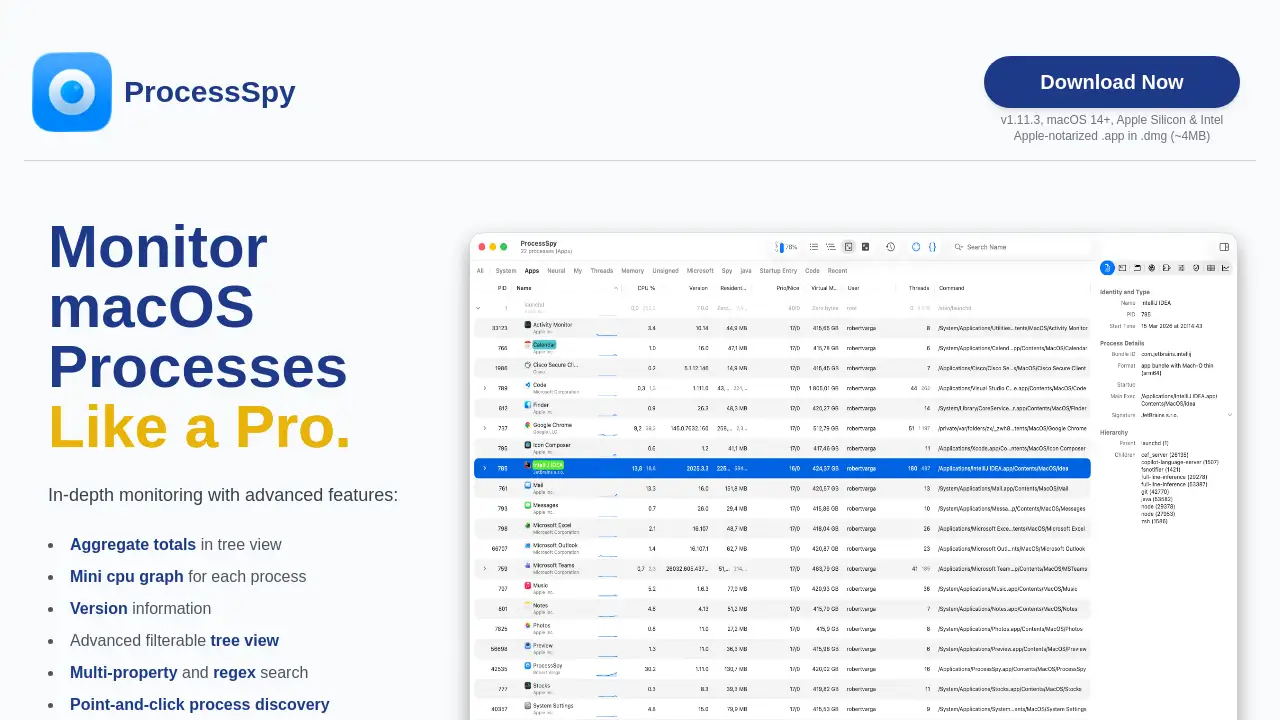
ProcessSpy is an advanced Mac process monitoring tool for developers, sysadmins, and power users.
What is ProcessSpy?
ProcessSpy is a native macOS application designed for in-depth system monitoring. It solves a common frustration for developers and administrators: the limited detail provided by the default Activity Monitor. While Activity Monitor shows basic metrics, ProcessSpy reveals the full command-line arguments, version information, file paths, and environment variables for each process. This level of detail is crucial for debugging complex applications, managing system resources, and distinguishing between multiple instances of similarly named processes, like different Java runtime environments. The tool is built specifically for macOS, ensuring a fast, responsive, and integrated user experience without the bloat of cross-platform frameworks.
Key Features of ProcessSpy
Advanced Tree View
The tree view displays processes in a hierarchical structure and shows aggregate totals for CPU usage, memory, and threads, providing a clear overview of resource consumption by application groups.
Multi-Property and Regex Search
Users can perform powerful searches across multiple process properties simultaneously using regular expressions, such as finding a process by name and a specific argument in its command line.
JavaScript Filters
For complex monitoring needs, ProcessSpy allows the creation of custom, programmable filters using JavaScript, enabling highly specific process selection based on multiple dynamic conditions.
Version Information Display
The main table directly shows the version details of each running process, helping users quickly identify which build or iteration of an application is active.
Point-and-Click Process Discovery
This feature simplifies investigating process relationships, allowing users to easily trace parent/child hierarchies and connected resources.
Comprehensive Data Export
Process data can be exported in JSON format for further analysis, and the paid version adds the ability to export historical CPU and memory data to CSV.
Advanced Process Details (Paid)
A paid license unlocks deep inspection capabilities, including viewing process entitlements, Info.plist contents, bundle identifiers, signature information, and environment variables.
Process History Recording (Paid)
This feature records historical metrics for CPU, memory, and thread counts over time, including application active status, which is invaluable for performance analysis and troubleshooting.
Memory of Finished Processes (Paid)
ProcessSpy can remember details of completed processes—including their arguments, environment variables, and historical data—for a configurable period, allowing for post-mortem analysis.
New Process Flagging
The tool can automatically tag newly discovered processes, making it easy to spot changes in the system landscape as they happen.
Use Cases for ProcessSpy
Debugging and Development
Developers can use ProcessSpy to inspect the exact command-line arguments and environment variables their applications launch with, identify memory leaks by tracking historical usage, and verify which dependencies are loaded.
System Administration
Sysadmins can monitor aggregate resource usage across services, investigate suspicious or unwanted processes with detailed forensic data, and manage startup items and daemons more effectively.
Performance Optimization
Power users and professionals can identify resource-hungry processes, analyze the impact of different applications on system performance over time, and optimize their workflow based on concrete data.
Security Analysis
The ability to view process signatures, entitlements, and launched-by relationships helps in assessing the security posture of running applications and investigating potential threats.
How to Use ProcessSpy
- Download and Install: Visit the official website to download the Apple-notarized DMG file, or install it quickly via Homebrew using the command
brew install --cask processspy. - Launch and Explore: Open ProcessSpy to see a real-time list of all system processes. The main view provides immediate details like PID, name, CPU, memory, and version.
- Utilize Search and Filters: Use the quick search bar for multi-property or regex searches. For complex filtering, create custom JavaScript filters to isolate specific processes.
- Inspect Process Details: Click on any process to explore its hierarchy in the tree view, see open files and network connections, or use the context menu for quick actions.
- Upgrade for Advanced Features: To access features like environment variables, process history, and deep inspection, purchase a license from the integrated Gumroad link.
Target Audience for ProcessSpy
- Software developers and engineers debugging macOS applications.
- System administrators managing Mac-based servers or fleets of workstations.
- Power users who want deeper insight into their Mac's operation than Activity Monitor provides.
- Security researchers analyzing application behavior and system interactions on macOS.
- Quality assurance testers needing to monitor application processes and resource usage during testing.
Is ProcessSpy Free?
ProcessSpy operates on a freemium model. A fully functional free version is available with core monitoring features. Advanced capabilities require a one-time license purchase.
| Plan | Price | Key Features |
|---|---|---|
| Free | $0 | Core process monitoring, tree view, multi-property search, JavaScript filters, JSON export, new process flagging. |
| Paid License | $24.99 (one-time) | Unlocks advanced process info (entitlements, plist), environment variables, process history recording & CSV export, memory of finished processes, signature info, and more. Includes lifetime updates for unlimited devices. |
ProcessSpy's Pros and Cons
| Aspect | Pros | Cons |
|---|---|---|
| Performance & Integration | Lightweight, native app with minimal system impact; tight macOS integration. | Requires macOS 14 or newer, not for older systems. |
| Features & Depth | Far more detailed than Activity Monitor; powerful search and filtering with JavaScript. | The most powerful features (history, deep inspection) require a paid license. |
| Usability | Clear interface; point-and-click discovery simplifies investigation. | Advanced features like JS filters have a learning curve for non-programmers. |
| Pricing Model | Generous free tier; affordable one-time payment for a perpetual license with updates. | No traditional subscription, but also no ongoing support guarantee beyond updates. |
Frequently Asked Questions about ProcessSpy
Is ProcessSpy safe to install on my Mac?
Yes, ProcessSpy is Apple-notarized and distributed as a signed application inside a DMG file. It is verified by Apple and safe to run on both Intel and Apple Silicon Macs.
What versions of macOS are supported?
ProcessSpy is designed for macOS 14 (Sonoma) and newer, including the latest macOS 26 (Tahoe). It does not support older versions of macOS.
Is there a trial for the paid features?
There is no separate trial. The free version itself acts as a fully functional, unlimited-time trial of the core application. Users can test all basic features and decide if the advanced paid capabilities are worth the license purchase.
Does the license allow use on multiple machines?
Yes, a single user license is valid for use on an unlimited number of personal devices. The license includes lifetime updates for all those devices.
How does ProcessSpy affect system performance?
ProcessSpy is engineered to be lightweight. It uses native macOS APIs efficiently and typically consumes minimal CPU and memory resources, so it should not noticeably slow down your Mac during monitoring.
Can I monitor process history in the free version?
No, the ability to record and export historical data for CPU, memory, and threads is a feature reserved for the paid license tier.
ProcessSpy Tags
ProcessSpy, Mac process monitoring, macOS activity monitor alternative, developer tools for Mac, system administration macOS, process tree view, macOS performance monitor, debug processes Mac, JavaScript process filters, regex process search, macOS system utility, Apple Silicon monitoring, process environment variables, macOS security tool, Gumroad software