Introduction
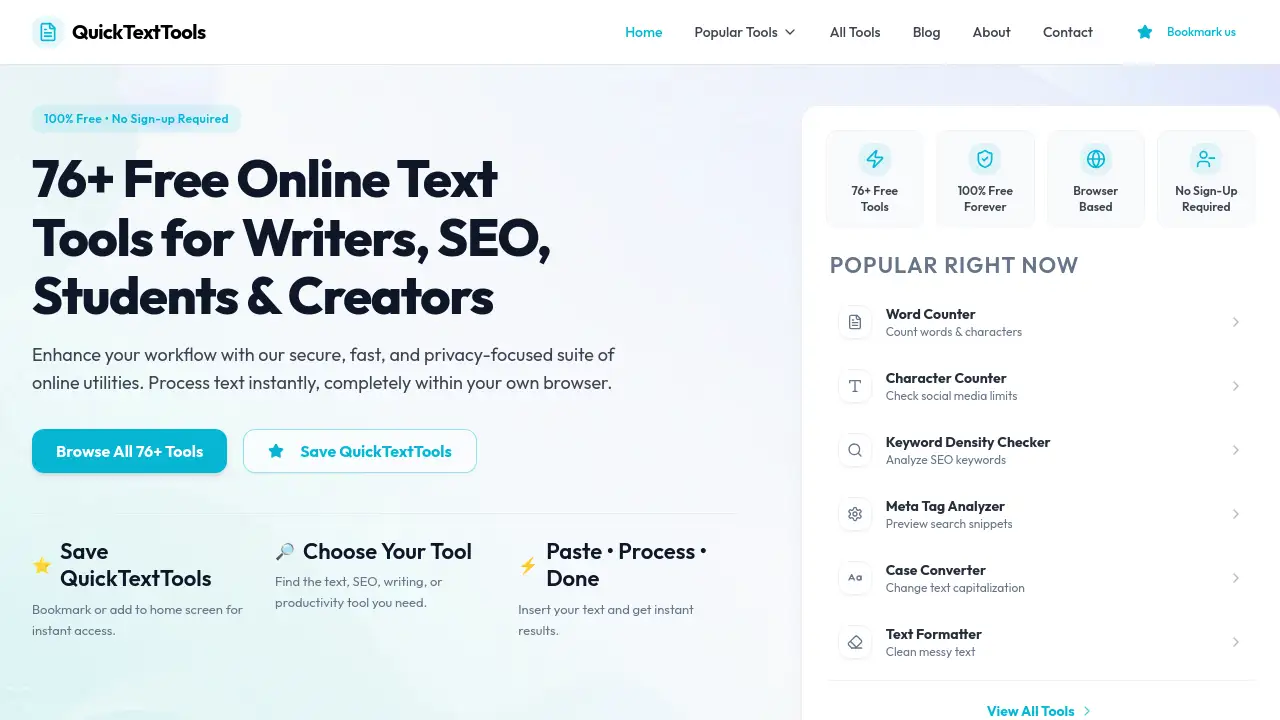
A comprehensive, free suite of online text processing and SEO tools for writers, marketers, and developers.
What is QuickTextTools?
QuickTextTools is a robust collection of over 76 free online utilities designed to process, analyze, and format text instantly. This platform addresses the common need for quick, on-the-spot text manipulation without the hassle of software installation or account creation. It is specifically built for writers, SEO professionals, students, marketers, and developers who require efficient tools for tasks ranging from basic word counting to advanced SEO analysis. The importance of QuickTextTools lies in its browser-based, privacy-focused approach, ensuring all processing happens locally on the user's device, keeping sensitive content secure.
Key Features of QuickTextTools
Large Collection of Text Tools
The platform boasts over 76 specialized tools, categorizing them for easy access into groups like writing, SEO, social media, and developer utilities.
100% Free and No Signup Required
All tools are completely free to use indefinitely, with no requirement for user registration, email signup, or subscription plans.
Browser-Based and Privacy-Focused
Every utility runs directly in the web browser using client-side JavaScript, meaning text is never uploaded to external servers, ensuring data privacy and security.
Instant, Fast Processing
Users can paste their text and receive results immediately, streamlining workflows with a simple "paste, process, done" model for rapid text manipulation.
Organized by Category
Tools are logically grouped into categories such as Writing Tools, SEO Tools, Social Media Tools, and Text Cleaning Tools, making it easy to find the right utility.
Popular Tool Highlights
The suite includes essential tools like a highly accurate Word Counter, a Keyword Density Checker for SEO, a versatile Case Converter, and a Text Cleaner for formatting.
Use Cases for QuickTextTools
Content Writers and Bloggers
Writers can use the word counter and readability checker to ensure their articles meet specific length and complexity guidelines for different publications.
SEO Specialists and Marketers
Professionals can optimize web content using the keyword density checker, generate meta tags, and build UTM links for campaign tracking.
Students and Academics
Students can format essays, check sentence structure, and analyze text for assignments using various counting and formatting tools.
Social Media Managers
Creators can generate engaging Instagram captions, craft YouTube titles, and create relevant hashtags to enhance their social media posts.
Developers and Technical Users
This audience can utilize tools like the QR code generator, random password generator, and text encoders/decoders for quick technical tasks.
How to Use QuickTextTools
Using the platform is straightforward and designed for maximum efficiency.
- Navigate to the Website: Visit the QuickTextTools homepage.
- Browse or Search for a Tool: Use the "All Tools" page or category sections to find the specific utility needed, such as the Case Converter or Keyword Density Checker.
- Paste Your Text: Copy and paste the text you want to process into the main input box of the chosen tool.
- Get Instant Results: The tool processes the text locally in your browser and displays the results immediately in an output box.
- Copy or Download: Copy the processed text to your clipboard or, for tools like the QR code generator, download the generated file.
Target Audience for QuickTextTools
- Writers, Bloggers, and Authors
- SEO Professionals and Digital Marketers
- Students and Researchers
- Social Media Managers and Content Creators
- Web Developers and Programmers
- Anyone needing quick text formatting or analysis
Is QuickTextTools Free?
Yes, QuickTextTools is completely free. The platform does not offer any paid plans or premium tiers. All 76+ tools are available for unlimited use at no cost and without any requirement to create an account.
| Plan | Price | Features |
|---|---|---|
| Free | $0 | Unlimited access to all 76+ online text tools, no sign-up required, browser-based processing. |
QuickTextTools's Pros and Cons
| Aspect | Pros | Cons |
|---|---|---|
| Cost & Access | Completely free forever; no registration required. | No premium features or advanced support tiers for complex enterprise needs. |
| Usability & Speed | Extremely simple, intuitive interface; instant results. | Functionality is limited to the predefined set of tools; no custom workflow automation. |
| Privacy & Security | Strong privacy focus; all processing happens locally in the browser. | Requires an internet connection to load the website, though tools work offline after loading. |
| Tool Range | Wide variety of 76+ tools covering writing, SEO, and formatting needs. | May have overlap with functionalities found in other standalone free websites. |
Frequently Asked Questions about QuickTextTools
Is QuickTextTools really free with no hidden costs?
Yes, QuickTextTools is 100% free. There are no subscription fees, no premium features locked behind a paywall, and no requirement to sign up for a trial. All tools are available for unlimited use at no cost.
Do I need to create an account to use the tools?
No, account creation is not required. You can visit the website and start using any tool, like the character counter or text cleaner, immediately without providing an email or password.
How does QuickTextTools ensure my text privacy?
Privacy is a core principle. The tools are built to run on client-side JavaScript, meaning all text you paste is processed directly within your own web browser. Your data is never sent to or stored on any external server.
Can I use these tools on my mobile phone?
Yes, the QuickTextTools website is responsive and designed to work seamlessly on desktops, tablets, and mobile phones, allowing you to process text on the go.
What kind of text tools are included?
The suite includes a wide range of utilities such as word counters, case converters, SEO tools like keyword analyzers and meta tag generators, social media caption tools, text cleaners, and basic developer tools like a password generator.
Are there any limits on how much text I can process?
Based on the available information, there are no stated limits on text length for processing. However, extremely large documents may be limited by your device's browser memory and performance.
QuickTextTools Tags
free online text tools, text utilities, word counter, SEO tools, keyword density checker, case converter, text formatter, writing tools, no signup required, browser-based tools, privacy-focused tools, content creation tools