Introduction
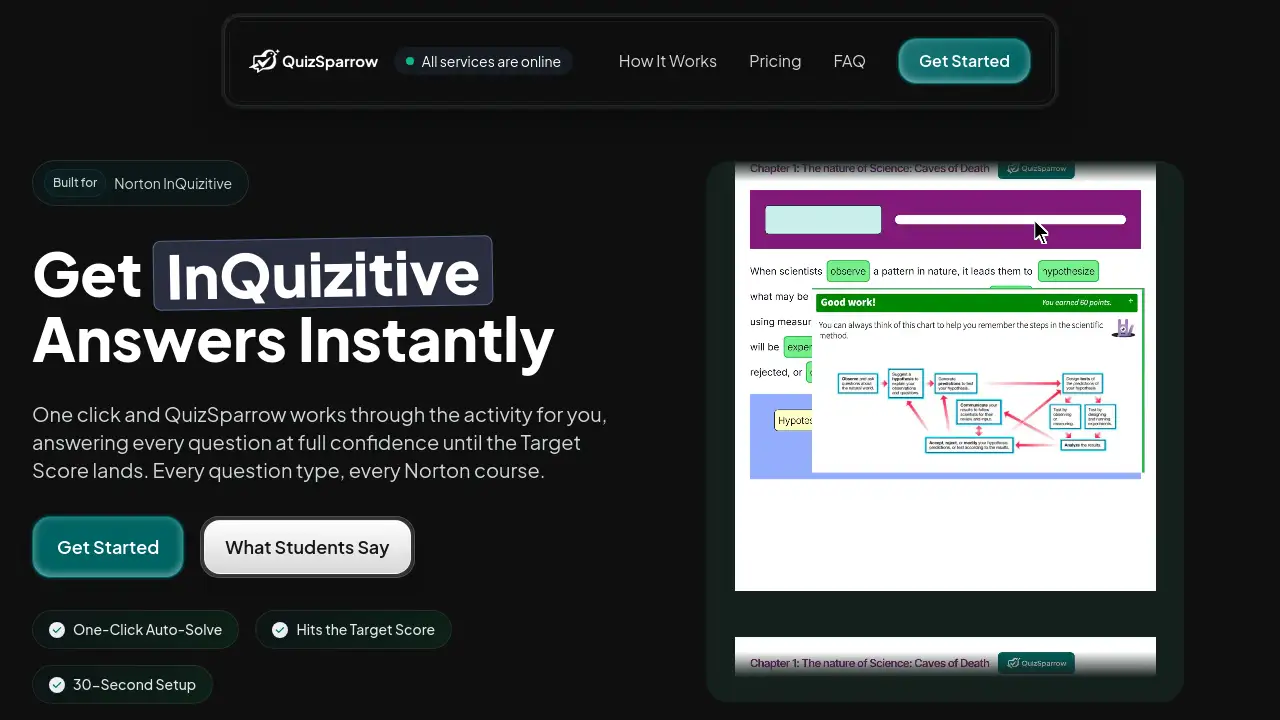
QuizSparrow is a browser extension built for Norton InQuizitive. It helps students get instant InQuizitive answers with one click. Instead of answering every question manually, QuizSparrow runs through the activity and keeps solving until the Target Score is reached. The setup takes about 30 seconds, which makes this tool a convenient option for busy learners.
What is QuizSparrow?
QuizSparrow is an answer tool designed for the Norton InQuizitive platform. This platform is commonly used in college courses, and it asks students to complete interactive activities to earn a certain number of points. These activities can take a long time, especially when students are unsure about the content.
Students who need InQuizitive answers usually face a lot of pressure. There are readings, quizzes, and other assignments to manage. QuizSparrow solves that problem by automating the response process. Once the extension is installed, it can read questions, choose answers, and continue through the activity at full confidence. It is built to handle every question type, including multiple choice, drag-and-drop, and label-the-diagram questions.
The purpose of QuizSparrow is to deliver InQuizitive answers without the usual friction. According to the product homepage, QuizSparrow works with every Norton course that uses InQuizitive. This matters because different courses use different activity formats. QuizSparrow removes the need to search for answers one by one and helps students finish faster.
That said, the tool is not a replacement for studying. It is best used as support for getting through required online assignments. With QuizSparrow, a learner can clear an InQuizitive activity in a short session and still spend time on other subjects. Because it can provide InQuizitive answers for multiple question types, it appeals to students in many different fields.
Key Features of QuizSparrow
One-Click Auto-Solve
The main feature of QuizSparrow is Auto-Solve. With one click, the extension starts answering questions and continues until the activity is finished. This gives instant InQuizitive answers without manual searching.
Target Score Support
QuizSparrow does not stop early. It keeps solving questions until the required Target Score is reached. This is exactly what InQuizitive asks for, so students do not have to keep checking their progress.
All Question Types
The tool supports every question type used in Norton InQuizitive. This includes multiple choice, matching, drag-and-drop, and diagram labeling. Students do not need to switch between different tools for different formats.
Fast Setup
QuizSparrow installs in about 30 seconds. There is nothing complicated to configure, so beginners can start using it quickly. The extension works in the background while the student opens the activity as normal.
Optional Explanations
Some answers come with short explanations. These can help learners understand why a particular answer is correct. For students who want to learn while using the tool, this is a useful extra feature.
Flexible Plans
QuizSparrow offers weekly, monthly, quarterly, and yearly plans. Users can choose a plan based on how long they need the service. All plans include instant answers, all question sets, and no usage limits.
Use Cases for QuizSparrow
Busy Weeknights
Students with multiple assigned activities can use QuizSparrow to get InQuizitive answers quickly. This reduces the time spent on repetitive questions and leaves more time for other homework.
Difficult Question Formats
Some InQuizitive questions are hard to answer by guessing. Drag-and-drop and diagram-labeling questions can be especially tricky. QuizSparrow handles these formats with confidence, which is another reason students search for InQuizitive answers.
Catching Up After Missing Class
If a student misses a lecture, QuizSparrow can help complete the assigned activity while the student reviews the material. This keeps the grade on track and reduces stress.
Last-Minute Deadline
When an activity is due soon, QuizSparrow provides a fast way to reach the Target Score. The one-click Auto-Solve action saves time and removes the pressure of answering every question manually.
How to Use QuizSparrow
Using QuizSparrow is simple and takes less than a minute once the activity is open.
- Add the QuizSparrow extension to your browser. The installation takes about 30 seconds.
- Open your assigned InQuizitive activity as you normally would.
- Click the Auto-Solve button. QuizSparrow will start answering every question at full confidence.
- Wait until the Target Score is reached. Explanations are optional if you want to review the answers.
No complex settings are required. The product is designed to let students get InQuizitive answers without extra setup.
Target Audience for QuizSparrow
QuizSparrow is suitable for different types of learners who use Norton InQuizitive.
- College students using Norton InQuizitive in their courses
- Distance learners who need to complete online activities
- Students with part-time jobs and limited homework time
- Learners who struggle with specific question formats
- Anyone looking for InQuizitive answers and a quick way to reach the Target Score
Is QuizSparrow Free?
QuizSparrow is not free. The official website lists four paid plans, and all plans include instant InQuizitive answers, all InQuizitive question sets, no usage limits, and cancel anytime.
| Plan | Price | Features |
|---|---|---|
| Weekly | $9.99 per week | Instant answers, all question sets, no usage limits, cancel anytime |
| Monthly | $24.99 per month | Instant answers, all question sets, no usage limits, cancel anytime |
| Quarterly | $16.66 per month ($49.99 billed quarterly) | Instant answers, all question sets, no usage limits, cancel anytime |
| Yearly | $8.33 per month ($99.99 billed annually) | Instant answers, all question sets, no usage limits, cancel anytime |
The yearly plan offers the lowest monthly rate, while the weekly plan is best for short-term use.
QuizSparrow's Pros and Cons
| Aspect | Pros | Cons |
|---|---|---|
| Pricing | Multiple plans and cancel anytime | No free plan; long-term use can add up |
| Ease of Use | One-click auto-solve; 30-second setup | Requires browser extension installation |
| Compatibility | Works with every Norton InQuizitive course | Only supports Norton InQuizitive, not other quiz platforms |
| Learning Support | Explanations optional; helps with tough question types | Should not replace actual reading and study |
Frequently Asked Questions about QuizSparrow
What is QuizSparrow?
QuizSparrow is a browser extension that helps students get InQuizitive answers by automatically solving activities on the Norton InQuizitive platform.
Does QuizSparrow work with all Norton InQuizitive courses?
According to the official product page, QuizSparrow works with every question type and every Norton course. Students can use it for different subjects that rely on InQuizitive.
How long does it take to install QuizSparrow?
The setup takes about 30 seconds. After adding the extension, students open their activity and click Auto-Solve.
Does QuizSparrow show explanations?
Yes, explanations are optional and available with answers. Some student reviews mention that the short explanations help them understand topics like comma splices.
Can I cancel my QuizSparrow subscription?
Yes. The pricing section on the official website says users can cancel anytime. There are weekly, monthly, quarterly, and yearly plans.
Is there a free version of QuizSparrow?
There is no free plan listed on the official website. The cheapest option is the weekly plan at $9.99 per week. For longer use, the yearly plan offers the lowest monthly cost.
QuizSparrow Tags
QuizSparrow, InQuizitive answers, Norton InQuizitive helper, InQuizitive auto-solve, get InQuizitive answers, InQuizitive browser extension, Norton course tool, homework assistant, target score solver, InQuizitive support, instant InQuizitive answers, QuizSparrow review