Introduction
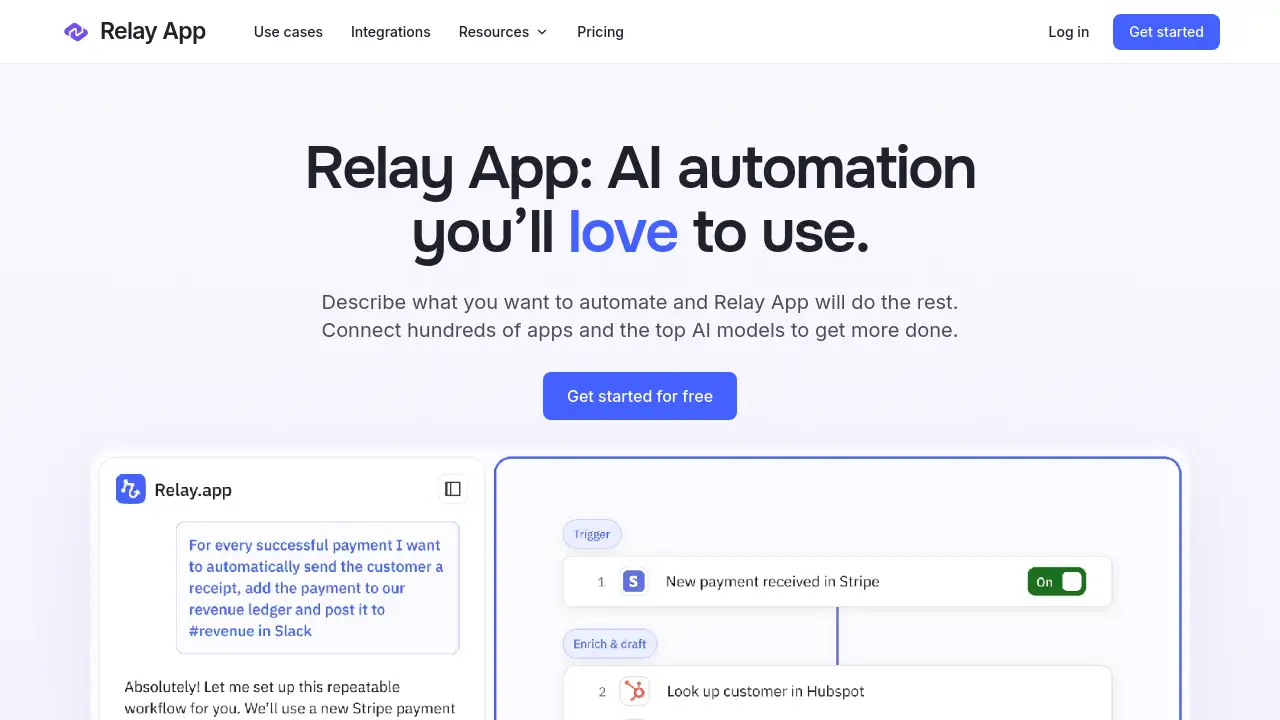
Relay App is an AI automation platform for building reliable AI agents and AI workflows with natural language. It connects 200+ apps and top AI models to help teams get more done.
What is Relay App?
Relay App is a workflow automation tool that turns plain-language descriptions into working automations. Instead of manually wiring every step, users describe what they want to automate, and Relay App helps build the process with AI. It connects to hundreds of popular apps and leading AI models, so teams can move data, make decisions, and complete tasks across their tools.
Relay App solves a common problem: repetitive work spread across many apps. It is suitable for operations teams, sales teams, marketers, HR teams, support teams, and founders who want AI automation without heavy engineering. Because Relay App combines AI agents, AI workflows, and human review, it supports both simple tasks and more complex business processes. The platform also gives users fine-grained control over what each automation can access and do, which matters when reliability is important.
Key Features of Relay App
Chat-First AI Workflow Builder
Relay App lets users start with a conversation. Describe the apps and steps to connect, and Relay App turns that description into an AI workflow that can be refined later.
Visual Workflow Editor
The visual editor gives precise control without turning a process into a confusing diagram. Users can add conditions, loops, branches, and data transformations while seeing how information moves through each step.
200+ App Integrations
Relay App connects with over 200 popular apps, including CRM, messaging, email, spreadsheets, and project tools. This makes Relay App a practical hub for workflow automation across different systems.
Relay AI Actions
Relay App includes focused AI actions for extracting data, summarizing text, classifying information, and making decisions. Users can also write custom prompts, choose a model, and map AI output into the next step.
Human-in-the-Loop Controls
Relay App supports human-in-the-loop actions such as approvals, reviews, and requests for information. This keeps people in control when judgment, accuracy, or compliance matters.
MCP Servers and Custom Tools
Relay App can expose custom tools to AI assistants like ChatGPT, Claude, and ElevenLabs through MCP servers. It also supports webhooks, HTTP requests, and utility steps for teams that need to go beyond built-in integrations.
Tables, Files, and Utilities
Relay App includes tables for structured data, tools for file conversion, CSV handling, date calculations, list operations, and custom JavaScript. These features help teams shape data between steps and build more flexible no-code automation.
Use Cases for Relay App
Lead Qualification
Relay App can collect a new form response, qualify the lead with AI, notify the sales team, and create a contact in HubSpot. This reduces manual follow-up and helps sales teams respond faster.
Deal Pipeline Reporting
Teams can use Relay App to find open deals, summarize the weekly pipeline, share a report in Slack, and save the summary in a document. This makes recurring reporting more consistent.
Employee Onboarding
Relay App can trigger when a new employee is hired, invite them to a workspace, add them to the right groups, and send a welcome email. This creates a repeatable onboarding process.
Weekly Reporting
Relay App can gather numbers on a schedule, summarize what changed, and prepare a report for review. This is useful for operations, marketing, and management teams.
Customer Support Drafts
Relay App can organize a customer question and draft an answer for a person to check before sending. The human-in-the-loop step helps maintain quality.
Research Summarization
Relay App can collect source material, extract useful information, and organize key findings into a structured draft. This supports research-heavy workflows without manual copy-paste.
How to Use Relay App
- Sign up for free on the Relay App website.
- Describe the workflow in natural language, including the apps and steps needed.
- Review and refine the workflow in the visual editor.
- Connect the required apps, AI models, and data sources.
- Add approvals, reviews, or other human-in-the-loop steps, then run the automation.
Relay App is designed to be approachable for beginners while still offering depth for advanced users. The chat-first builder helps users start quickly, and the visual editor helps them improve reliability over time.
Target Audience for Relay App
- Operations teams that manage repetitive cross-app processes
- Sales and marketing teams that need lead routing, reporting, and follow-up
- HR teams that coordinate onboarding and internal requests
- Customer support teams that want AI-assisted drafts and reviews
- Founders and small businesses that need affordable automation
- No-code builders who want AI agents and AI workflows
- Developers and technical teams that need webhooks, HTTP, and custom logic
- Agencies that build automation for multiple clients
Is Relay App Free?
Relay App offers a free sign-up through its homepage. The reference information does not list detailed paid plan prices, seat limits, or usage quotas. Users who need current pricing, higher limits, or team features should check the official Relay App website for the latest plan details.
Relay App's Pros and Cons
| Aspect | Pros | Cons |
|---|---|---|
| Pricing | Free start available | Paid plan details are not shown in the reference information |
| Features | AI automation, AI agents, AI workflows, visual editor, and human-in-the-loop actions | Advanced workflows may take time to learn |
| Integrations | Connects 200+ apps and top AI models | Availability depends on each third-party app and API |
| Control | Supports approvals, custom prompts, webhooks, and custom JavaScript | No offline use is mentioned |
| Use Cases | Suitable for lead qualification, reporting, onboarding, and support | May be more than needed for very simple personal tasks |
Frequently Asked Questions about Relay App
What is Relay App best used for?
Relay App is best used for workflow automation that combines apps, AI, and human review. Common examples include lead qualification, reporting, onboarding, and customer support drafts.
Do I need coding skills to use Relay App?
No. Relay App uses natural language and a visual editor, so users can build AI workflows without coding. For advanced needs, custom JavaScript and HTTP requests are available.
How many apps does Relay App connect with?
Relay App connects with 200+ apps. This includes popular business tools for CRM, messaging, email, documents, and spreadsheets, along with AI models and MCP servers.
Can Relay App use AI models like ChatGPT and Claude?
Relay App provides access to top AI models and supports custom prompts. Its MCP servers can also expose tools to AI assistants such as ChatGPT, Claude, and ElevenLabs.
Does Relay App support human approvals?
Yes. Relay App includes human-in-the-loop actions for reviews, approvals, and requests for information. This helps teams keep control over important decisions.
Is Relay App free to try?
Relay App offers a free sign-up on its website. Users should visit the official site to confirm current free limits and any paid plan options.
Relay App Tags
Relay App, AI automation, AI agents, AI workflows, workflow automation, no-code automation, natural language workflows, 200+ app integrations, human-in-the-loop, MCP servers, visual workflow editor, Relay AI