Introduction
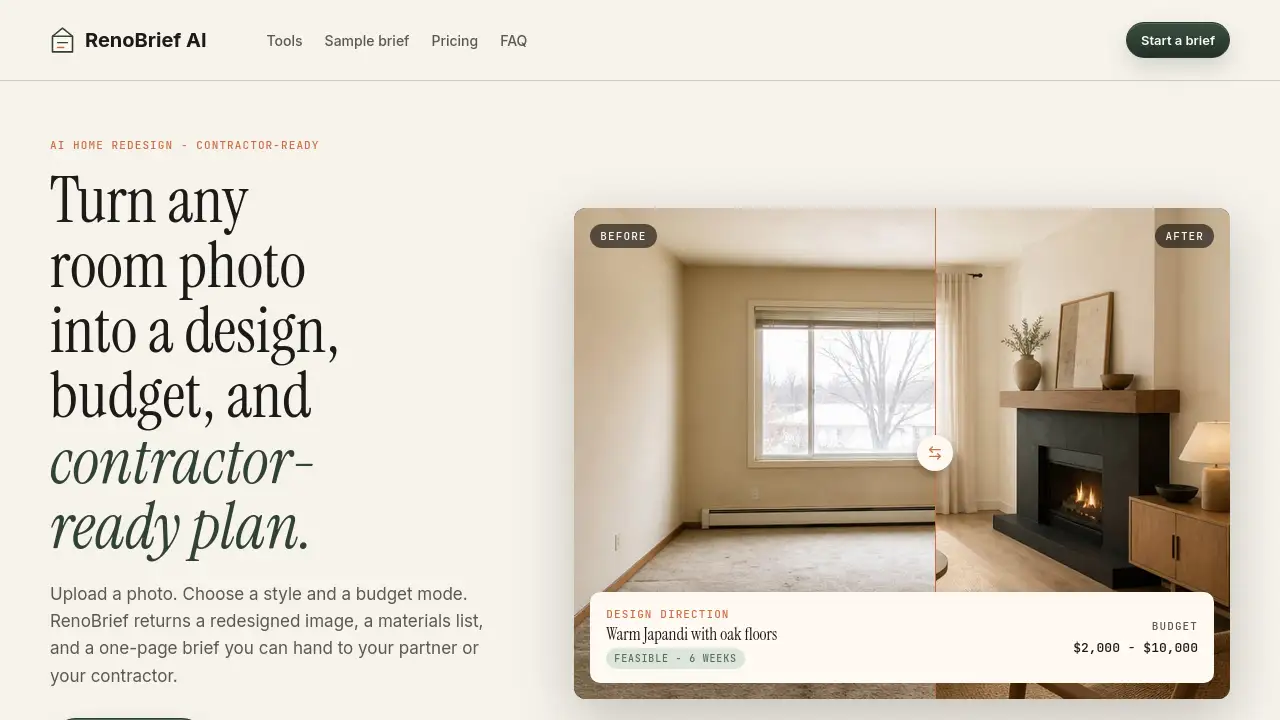
AI home redesign tool RenoBrief turns any room photo into a contractor-ready renovation plan with a budget estimate.
What is RenoBrief?
RenoBrief is an AI home redesign platform that simplifies the early stages of renovation planning. It addresses a common challenge: homeowners often struggle to communicate their vision clearly to contractors, leading to misunderstandings and budget overruns. By uploading a simple photo, users can generate a visual design concept, a detailed material list, and a realistic budget range. This creates a concrete, contractor-ready plan that serves as a powerful discussion starter, making the renovation process more transparent and manageable from the outset. It is suitable for anyone considering a home update, from a minor room refresh to a more significant remodel.
Key Features of RenoBrief
AI-Powered Design Transformation
Upload a photo of a room or exterior, and the AI generates a redesigned image based on your selected style, providing a clear visual of the potential outcome.
Detailed Material Lists
Each generated renovation brief includes a specific list of suggested materials, such as "European oak plank floor" or "limewashed walls," which helps in sourcing and cost estimation.
Realistic Budget Range Estimation
The tool provides a budget range (e.g., $2,000 - $10,000) calibrated to regional averages and the materials specified, offering a practical financial framework rather than a fixed quote.
Contractor-Ready Brief Generation
The core output is a concise, one-page contractor-ready plan that outlines the design direction, scope, materials, and specific notes for contractors, facilitating clear communication.
Project-Specific Guidance
RenoBrief tailors its questions and the contractor notes it surfaces based on the type of surface being renovated (e.g., a living room vs. a facade), ensuring relevant advice.
Use Cases for RenoBrief
Planning a Living Room Refresh
Homeowners can visualize a new style, like Warm Japandi, and get a clear budget range and material list before consulting with interior designers or contractors.
Preparing for a Kitchen or Bathroom Remodel
Users can upload photos to explore different design directions and generate a detailed contractor-ready plan to obtain accurate quotes from multiple professionals.
Exterior Facade Renovation
The tool can be used to redesign the outside of a home, creating a brief that helps contractors understand the desired materials and scope for siding, paint, or landscaping updates.
Budgeting for a Home Office Update
Individuals looking to create a functional workspace can use RenoBrief to get a feasible budget range and a material list for furniture and finishes.
How to Use RenoBrief
Using RenoBrief is a straightforward process designed to quickly turn an idea into a actionable plan:
- Upload a Photo: Capture a clear image of the room or exterior area you want to renovate and upload it to the platform.
- Choose Style and Budget Mode: Select from available design styles (e.g., Modern, Japandi, Minimalist) and indicate your budget preference.
- Receive Your RenoBrief: The AI processes your input and generates a package containing the redesigned image, a detailed materials list, and a one-page contractor-ready plan with a budget range.
- Save, Share, or Handoff: Download or save your renovation brief. You can then share it directly with partners or contractors to start the quoting and discussion process.
Target Audience for RenoBrief
- Homeowners planning renovations who need a clear vision and budget estimate.
- Property Investors or Landlords looking to efficiently plan and budget for property updates.
- Interior Design Clients who want to explore initial concepts before deep diving with a professional.
- DIY Enthusiasts seeking a structured plan and material list for their projects.
Is RenoBrief Free?
According to the homepage, the first renovation brief is free during the platform's V1 testing phase. This allows users to experience the core AI home redesign functionality. For ongoing use beyond the first brief, users would likely need to visit the official website for details on subscription plans or pricing tiers as the service evolves.
RenoBrief's Pros and Cons
| Aspect | Pros | Cons |
|---|---|---|
| Planning & Communication | Creates a visual and written contractor-ready plan, greatly improving clarity between homeowner and professional. | The output is a conceptual brief, not a technical construction drawing, so engineering details are not included. |
| Budgeting | Provides a realistic budget range early in the process, helping set financial expectations. | The final cost depends on many external factors (contractor rates, permits), so the range is an estimate. |
| Ease of Use | The process is simple and fast, requiring only a photo to start. | Design style options in the initial version are currently limited to five core styles. |
| Accessibility | The free first brief lowers the barrier to try the AI home redesign tool. | Future pricing for continued use is not yet clearly defined on the homepage. |
Frequently Asked Questions about RenoBrief
Is RenoBrief a construction drawing?
No. Every RenoBrief is a planning concept: a discussable renovation brief that a contractor can quote against. It does not produce code-compliant or stamped construction documents.
How accurate is the budget range?
Budgets are calibrated to regional remodeling averages and the materials listed in the brief. The tool shows a budget range, not a fixed number. Your final cost depends on contractor selection, permits, and material availability.
Do you store my photos?
Photos are encrypted in transit and used solely to create your contractor-ready plan. Saved projects remain accessible in your account history.
Can I share a brief with my contractor?
Yes. Every brief is designed as a one-page handoff document containing the scope, materials, budget range, and contractor notes, perfect for sharing.
Which design styles are supported?
The initial version supports five primary styles: Modern, Japandi, Minimalist, Farmhouse, and Quiet Luxury. More style controls may be added as the tool develops.
What surfaces can I plan with RenoBrief?
The tool is designed to plan renovations for various surfaces, including interior rooms (like living rooms) and exterior facades, with tailored guidance for each.
RenoBrief Tags
AI home redesign, contractor-ready plan, renovation brief, budget range, home renovation tool, interior design AI, remodel planning, material list, contractor notes, renovation estimate, home improvement planning, virtual renovation