Introduction
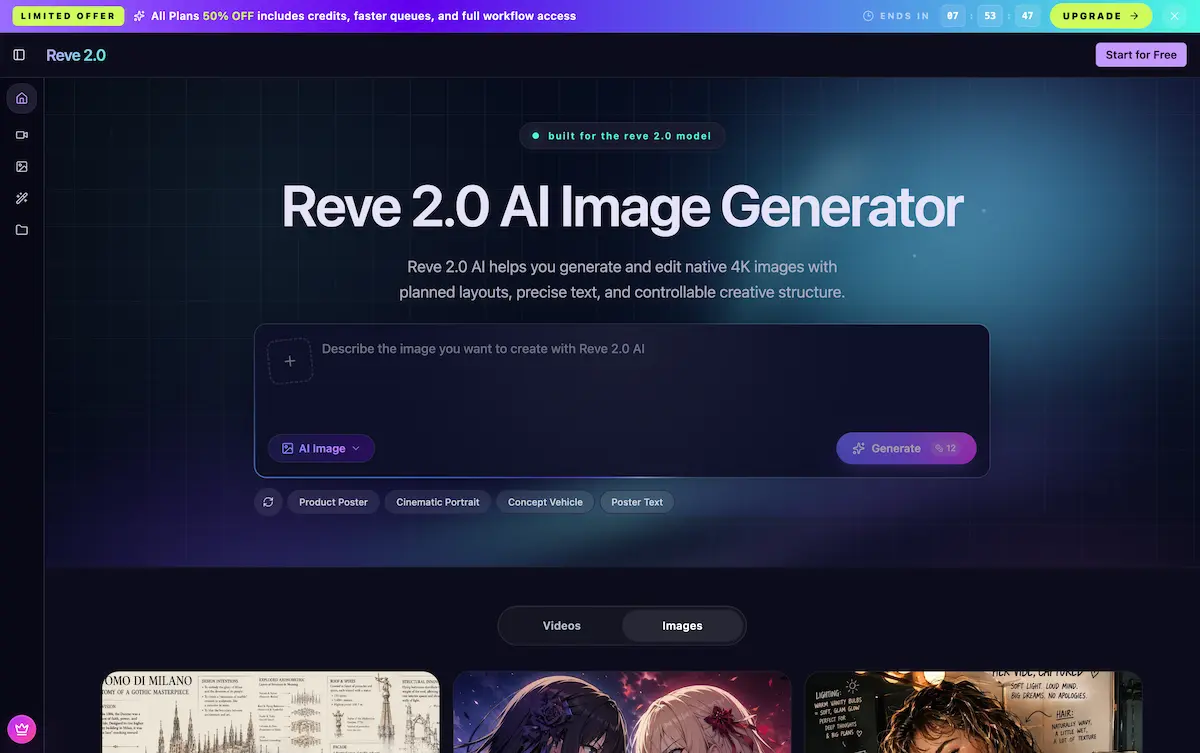
Reve 2.0 AI is a structured image generator that delivers native 4K output, planned layouts, and precise text rendering. It helps creators move from a prompt or reference to a polished, editable visual with greater control and consistency than typical AI tools.
What is Reve 2.0?
Reve 2.0 AI is an AI image generation and editing platform built around the Reve 2.0 Model. Unlike conventional image generators that treat each prompt as a one-shot gamble, Reve 2.0 AI uses a planning-first approach. It evaluates object placement, spacing, text hierarchy, and visual relationships before rendering, which makes the results feel intentionally designed rather than randomly generated. The tool outputs native 4K images directly, avoiding the quality loss often seen with upscaling. It also allows for iterative editing, so users can revise subjects, backgrounds, text, and layout while preserving the original creative direction.
This platform is suitable for marketers, designers, filmmakers, content creators, and any professional who needs reliable, high-resolution visuals with strong composition control. By combining planning, native 4K rendering, and editable image structure, Reve 2.0 AI addresses common pain points like unpredictable results, poor text clarity, and difficulty making revisions.
Key Features of Reve 2.0
Planning-First Image Generation
Reve 2.0 AI plans objects, spacing, text, and relationships before rendering. This ensures scenes feel designed instead of guessed, which is especially useful for layouts with multiple elements.
Native 4K Output
Instead of generating a lower-resolution image and upscaling, Reve 2.0 AI directly renders detailed 4K results. This reduces quality drift and keeps fine details sharp for print and large displays.
Editable Image Editing
The tool keeps visual structure addressable. Users can revise subjects, backgrounds, props, colors, and prompts through multiple iterations while maintaining the approved composition.
Precise Text Rendering
Text placement is treated as part of the image plan. This improves the clarity of posters, labels, signs, packaging, and any design where typography matters.
Image-to-Image and Text-to-Image Modes
Users can start with a text prompt or upload a reference image. The planner adapts to either input, offering flexible creative workflows.
Fast Inference
Reve 2.0 AI boasts a 0.8-second inference time, enabling quick iteration without sacrificing quality.
Use Cases for Reve 2.0
Product Visuals
Create product renders, ad concepts, packaging scenes, and hero images with composition that stays clear at 4K. Marketers can generate multiple polished merchandising options for testing.
Graphic Design
Build posters, thumbnails, covers, and branded layouts where text, hierarchy, and spacing need strong control. The planning-first model ensures text is legible and correctly placed.
Image Editing
Revise subjects, backgrounds, props, colors, or prompt direction while preserving the visual structure. This is ideal for creative teams that need an editable workflow rather than one-off outputs.
Cinematic Stills
Filmmakers can create concept frames with controlled composition before production. The tool delivers cinematic lighting and framing that matches a real shot list.
Social Media Content
Generate sharp thumbnail sets or social image sets that look deliberate and professional, without losing the core campaign mood between versions.
Brand Visuals
Keep brand objects, colors, and text hierarchy consistent across repeated image tests. Brand designers can iterate on packaging, ads, and style boards efficiently.
How to Use Reve 2.0
Using Reve 2.0 AI is straightforward and follows three main steps:
- Input Prompt – Describe the image you want in text, or upload an image as a reference for style or composition.
- Choose Parameters – Set the aspect ratio, image size (up to 4K), output count, and quality preferences.
- Generate and Download – Click Generate, wait a moment, and download your high-resolution image. You can then refine the result using the editing features.
The entire process emphasizes quick iteration, so users can experiment with different prompts or edits without starting from scratch.
Target Audience for Reve 2.0
- Marketers and E‑commerce Managers – Need polished product images, ad concepts, and packaging visuals at 4K resolution.
- Graphic Designers – Require consistent layout, text hierarchy, and editable assets for posters, thumbnails, and brand materials.
- Filmmakers and Video Producers – Use the tool for cinematic mood boards, key art, and pre‑production concept frames.
- Content Creators and Social Media Managers – Want sharp, intentional image sets for thumbnails, posts, and campaigns.
- Brand Strategists and UX Designers – Need visual mockups and style testing that can be revised without losing the original direction.
- Game Developers and Concept Artists – Explore environments, props, and character moments with structured composition.
Is Reve 2.0 Free?
Reve 2.0 AI offers a free tier that lets users generate and download high-definition images without an upfront payment. For extended usage, advanced features, or higher output limits, a paid plan is available. Exact pricing details can be found on the official website. The free option is a good way to test the planning-first workflow and native 4K quality.
Reve 2.0's Pros and Cons
| Aspect | Pros | Cons |
|---|---|---|
| Image Quality | Native 4K output with fine detail; no upscale artifacts. | Requires a reasonably modern device for smooth preview. |
| Control | Planning-first approach gives consistent layouts and editable structure. | May have a learning curve for users accustomed to fully stochastic generators. |
| Text Rendering | Integrates text placement into the image plan; clear typography. | Complex multi‑line text may still need manual tweaks. |
| Iteration | Supports revision of subjects, backgrounds, and layout without starting over. | Very heavy edits may require a new plan. |
| Speed | Sub‑second inference time for initial generation. | Editing steps may take a bit longer depending on complexity. |
| Pricing | Free tier available; no‑risk trial. | Full features may require a paid subscription for heavy usage. |
Frequently Asked Questions about Reve 2.0
What is Reve 2.0 AI and how does it differ from other image generators?
Reve 2.0 AI is a planning-first image generator that renders native 4K images with editable structure. Unlike typical generators that treat prompts as one-off guesses, it plans object relationships, spacing, and text before rendering, making results more predictable and easier to revise.
Can I use Reve 2.0 AI for commercial projects?
Yes. The tool is designed for professional use, including product visuals, advertising materials, and branded content. Always review the terms of service for specific commercial licensing rights.
Does Reve 2.0 AI support image editing after generation?
Yes. Reve 2.0 AI keeps visual structure addressable, allowing users to revise subjects, backgrounds, props, colors, and prompts through multiple iterations while preserving the original composition.
What kind of text can Reve 2.0 AI render accurately?
The tool treats text placement as part of the image plan, improving clarity for posters, labels, signs, and packaging. Simple to moderately complex text strings work well; extremely long or heavily stylized text may require additional refinement.
Is there a limit on the free version of Reve 2.0 AI?
The free tier typically provides a set number of generations or credits per day. For unlimited usage and advanced features like higher resolution or batch processing, a paid plan is recommended.
How do I achieve the best results with Reve 2.0 AI?
Use clear, descriptive prompts and specify desired composition, lighting, and text content. Starting with a reference image can also improve consistency. Utilize the editing features to refine outputs iteratively.
Reve 2.0 Tags
Reve 2.0 AI, AI image generator, native 4K image generation, planning-first AI, AI image editing, text to image, image to image, 4K rendering tool, AI product visualization, cinematic stills AI, editable AI images, Reve 2.0 model