Introduction
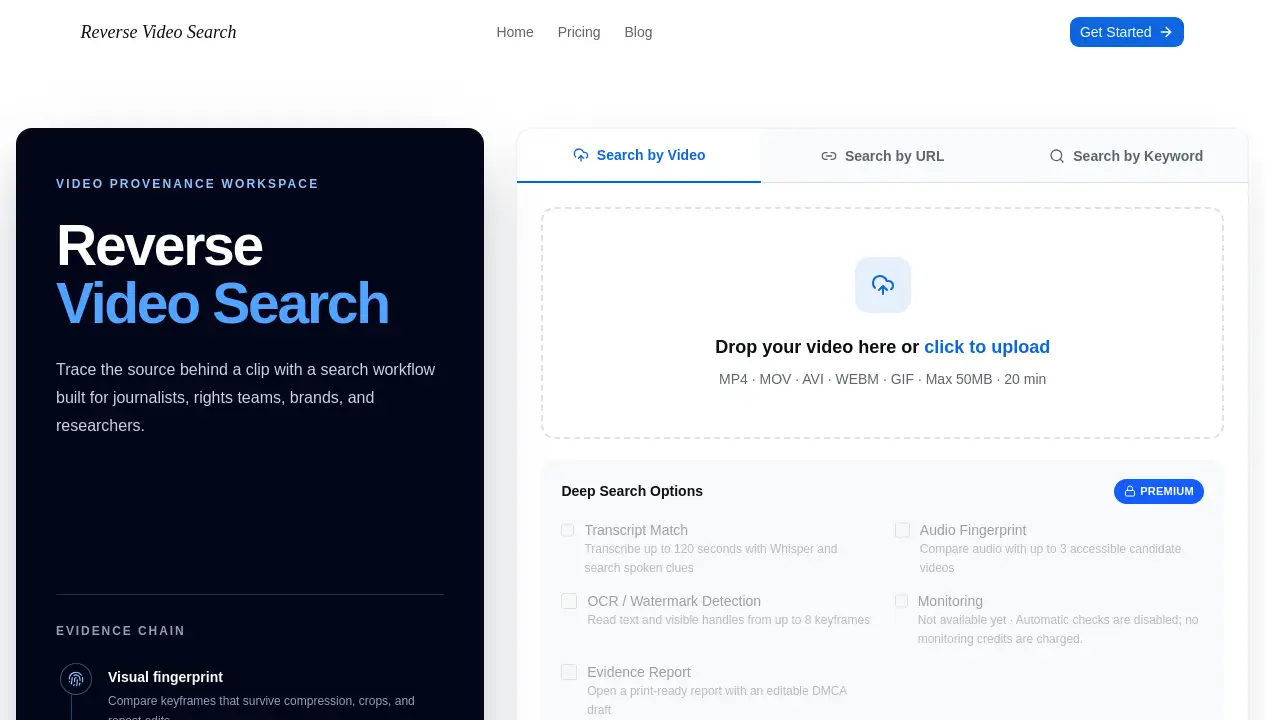
Reverse Video Search is an online tool that helps users trace a video back to its likely original source. Upload a clip, paste a public video URL, or describe footage with keywords, and Reverse Video Search looks for matching pages across the web.
What is Reverse Video Search?
Reverse Video Search is a media investigation service built around a simple idea: a video keeps its identity even when its title, caption, or language changes. When a clip is re-uploaded, cropped, mirrored, compressed, or renamed, ordinary keyword search often sees only the newest description. Reverse Video Search instead reads the underlying content — keyframes, audio, spoken phrases, subtitles, logos, and on-screen text — and compares those signals against indexed pages and public platforms.
Reverse Video Search addresses a common problem for anyone who needs to find the original video source. Matches are ranked by similarity, dates, source quality, and confidence, which gives users a starting point for human verification rather than a black-box verdict. The service suits creators chasing unauthorized reposts, journalists checking whether viral footage is presented out of context, brands watching campaign assets, and researchers who need a documented provenance record. Because Reverse Video Search combines visual, audio, and text signals, it can surface relationships that caption-based searching would miss.
Key Features of Reverse Video Search
Video, URL, and Keyword Input
Add a short clip in MP4, MOV, AVI, WEBM, or GIF format up to 50MB and 20 minutes, paste a public video URL, or type keywords that describe the footage. Distinctive frames and spoken phrases usually produce the strongest matches.
Visual Fingerprinting
Reverse Video Search compares keyframes and near-duplicate scenes that stay recognizable after resizing, cropping, mirroring, or compression. This video fingerprinting approach helps connect re-uploads that no longer look identical to the original upload.
Audio Fingerprint Matching
Reverse Video Search can match a soundtrack, voice recording, or interview even when the same audio appears inside a different edit. As part of the premium deep search options, audio fingerprint checks compare a clip with up to three accessible candidate videos.
Transcript Matching
Premium users can transcribe up to 120 seconds of speech with Whisper and search for spoken clues. This transcript matching makes it possible to trace a clip by what is said rather than by what a caption claims.
OCR and Watermark Detection
Reverse Video Search reads text, subtitles, logos, usernames, and visible handles from up to eight keyframes. Those details often reveal the account behind a repost.
Evidence-Ready Reports
Users can open a print-ready report with an editable DMCA draft that keeps source URLs, dates, thumbnails, similarity details, and notes in one place for review or a rights request.
Privacy Controls and Search Updates
File limits, retention, and deletion controls are presented before someone uploads sensitive footage for analysis. Email updates also notify users when a search finishes, finds no matches, or cannot be completed, and deepfake detection is highlighted among the service's safeguards.
Use Cases for Reverse Video Search
Creators Protecting Original Work
Creators use Reverse Video Search to find unauthorized reposts of tutorials, films, livestreams, and social clips, then document copies and prepare attribution or licensing conversations.
Journalists Verifying Viral Footage
Reporters can use Reverse Video Search to trace viral footage to an earlier upload and test whether the date, location, or caption is misleading before publication.
Brands Monitoring Campaign Assets
Brands and agencies turn to Reverse Video Search to check influencer deliverables, campaign clips, and logos for modified ads, fake endorsements, or risky copies.
Researchers and Legal Teams
Researchers use Reverse Video Search to build a searchable provenance record with source URLs, dates, thumbnails, edits, and notes that support later review.
How to Use Reverse Video Search
- Add your best source. Upload a short, clear clip, paste a public video URL, or enter keywords describing the footage.
- Extract the signals. Reverse Video Search samples keyframes and inspects audio, transcripts, subtitles, logos, and on-screen text for extra clues.
- Compare likely matches. Reverse Video Search checks visual fingerprints against indexed pages and public platforms, then ranks results by similarity, date, source quality, and confidence.
- Verify before acting. Open the source links, compare timelines and edits, and save the evidence report before contacting a rights team or publishing a finding.
Target Audience for Reverse Video Search
- Content creators and video editors tracking re-uploads of their work
- Journalists and fact-checkers verifying footage and its context
- Brands, agencies, and social media teams monitoring campaign assets
- Researchers, archivists, and legal teams documenting video provenance
- Rights holders preparing DMCA notices or licensing discussions
Is Reverse Video Search Free?
Users can try one search without an account, and signing up adds five bonus credits. Each search costs five credits, and unused credits do not expire on paid plans.
| Plan | Price | Features |
|---|---|---|
| Free trial | $0 | One search without an account; 5 bonus credits after signup |
| Starter | $4/month | 20 credits per month, 4 searches included, unused credits do not expire, email support |
| Pro | $12/month | 90 credits per month, 18 searches included, unused credits do not expire, email support |
| Enterprise | $60/month | 500 credits per month, 100 searches included, unused credits do not expire, email support |
Reverse Video Search's Pros and Cons
| Aspect | Pros | Cons |
|---|---|---|
| Pricing | Low entry cost; unused credits roll over | Each search consumes credits, which adds up with heavy use |
| Signals | Combines visual, audio, transcript, and OCR checks | Accuracy depends on index coverage and clip quality |
| Output | Print-ready evidence report with an editable DMCA draft | A match still requires independent verification |
| Privacy | File limits, retention, and deletion controls are stated | Private or restricted footage needs permission before upload |
| Coverage | Accepts uploads, public URLs, and keywords | Cannot see private accounts, deleted posts, or regional restrictions |
Frequently Asked Questions about Reverse Video Search
What is Reverse Video Search used for?
Reverse Video Search compares frames, audio, spoken words, and on-screen text inside a clip to find related copies or earlier uploads. It is most useful when titles, captions, or languages have changed.
Can I search by video, URL, or keyword?
Yes. Upload a file up to 50MB, paste a public video URL, or describe the clip with keywords. A distinctive short segment often gives the clearest result.
How accurate are the matches?
Accuracy depends on index coverage, video quality, and how heavily a clip was edited. Visual, audio, transcript, and OCR signals improve confidence, but every result should be checked against the source page, date, and context.
Is my uploaded video kept private?
Check the provider's encryption, retention, model-training, access, and deletion policies before uploading sensitive material. Avoid submitting private or restricted footage without the right permission.
Can Reverse Video Search help with copyright claims?
It can help document reposts, source URLs, upload dates, edits, and watermarks before contacting a platform or rights holder. A match supports a review; it is not automatic proof of ownership or infringement.
Does Reverse Video Search offer automatic monitoring?
Monitoring is listed as not yet available, and no monitoring credits are charged while automatic checks are disabled.
Reverse Video Search Tags
reverse video search, find original video source, reverse video lookup, video fingerprinting, audio fingerprint matching, video copyright protection, verify viral footage, public video URL search, video provenance report, OCR watermark detection, deepfake detection, video source finder