Introduction
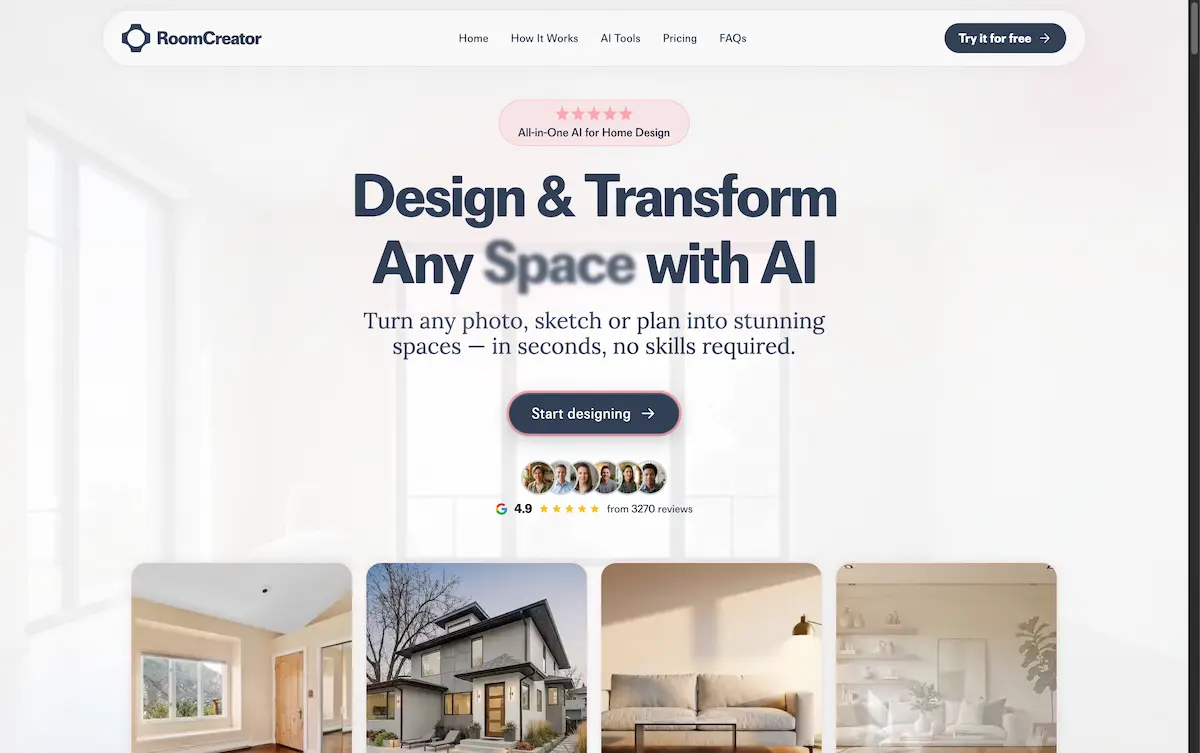
An AI-powered interior design tool that helps you redesign your space in seconds.
What is RoomCreator?
RoomCreator is an AI-powered interior design tool designed to help users visualize and transform their living spaces. It solves the common problem of not being able to picture how design changes will look before investing time and money into renovations, redecorating, or staging. The platform is suitable for a wide range of users, from homeowners planning a makeover to real estate agents needing to enhance property listings. By using state-of-the-art AI models, RoomCreator allows anyone to generate stunning, hyper-realistic designs of their rooms, exteriors, or even sketches, making confident design decisions significantly easier and more accessible.
Key Features of RoomCreator
Instant Interior Redesign
Users can upload a photo of any room and instantly explore professionally designed interiors in multiple styles, seeing realistic layouts, furniture, and colors applied to their exact space.
Exterior Design Visualization
This feature allows users to test exterior styles, colors, and landscaping using a single photo, providing instant curb appeal visualization before any actual renovation work begins.
Precision Brush Editor
By brushing over specific areas of an image, users can remove furniture or replace decor without regenerating the entire room, offering full control over detailed edits.
Empty Room Declutter
With one tap, this tool instantly removes all furniture and objects from a room photo, leaving a clean canvas of walls, floors, and windows for redesign planning.
Sketch to Interior Render
Users can upload a hand-drawn sketch or layout concept and transform it into a realistic interior image, perfect for visualizing early ideas and concepts.
Cinematic Motion Previews
This feature transforms static interior photos into smooth 3–5 second motion videos with gentle pans and zooms, ideal for creating immersive presentations for clients or social media.
Use Cases for RoomCreator
Home Renovation Planning
Homeowners can test different paint colors, furniture layouts, and design styles in their own space to avoid costly mistakes and make confident renovation decisions.
Real Estate Listing Enhancement
Real estate agents can transform empty or outdated rooms into beautifully staged interiors, creating stunning visuals that help property listings stand out and attract potential buyers.
Investment Property Evaluation
Individual investors can generate realistic before-and-after visuals to evaluate a property's renovation potential and showcase its future value for flips or rental presentations.
Interior Design Concepting
Design enthusiasts and professionals can quickly iterate on design ideas, turning sketches or basic room photos into photorealistic concepts to share with clients or collaborators.
How to Use RoomCreator
Getting started with this AI interior design tool is straightforward. First, visit the RoomCreator website and sign up for a free account, which includes 10 complimentary credits. The process involves three simple steps:
- Upload Your Photo: Start by uploading a photo of the space you want to redesign. The platform accepts images of messy rooms, pixelated pictures, or even rough sketches.
- Pick a Style: Choose from a variety of design themes such as Modern, Scandinavian, Coastal, or Bohemian to match your desired aesthetic.
- Generate and Review: The AI will process your request and present hyper-realistic previews of your redesigned space within seconds, allowing you to save, compare, or further edit the results.
Target Audience for RoomCreator
- Homeowners looking to renovate, redecorate, or visualize new furniture in their existing spaces.
- Real Estate Agents and Stagers who need to create appealing visuals for property listings quickly and cost-effectively.
- Interior Designers and Architects seeking a rapid tool for client presentations and concept visualization.
- Property Investors and Flippers evaluating renovation options and needing to showcase potential to stakeholders.
- Renters and DIY Enthusiasts wanting to experiment with new layouts and styles without permanent changes.
Is RoomCreator Free?
RoomCreator offers a free tier to start, with paid plans for more frequent use. The available plans are detailed below.
| Plan | Price | Key Features |
|---|---|---|
| Free Plan | $0/month | 10 credits, standard render speed, basic color & layout previews. |
| Starter Plan | $9/month | 30 credits/month, faster renders, exterior previews, motion previews, save & compare designs. |
| Pro Plan | $29/month | 100 credits/month, priority render speed, full exterior & landscape tools, AI-written descriptions, advanced styles. |
All plans operate on a credit system, where each AI-generated image or video consumes a certain number of credits. Users can start with the free plan and upgrade at any time.
RoomCreator's Pros and Cons
| Aspect | Pros | Cons |
|---|---|---|
| Ease of Use | Very simple, three-step process; no design skills required. | Advanced editing features may have a slight learning curve. |
| Speed & Efficiency | Generates multiple design concepts in seconds, saving significant time. | Render speed on the free plan is standard; faster speeds require a paid subscription. |
| Cost & Accessibility | Free tier available to test; affordable entry point for casual users. | Credits can be consumed quickly on large projects, making the free tier limited for extensive planning. |
| Output Quality | Produces hyper-realistic, high-quality images that accurately visualize design concepts. | As with any AI, results can sometimes be imperfect or require regeneration with adjusted prompts. |
| Tool Versatility | Comprehensive suite including exterior design, video creation, and sketch rendering. | Some niche design styles or very complex architectural details may not be perfectly interpreted. |
Frequently Asked Questions about RoomCreator
What is RoomCreator?
RoomCreator is an AI-powered tool that helps users redesign their interior and exterior spaces. It allows you to upload a photo and instantly generate stunning, realistic visualizations of your room in different styles, helping you make design decisions before spending money.
Is RoomCreator free to use?
Yes, RoomCreator offers a free plan that includes 10 credits to test the platform without requiring a credit card. For users who need more capabilities, paid Starter and Pro plans are available with additional credits and advanced features like faster rendering and motion previews.
Who can use RoomCreator?
RoomCreator is built for a wide audience. It is ideal for homeowners planning renovations, real estate agents staging listings, interior designers, property investors, and anyone who wants to visualize changes to a space without any professional design experience.
Can I use the images I generate for commercial purposes?
The terms of use should be reviewed on RoomCreator's official website for the most accurate and detailed information regarding commercial licensing of generated images.
What if I'm not satisfied with the generated images?
If a generated design does not meet expectations, users can simply use another credit to regenerate the image with different style choices or adjustments. The platform's intuitive process makes it easy to iterate until you achieve a satisfying result.
How does RoomCreator handle your data and privacy?
According to the provided information, RoomCreator states that user uploads are used only to generate designs. The company claims it does not sell user images or use them to train public AI models, prioritizing user privacy.
RoomCreator Tags
AI interior design, redesign your space, room design tool, virtual home staging, exterior visualization, AI design generator, home renovation planner, real estate staging software, interior design app, AI home makeover, design visualization tool, sketch to render AI