Introduction
A comprehensive directory to help teams discover the best SaaS tools for their workflow.
What is SaaS Branch?
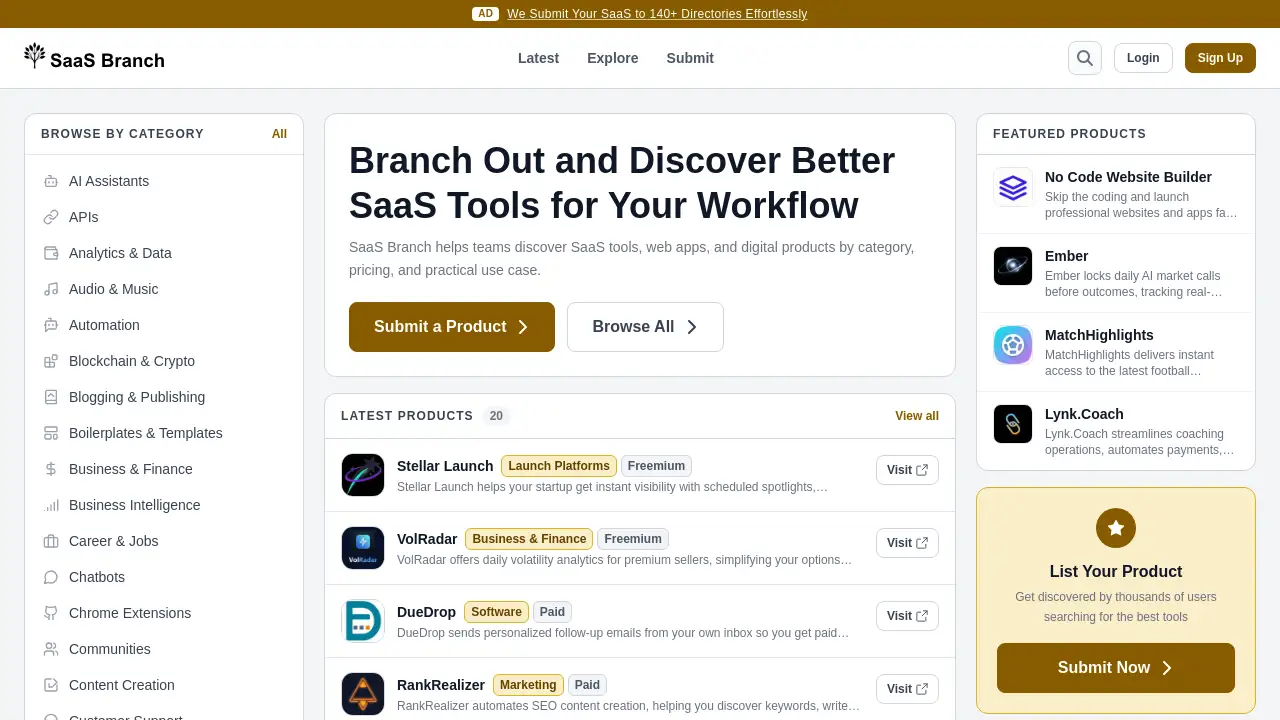
SaaS Branch is an online directory designed to help individuals and teams discover and evaluate SaaS tools, web apps, and digital products. The platform addresses the common challenge of information overload when searching for new software by organizing tools into detailed categories, pricing models, and practical use cases. This structured approach makes it an essential resource for anyone looking to optimize their workflow, from startup founders and product managers to marketing teams and freelancers. By focusing on discovery by category and pricing, SaaS Branch simplifies the process of finding the right digital tool for any business need.
Key Features of SaaS Branch
Extensive Category-Based Browsing
The platform organizes thousands of SaaS tools into over 50 specific categories, such as AI Assistants, Marketing, Productivity & Management, and No Code & Low Code, allowing users to quickly narrow down their search for web apps in their area of interest.
Clear Pricing Model Filter
Users can filter tools by their pricing structure, including Free, Freemium, Free Trial, and Paid plans, making it easy to find digital products that fit specific budget constraints from the outset.
Curated Product Listings
Each listed tool includes a brief description, direct link, and categorization, providing a quick, at-a-glance overview to help teams discover relevant SaaS solutions without navigating away from the directory.
Latest Products and Updates
A dedicated "Latest" section showcases recently added or updated tools, helping users stay informed about new and emerging digital products in the fast-moving SaaS landscape.
Community-Driven Submissions
The platform allows anyone to submit a product for listing, fostering a growing and diverse database of SaaS tools and web apps vetted by the community.
Use Cases for SaaS Branch
Researching New Software for a Team
A project manager tasked with finding a new project management tool can use SaaS Branch to browse the Productivity & Management category, compare options by pricing, and discover tools with specific features like automation.
Scoping Competitors and Market Trends
A startup founder developing a new SaaS product can explore directories and launch platforms within SaaS Branch to understand the competitive landscape and identify potential marketing or partnership opportunities.
Finding Free or Budget-Friendly Tools
Freelancers or small business owners on a tight budget can use the pricing filters to quickly identify free or freemium digital products for essential tasks like accounting, design, or content creation.
Discovering Niche or Specialized Applications
Developers or specialists looking for tools in a specific niche, such as Blockchain & Crypto APIs or Legal tech software, can drill down into precise categories to find relevant web apps they might not find through general search engines.
How to Use SaaS Branch
Using the directory is a straightforward process designed for efficient SaaS tool discovery.
- Visit the Website: Navigate to the SaaS Branch homepage.
- Browse or Search: Explore tools by scrolling through the "Latest Products" or use the search bar for a specific query. Alternatively, click "Browse All" or "Explore" to see the full catalog.
- Filter by Category and Pricing: On the Explore page, select a relevant category from the extensive list (e.g., "Marketing," "Dev Tools"). Further refine results using the pricing filters (Free, Freemium, etc.).
- Review Product Listings: Click on any product card to view more details. Each listing provides a description, category, pricing tag, and a direct "Visit" link to the tool's official website.
- Submit a Tool (Optional): If you have a SaaS product to share, you can use the "Submit a Tool" feature to add it to the directory for others to discover.
Target Audience for SaaS Branch
- Startup Founders and Entrepreneurs seeking tools for development, marketing, and launch.
- Product Managers and Team Leads responsible for selecting software to improve team workflows.
- Marketing Professionals looking for the latest SEO, social media, and analytics web apps.
- Freelancers and Solopreneurs needing to find affordable, high-impact digital products.
- Developers and Tech Enthusiasts exploring new APIs, dev tools, or no-code platforms.
- Business Analysts and Consultants researching software solutions for client recommendations.
Is SaaS Branch Free?
Based on the available information, SaaS Branch appears to be a free directory for users to discover tools. The platform generates revenue through promotional listings, such as the highlighted ad for a submission service. There is no indication of a paid membership tier for basic browsing and discovery features.
| Plan | Price | Key Features |
|---|---|---|
| Free Access | $0 | Unlimited browsing by category and pricing, access to all product listings, and use of search functionality. |
SaaS Branch's Pros and Cons
| Aspect | Pros | Cons |
|---|---|---|
| Discovery & Curation | Excellent organization by detailed categories and pricing simplifies finding relevant SaaS tools. | The depth of information per tool (e.g., detailed reviews, feature comparisons) is limited compared to dedicated review sites. |
| User Experience | Clean, simple interface makes browsing and searching for digital products intuitive and fast. | Relies on community submissions, so the comprehensiveness for every niche may vary. |
| Cost | Completely free for end-users to discover and explore web apps. | Contains promotional content and ads, which are necessary for a free service but can distract from the core directory. |
| Content Freshness | "Latest Products" section helps users find new and trending tools. | As a directory, it depends on submitters to update their listings, so some information may become outdated. |
Frequently Asked Questions about SaaS Branch
Is SaaS Branch free to use?
Yes, the SaaS Branch directory is completely free to use for browsing, searching, and discovering SaaS tools. Users can access all categories and pricing filters without any cost.
How are the tools on SaaS Branch categorized?
Tools are organized into over 50 specific categories, such as AI Assistants, E-commerce, Productivity & Management, and Web Development. This allows for precise discovery of web apps based on their primary function.
Can I submit my own SaaS product to the directory?
Yes, SaaS Branch has a "Submit a Tool" feature. This allows developers and companies to list their digital products, making them discoverable by the platform's audience of potential users.
How current is the information on SaaS Branch?
The platform features a "Latest Products" section showcasing recent submissions. While it encourages fresh listings, the accuracy of details for each tool relies on the submitters, so it's always recommended to visit the official product website for the most current information.
Does SaaS Branch provide software reviews or ratings?
The primary function is discovery and categorization. Listings include a description and key details but do not currently feature user reviews or editorial ratings. It serves as a starting point for research rather than an in-depth review platform.
What is the main benefit of using a SaaS directory like this?
The main benefit is efficiency. Instead of scattered Google searches, users can systematically discover SaaS tools filtered by their specific needs—like category and budget—saving significant time in the initial research phase of finding new software.
SaaS Branch Tags
SaaS tools directory, discover SaaS tools, web apps directory, digital products, software discovery platform, find business software, SaaS by category, SaaS pricing filter, productivity tools, marketing software, no code tools, startup tools, workflow optimization, software comparison